Page 2 of 11 King Pigeon Hi-Tech. Co., Ltd. Ver 1.3
Remote Relay Switch
【UPGRADE HISTORY】
D
ATE VERSION
FIRMWARE VERSION
DESCRIPTION
2017.9.15
V1.2 V1.1
1.Support New Cloud Network App
2.Revise the Timer Command
3.Supplement Modbus TCP Protocol
2018-1-12
V1.3 V1.3 1.Change Modbus TCP protocol to Modbus RTU protocol ;Revise
Commond of setting protocol
2.Add Commond of access Modbus RTU Protocol to Cloud Platform
【Gentle Reminder】
Please scan the QR code below or search in Apple store to download the APP for easy setting.
Normal SMS App
(
Remote Relay Switch
)
Cloud Control App (IoT RTU)
【Model List】
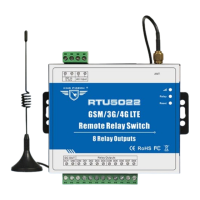
Model GSM/GPRS/3G/4G Relay Output Rated Voltage Rated Voltage
RTU5020 Optional 2
RTU5021 Optional 4
RTU5022 Optional 8
9~36VDC Optional: 110~220VAC@50Hz
Notice
1
.
Default version is GSM
;
2
.
DIN 35mm Rail installation bracket is optional;
3. For 3G WCDMA and 4G LTE version, please tell our sales where you would like to use them.
This handbook has been designed as a guide to the installation and operation of RTU5020,RTU5021,RTU5022
GSM SMS GPRS 3G 4G Remote Relay Switch.
Statements contained in the handbook are general guidelines only and in no way are designed to supersede the
instructions contained with other products.
We recommend that the advice of a registered electrician be sought before any Installation work commences.
King Pigeon Hi-Tech.Co., Ltd, its employees and distributors, accept no liability for any loss or damage including
consequential damage due to reliance on any material contained in this handbook.
King Pigeon Hi-Tech.Co., Ltd, its employees and distributors, accept no liability for GSM Network upgrading or
the technology specifications


 To Next Page