Page 6 of 11 King Pigeon Hi-Tech. Co., Ltd. Ver 1.3
Remote Relay Switch
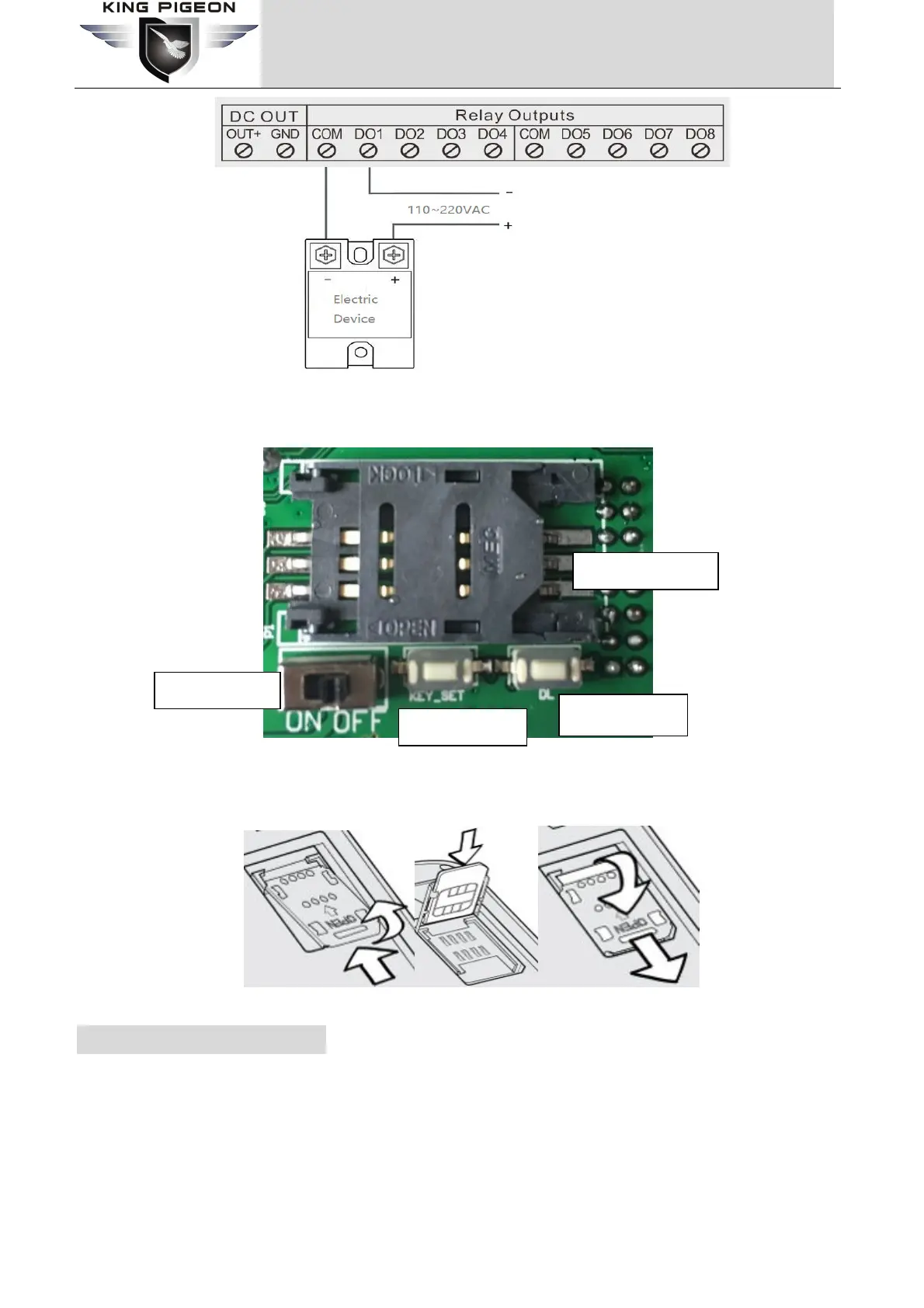
3) Insert SIMCard
At the backside of the panel, please use the tool to remove the screw, and you can see the below:
Slide the SIM card holder in the direction of “OPEN” (etched on the SIM card holder), and then flip it open. Then
Insert the SIM card with its gold contacts facing down and its cut-off corner facing out the SIM card slot. See below
photo. Close the SIM card holder and then slide it in the opposite direction of “OPEN” to lock it. See above photo.
7. Initialize/Reset the unit
The Unit can be reset to factory default once mistake programmed. Please follow below steps to initialize it. After
initialized, the parameters will set as factory default.
1) Switch off the Unit
2) Press the RESET button;
3) Switch the Power Switch to ON side to powered on the Unit, holding 5seconds, then loose the RESET Button.
4) Restart the unit then recovery to factory default settings, and will enter to work mode.
Power Switch
SIMCard Holder
RESET Button
Upgrade Button


 To Next Page