page 15 of 42
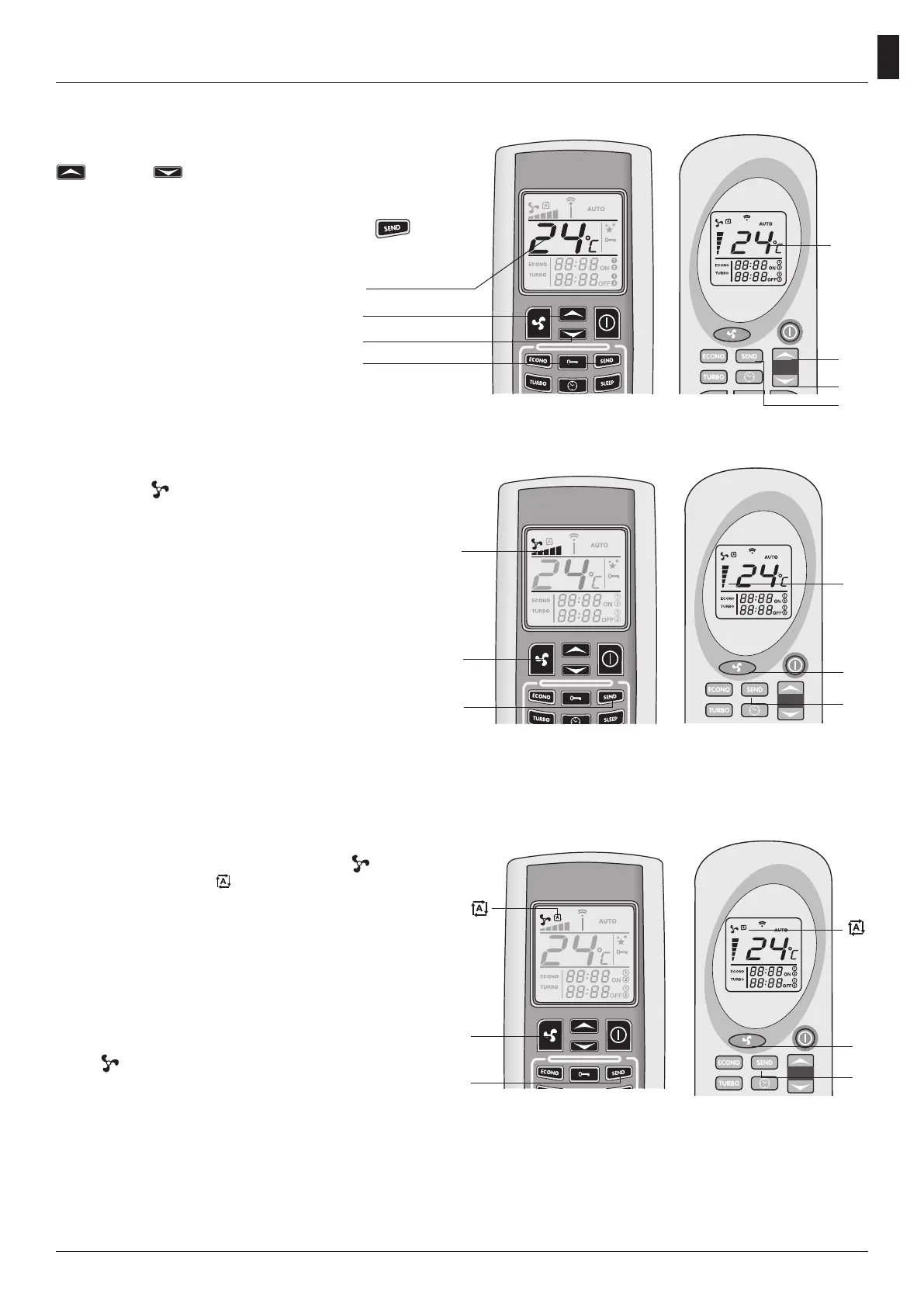
Automatic power function
To enter this function, press the key
(1), until
you see the symbol
on the display. Press SEND
(2) to transmit your selection. You will read the
word “Auto” and the room temperature on the
control board of the stove.
When you select this mode, the pcb will set the
working power automatically according to the
difference in degrees between the set temperature
and the temperature identi ed by the sensor on
the back of the stove.
Press
, once more, select the wished power and
press SEND to go back to the usual functioning.
Change the temperature
You can change the temperature using the keys
(1) and (2). The temperature range goes
from a min. value of 7°C to a max. value of 40°C.
Once you have chosen the wished temperature,
con rm your selection pressing the key (3).
Change the power
Use the key
(1)to select the power of the stove.
The marks (2) on the display of the remote control
indicate the ve possible powers. Press the key
SEND (3) to con rm your selection. You will see
the words on1-on2-on3-on4-on5 and the room
temperature on the control board of the stove
according to the selected power.
You can also select the automatic function. Please
refer to the paragraph on the Automatic Power
Function to understand how the stove works in
this mode.
1
2
Set temperature
3
1
2
Set
temperature
3
2
1
3
1
3
2
1
2
1
2



 To Next Page