KI 9000 UM-14 37
PERFORMANCE VERIFICATION TESTS
Optical Light Source
Centre wavelength and Spectral Bandwidth (FWHM) Test (optional)
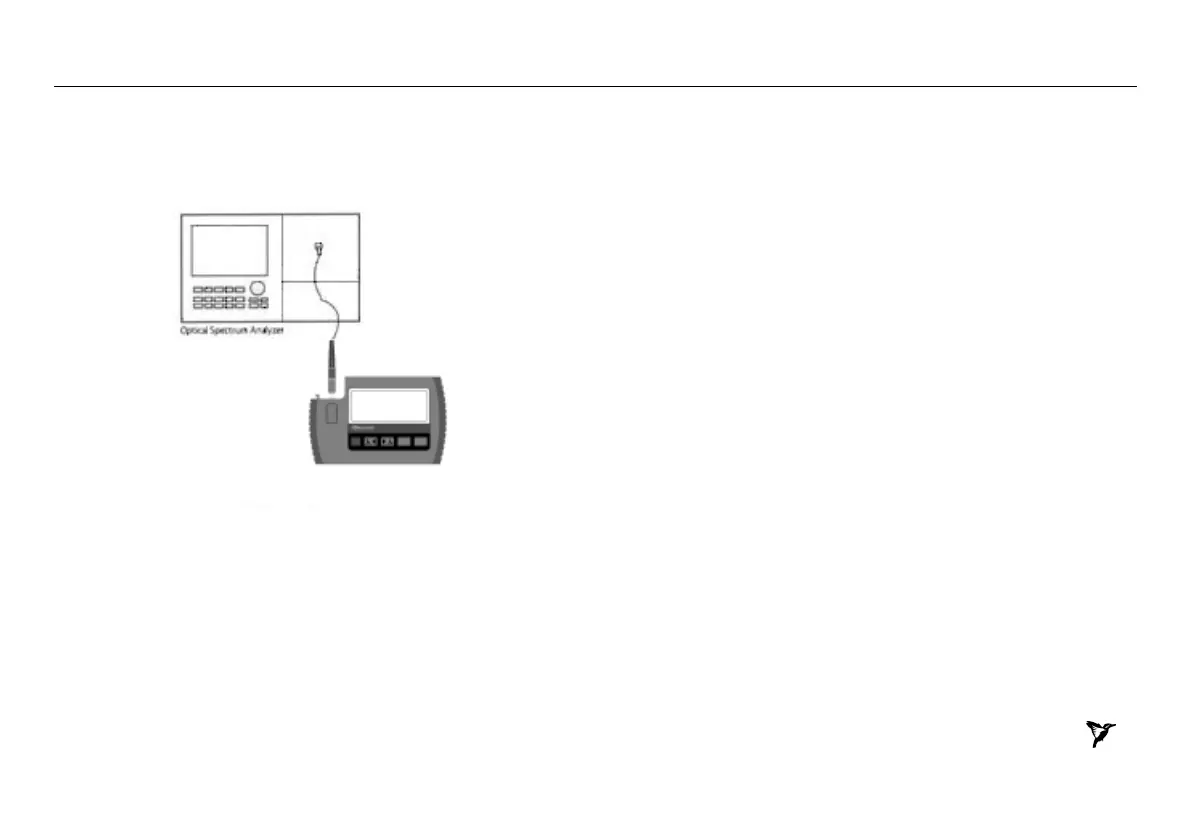
1. Connect the equipment as shown in Figure 5.
Figure 5. Test set-up for the centre wavelength and spectral bandwidth
2. Switch on the instruments and allow to fully warm up.
3. On Light Source, enable the source and set the wavelength to 1310
nm.
4. On the OSA, press the [Instr Preset] key
5. Press [Auto/Meas] and wait until 'End of Automeasure' is displayed
6. Choose [User] and select the type of source to be measured (FP for
Fabery Perot laser).
7. To show the display in linear mode:
• Press [Menu].
• Press [Amptd] on the left side of the display.
• Press [Linear] on the right side of the display.
8. To ensure interference - free reading of the display it is advisable
to stop the repeating calculations.
• Press [User].
• Press [Single Sweep].
If the trace on the display is not clear, you can change resolution by
using the span key.
9. From the displayed measurements check and note the values for
"mean wavelength" (Centre wavelength) and "FWHM" (Spectral
Bandwidth) in the test report, Table 6.
10. Repeat the test with the source wavelength set to 1550 nm.


 To Next Page