Document No. 480WD+MLW.ß01 Kingston MobileLite Wireless (ßeta) Page 8 of 12
Photos
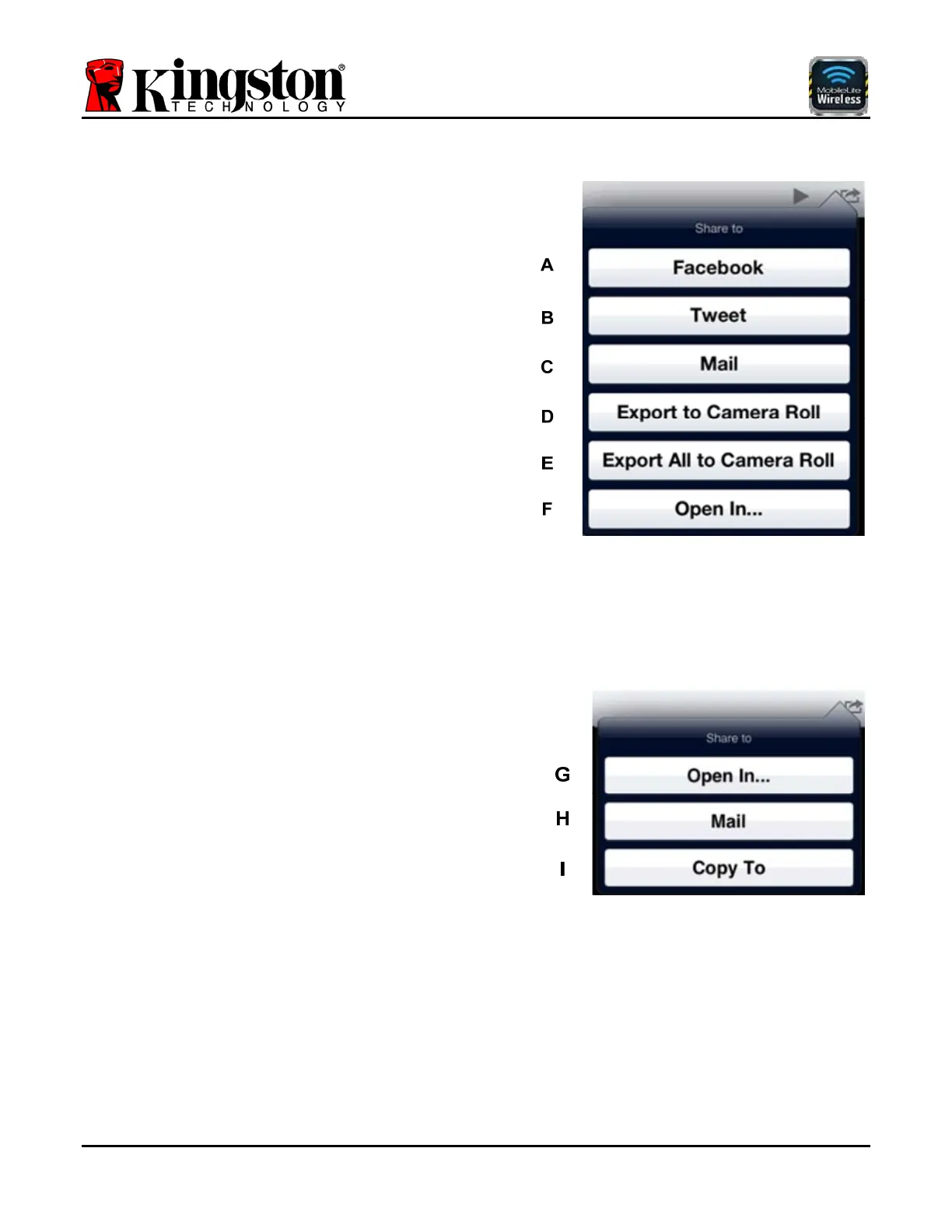
A. Facebook Button - Share/post photo(s) directly to
Facebook using the credentials configured in the iOS App
(if installed) on your iDevice. Varies based on version of
iOS. **Feature coming soon**
B. Tweet Button - Share/post directly to Twitter using the
credentials configured in the iOS App (if installed) on your
iDevice. Varies based on version of iOS. **Feature
coming soon**
C. Mail Button - Opens the default mail application
installed on your iDevice using the credentials configured
within the App.
D. Export to Camera Roll - Copies a single photo to the
'Camera Roll' location on your iDevice.
E. Export All to Camera Roll - Exports all photos to the
'Camera Roll' location on your iDevice.
F. Open In... - Allows you to open a photo using an
application associated with a particular file type.
Videos
G. Open In... - Allows you to open/play a video using an
application associated with a particular file type.
H. Mail Button - Opens the default mail application
installed on your iDevice using the credentials configured
within the App.
I. Copy To - Allows you to copy the selected video file to
a new location (depending on what media type(s) are
currently inserted (i.e. USB, SD, or MicroSD) on the MLW
device or to the 'Local' iOS device itself.



 To Next Page