Trunked POC Portable Two-way Radio Quick Reference Guide
11
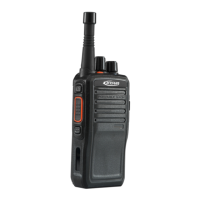
Keys, buttons and knobs overview
Power switch / Volume knob
To power on, rotate clockwise.
To power off, rotate counter-clockwise.
To increase the volume, continue rotating clockwise. Rotate counter-clockwise to decrease the volume.
Channel knob / Group selector knob
Rotate clockwise to change channels / groups. Your service provider may program your radio up to 16
channels with contact groups or persons.
Top button (Programmable)
It’s programmable to support the following functions: broadcast battery / broadcast user name /
broadcast group name / download voice record / open contact list. It supports defining function for two
actions: “ long press” and “ short press”
Side button (Programmable)
It’s programmable to support the following functions: broadcast battery / broadcast user name /
broadcast group name / download voice record / open contact list. It supports defining function for two
actions: “ long press” and “ short press”


 To Next Page