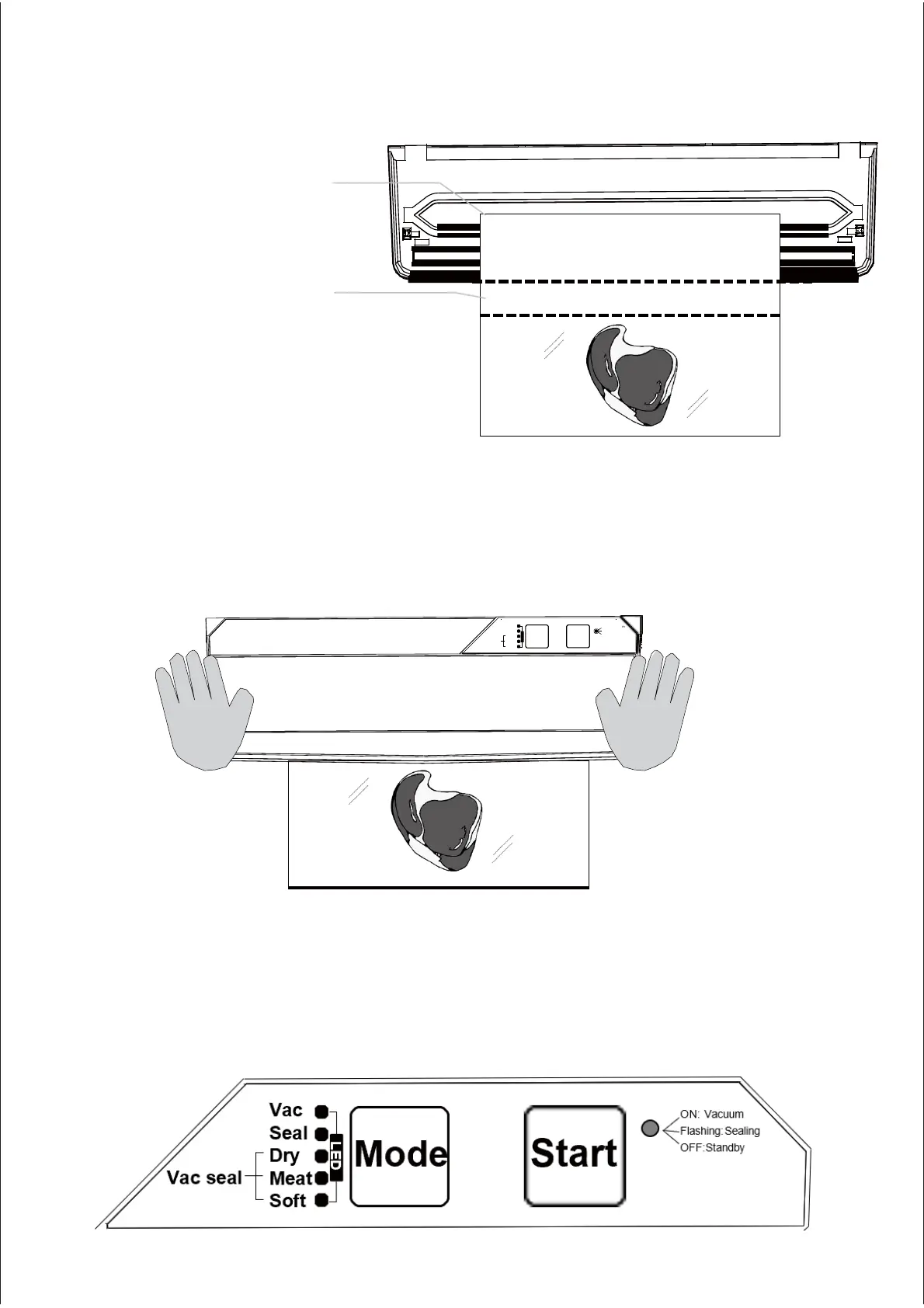
2.Put the food into a vacuum textured bag and operate as shown below.
3.Place the mouth of the
bag on top of the
vacuum drip tank.
4.Make sure that the food
in the vacuum bagis
at least 1.5 inches from the
edge of the machine.
5.Close the top cover and press
both sides of the top cover down
simultaneously with both hands,
as shown below, until you hear a
"click".
6.Confirm that the bag isn’t too full and that the food isn’t stuck under the
upper cover, which could affect the vacuum.
LED
Mechanical keyboard non touch key
Fla sh ing :
sea li ng
Va c
ON: V ac u um
S ea l
Dr y
Start
OF F:S ta nd by
V ac se al Meat
Mode
S of t
7.Select the relevant vacuum sealing mode using the Mode button
and then press Start. The vacuum sealer will then start working.
8.Wait until the LED status lights to the right of the Start button go out,
and then open the top cover and remove your vacuum-sealed
plastic bag.
-7-
Kitchen HQ Vacuum Sealer User Manual


 To Next Page