15
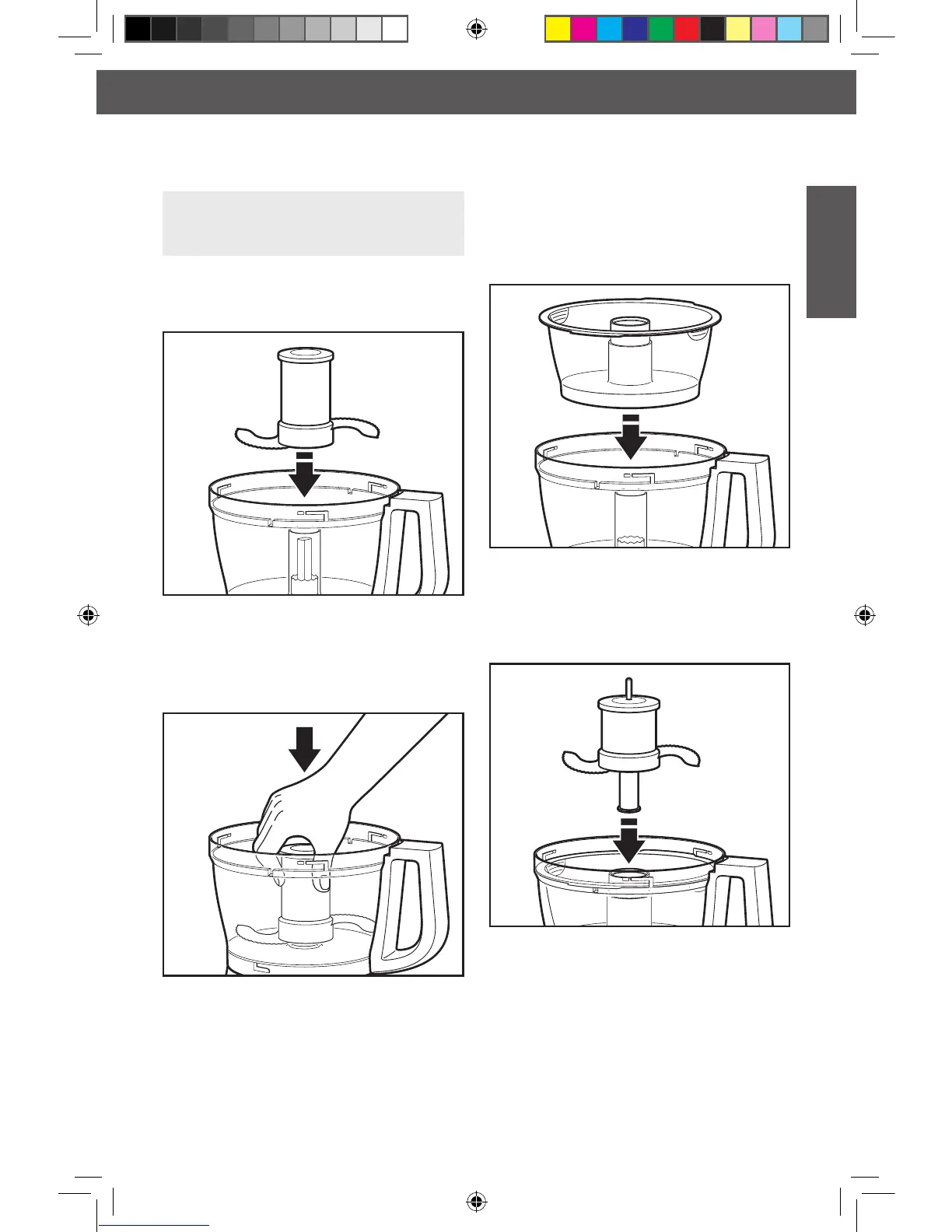
Installing the Mini-Bowl* and
Mini-Blade*
1. Place the mini-bowl inside the work bowl
over the power shaft. Rotate the mini-
bowl until the tabs on the top edge of the
bowl drops into the indents on the top of
the work bowl.
2. Insert the drive adapter into the mini-
blade, and place on the power shaft. It
may be necessary to rotate the blade until
it falls into place. Press down rmly to lock
it into place.
3. Install the work bowl cover, being sure it
locks into place.
4. To remove the mini-bowl after processing,
remove the mini-blade by pulling straight
up on the cap. Then lift the bowl straight
up and out, using the two nger grips
located along the top edge of the bowl.
SETTING UP YOUR FOOD PROCESSOR
Installing the Multipurpose
Blade or Dough Blade*
IMPORTANT: The multipurpose blade
and dough blade* can only be used with
the work bowl.
1. Place the blade on the power shaft.
2. Rotate the blade so it falls into place on
the power shaft.
3. Push to lock: press down rmly on the
multipurpose blade until it is down as
far as it will go. The multipurpose blade
features an internal seal that ts tightly
over the center of the work bowl.
4. Install the work bowl cover, being sure it
locks into place.
* Included only in model 5KFP1335
W10505785Bv3.indd 15 6/12/13 10:22 AM








 To Next Page