10
CARE AND CLEANING
TROUBLESHOOTING GUIDE
Problem Solution
While using the Sifter+Scale
attachment, you may see the
following messages displayed:
Err
The scale has exceeded its weight limit. Remove
ingredients from hopper, and try again with a
smaller amount.
- - - Err1
Tare error. Remove ingredients and turn off power.
Then, turn power back on. If Err1 is still
present, call customer service.
If the problem cannot be
corrected:
See the “Terms of KitchenAid Guarantee ("Guarantee")"
section. Do not return the product to the retailer.
Retailers do not provide service.
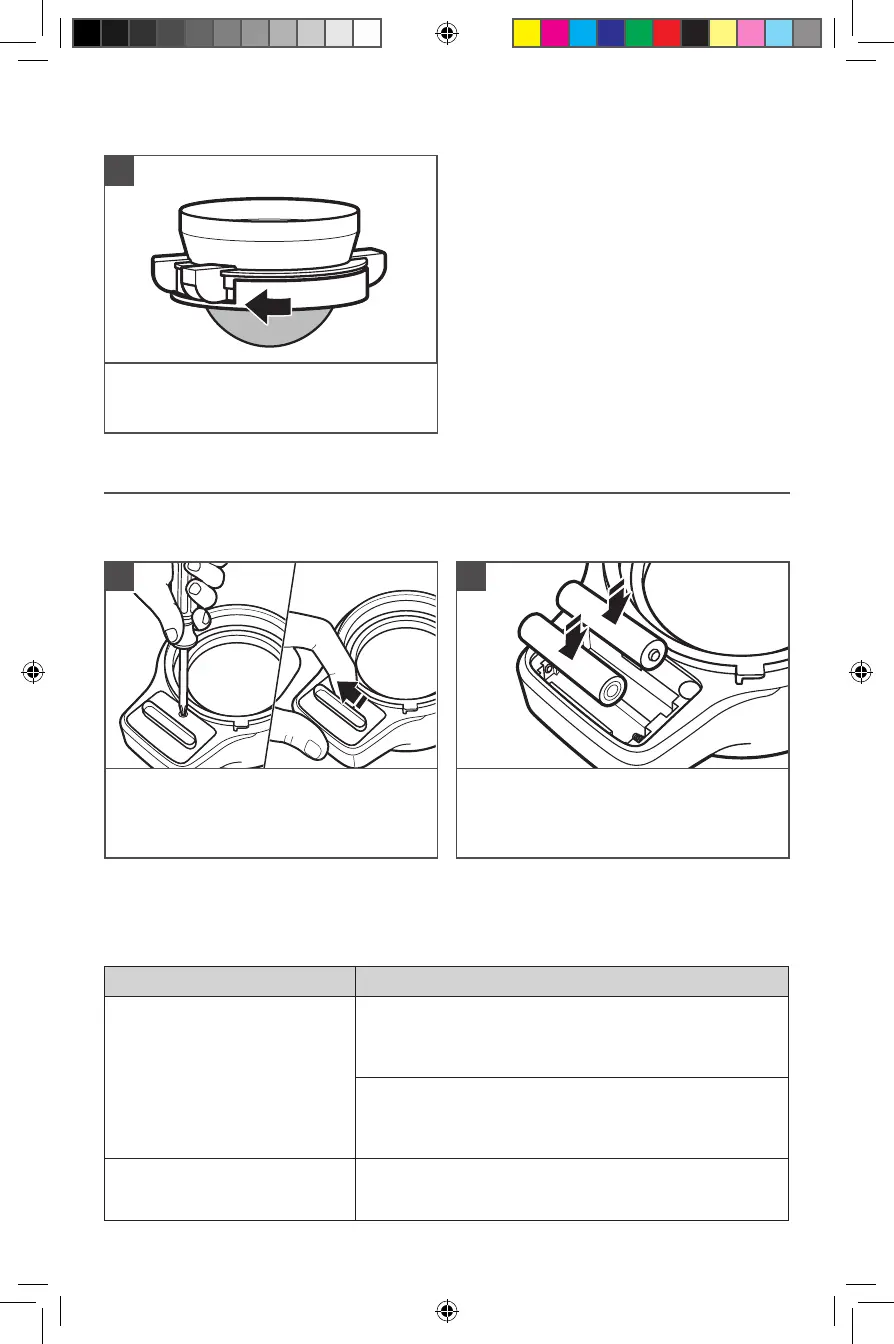
To disassemble the Sifter assembly: Turn
the Collar to the left to loosen and release
the screen for cleaning, if desired.
3
REPLACING THE BATTERIES
Flip the digital scale over, and use a
Phillips-head screwdriver to remove the
screw on the compartment cover. Lift
the compartment cover as shown.
1
The digital scale of your Sifter+Scale attachment is powered by 2 AAA batteries
(included).
Replace the 2 AAA batteries in the
compartment. Make sure to replace
the screw when reattaching the
compartment cover.
2
W11494233A_01_EN.indd 10W11494233A_01_EN.indd 10 1/6/2021 1:59:59 PM1/6/2021 1:59:59 PM



 To Next Page