22
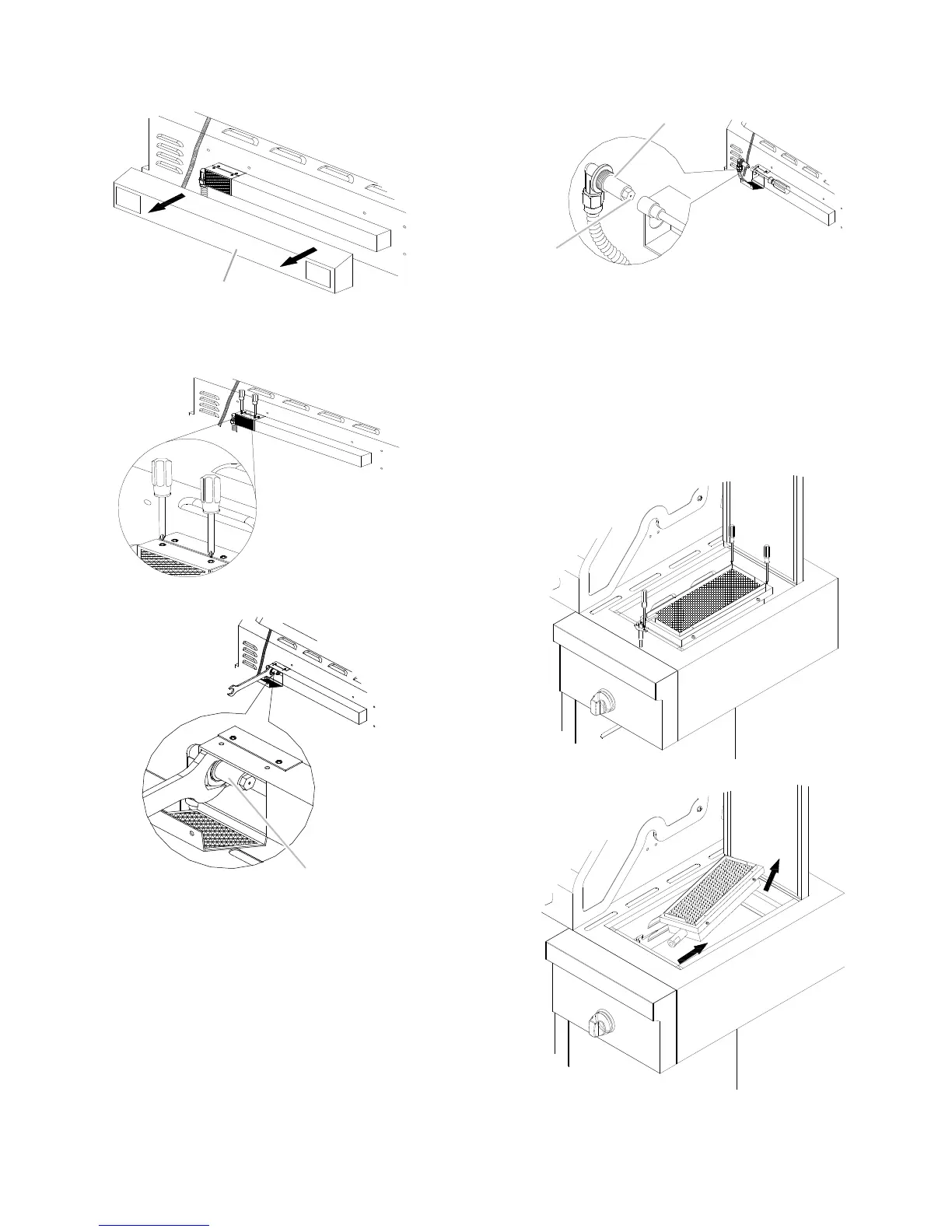
3. Remove the access cover at the back of the grill hood by
removing the 4 screws (2 screws on each side of the
rotisserie infrared burner).
4. Using a Phillips screwdriver, remove the 2 screws holding the
spider guard to the burner.
5. Use 24 mm wrench to remove the orifice nut.
6. Take out the orifice support, and then use a 6 mm socket and
wrench or 6 mm nut driver to remove the LP orifice at the end
of the supply pipe. Replace with Natural gas orifice.
IMPORTANT: Check that the orifice is properly installed
inside of the supply pipe.
7. Reinstall the orifice support and supply pipe and tighten the
nut with a 24 mm wrench.
8. Reinstall the spider guard, access cover, and wind baffle.
Change the Sear Burner Orifices
1. Remove the screw securing the igniter and the 2 searing side
burner screws.
2. Lift out the searing side burner.
A. Access cover
A. Orifice nut
A. Orifice support
B. Orifice




 To Next Page