25
Using Y
our Side Burner
Lighting the side burner
1. Open the side burner lid. Do not light burners with the lid on.
2. Do not lean over the
grill.
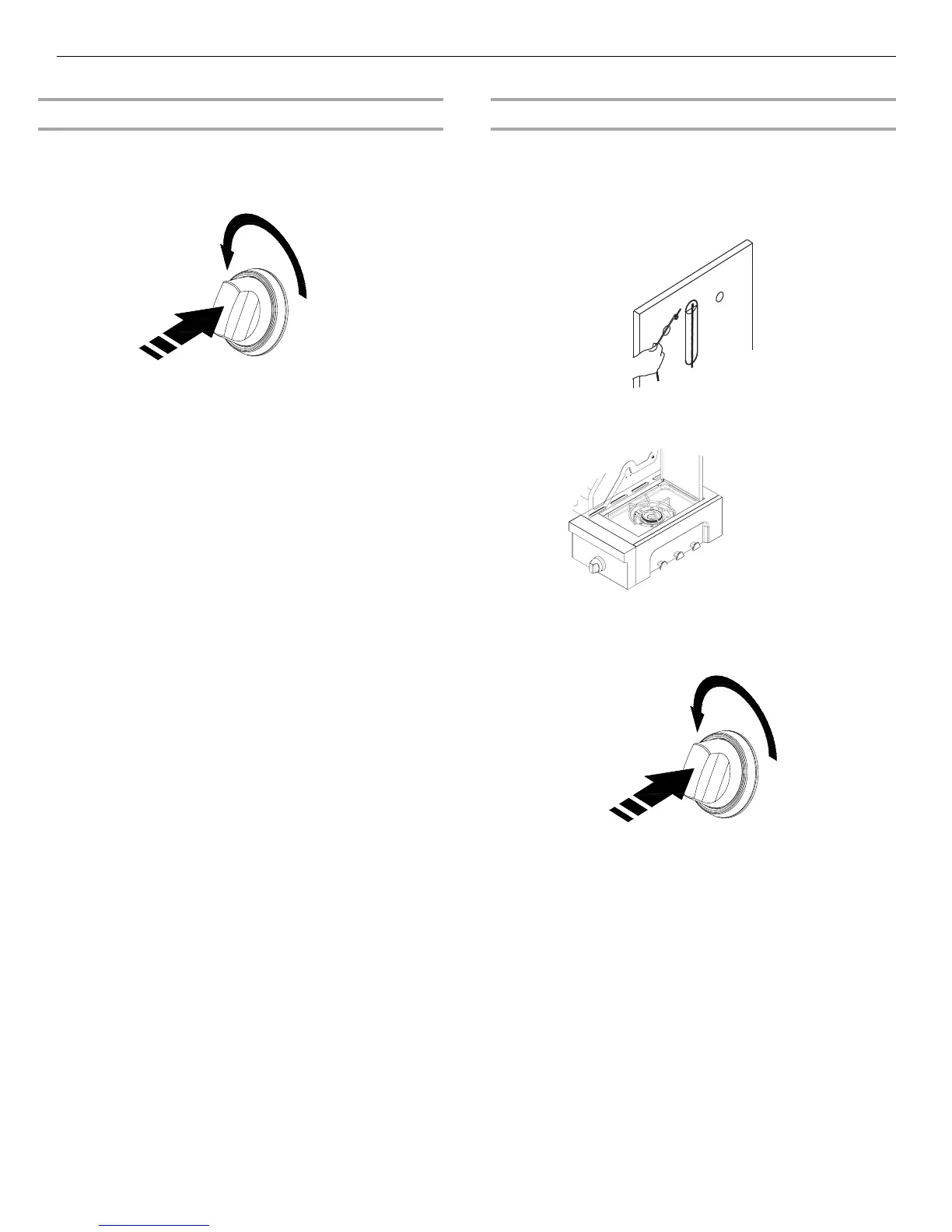
3. Push in and turn the control knob to IGNITE HIGH and hold in.
While continuing to hold it in.
IMPORTANT: If burner does not light immediately, turn the
burner knob to OFF and wait 5 minutes before relighting.
Man
ually Lighting the Side Burner
1. Open the
side burner cover. Do not light burners with
the cover on.
2. Do not lean over the grill.
3. Remove the manual lighting extension (see the following
illustration) and attach a match to the split ring.
4. Strike the match to light it.
5. Hold the lit match close to the side burner.
6. Push in and turn the burner knob to IGNITE HIGH for the burner
closest to the lit match. The burner will light immediately.
When burner is lit, turn knob to desired setting.
7. Repeat steps 3 through 6 for each burner.
8. Remove match and replace manual lighting extension on the
right side panel.
IMPORTANT:
If burner does not light immediately, turn the burner knob to OFF
and wait 5 minutes before relighting.
If any burners do not light after attempting to light them manually,
contact the Customer Service Center. See the “Assistance”
section.



 To Next Page