6
Grind
Size
Cups/
Shots
Grind
Time
Program Start/Stop
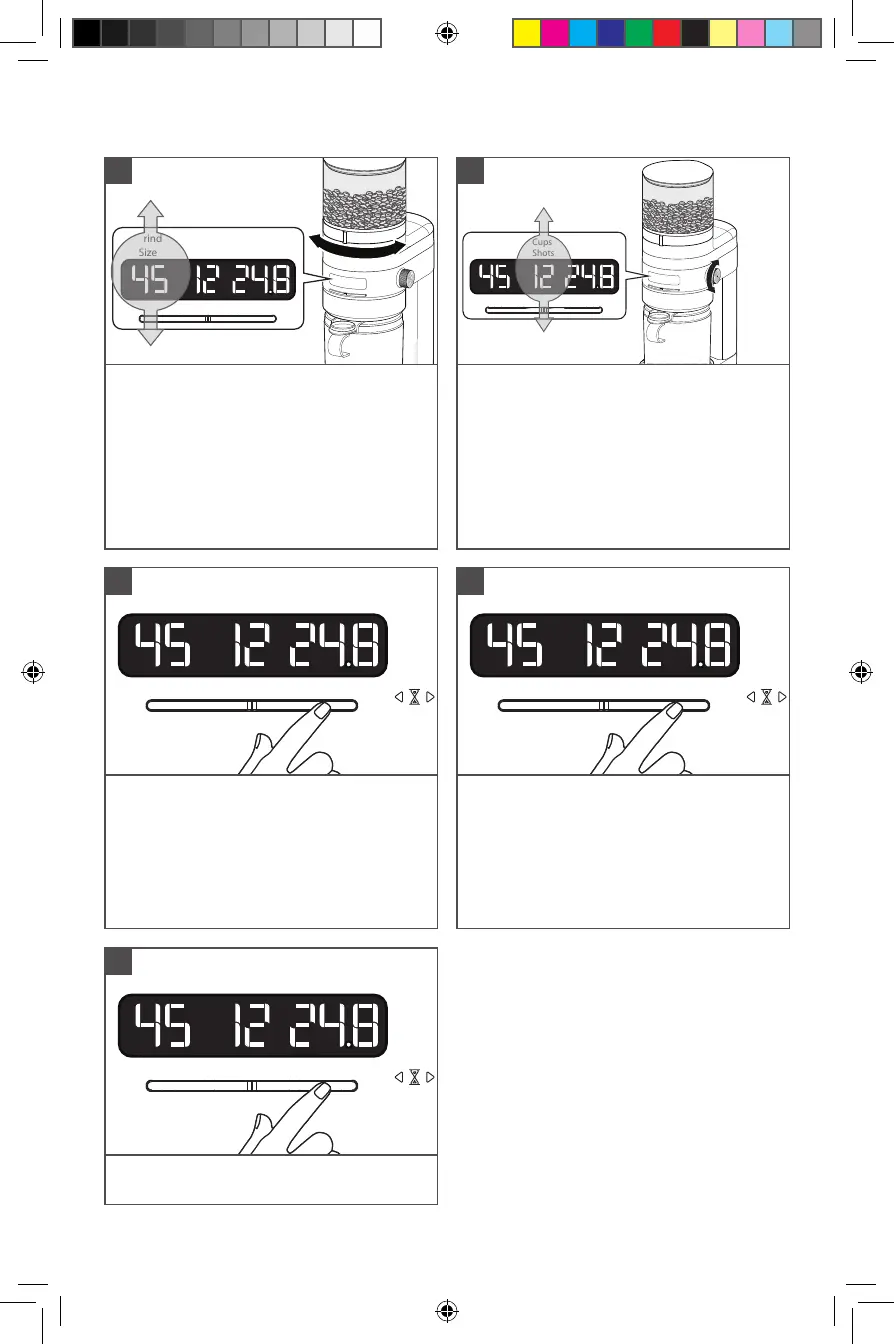
To start grinding:
Press Start/Stop to begin grinding.
Grinder will stop automatically when the
time reaches 0 on the display.
3
Grind
Size
Cups/
Shots
Grind
Time
Program Start/Stop
To pause during grinding:
Press Start/Stop. To resume grinding press
Start/Stop.
NOTE: Grinder can remain paused for
up to 15 seconds. After 15 seconds, the
cycle will cancel and display will show the
current selection.
4
PRODUCT USAGE
Grind
Size
Cups/
Shots
Grind
Time
Program Start/Stop
Select Grind Size: Refer to the Brew
method icons on the machine. Rotate
the Grind size knob to select a grind
size within the brew method range you
are using. The selected grind size will be
shown on the display.
NOTE: As grind size number increases
the actual grind size decreases (1 is
Coarse and 70 is ne).
1
Less
More
Grind
Size
Cups/
Shots
Grind
Time
Program Start/Stop
Select Coffee Dose:
Rotate the Dose selection knob for the
number of cups or shots.
French press, Perc, Drip coffee: Select
between 1 - 12 cups.
Espresso: Select between 1 - 2 shots.
2
Grind
Size
Cups/
Shots
Grind
Time
Program Start/Stop
To cancel the grinding cycle: Press and
hold Start/Stop for 3 seconds.
5
TIP: If Grind size knob is hard to rotate,
run the machine while adjusting the size
to remove any coffee grounds caught
between the burrs.
W11312158A.indb 6W11312158A.indb 6 1/6/2020 5:56:37 PM1/6/2020 5:56:37 PM


 To Next Page