10
ASSEMBLING THE FOOD PROCESSOR
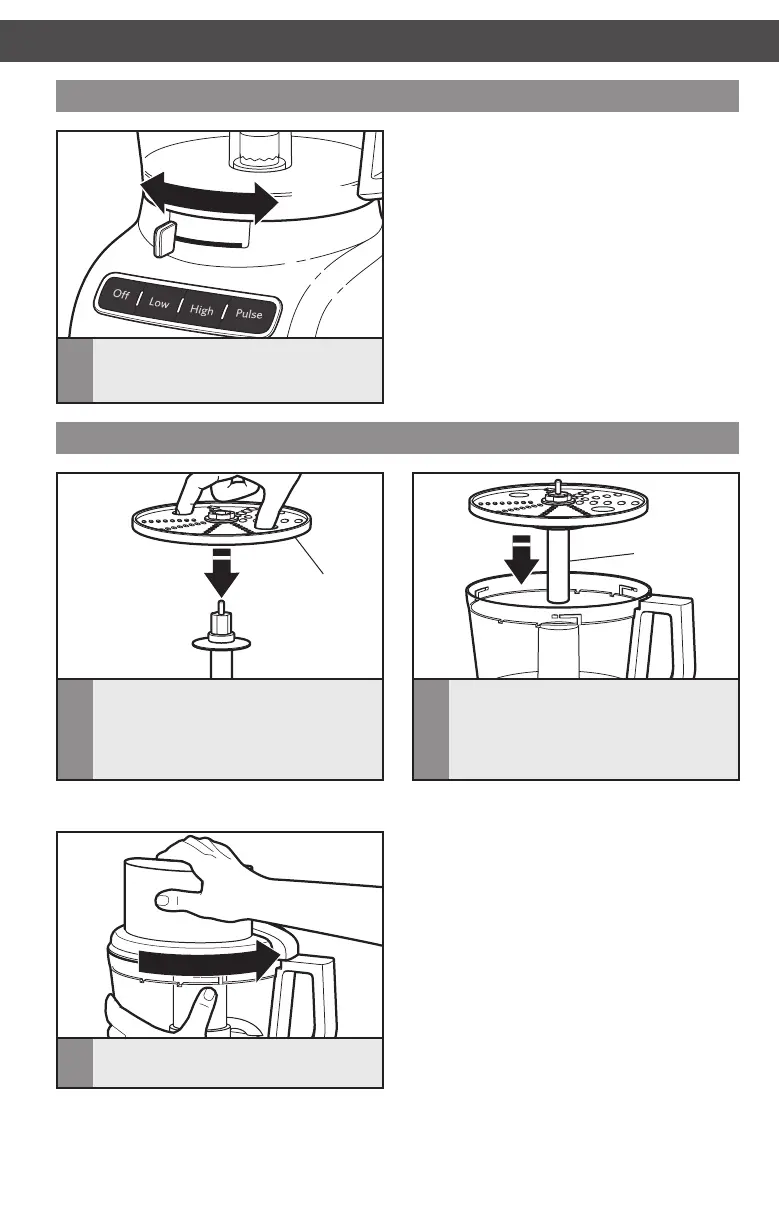
Installing the reversible shredding disc or julienne disc
TIP: You may need to turn the disc/adapter until it drops down into place.
ASSEMBLING THE FOOD PROCESSOR
1
Hold the julienne disc or reversible
shredding disc by the 2 finger grips with
the desired shredding side facing UP.
Insert the disc adapter into the hole in
the bottom of the disc.
Finger grip
2
With the work bowl installed, slide the
disc adapter onto the power shaft. Then
install the work bowl cover, being sure it
locks into place.
Disc
adapter
3
Install the work bowl cover, being sure
it locks into place.
Adjusting the slicing thickness
NOTE: The lever only works with the
adjustable slicing disc. Changing thickness
settings with other discs or blades installed
will have no effect on operation.
1
Set the desired slicing thickness by
moving the lever to the left for thinner
slices or to the right for thicker slices.
Thicker
Thinner
W10898010C_v06.indd 10 8/24/16 4:55 PM





 To Next Page