12
OPERATING THE FOOD PROCESSOR OPERATING THE FOOD PROCESSOR
Before operating the Food Processor, be
sure the work bowl, blades, and work bowl
cover are properly assembled on the Food
Processor base (see “Assembling the Food
Processor” section).
Rotating Blade Hazard
Always use food pusher.
Keep ngers out of openings.
Keep away from children.
Failure to do so can result in
amputation or cuts.
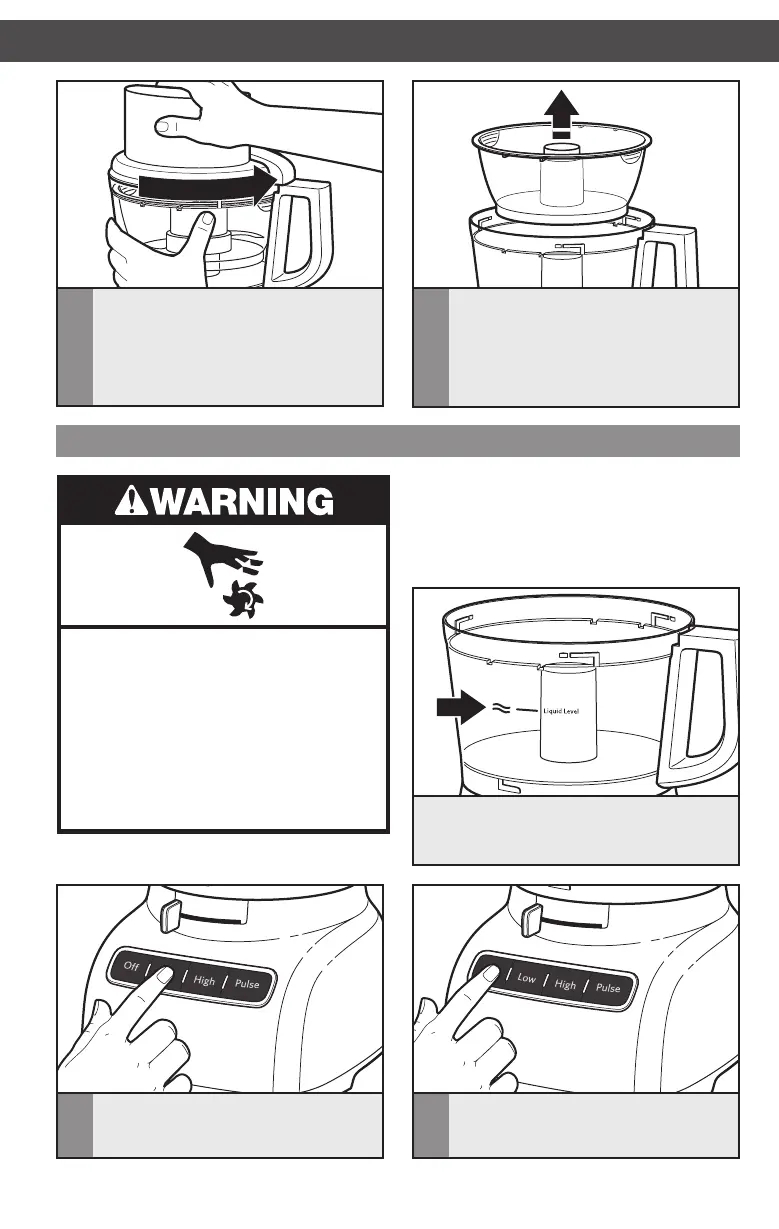
Using the Food Processor
1
To turn on, press LOW or HIGH. The
Food Processor will run continuously
and the indicator light will glow.
2
When finished, press the OFF button.
The indicator light will go out and the
blade or disc will slow to a stop.
This line on the work bowl indicates
the maximum level of liquid that can be
processed by the Food Processor.
3
Install the work bowl cover, being sure
it locks into place.
4
To remove the mini-bowl after
processing, remove the mini-blade by
pulling straight up on the cap. Then lift
the bowl straight up and out, using the
two finger grips located along the top
edge of the bowl.
W10898010C_v06.indd 12 8/24/16 4:55 PM





 To Next Page