2-16
THE OPERATING CONTROL SYSTEM
WARNING
Personal Injury Hazard
Disconnect from the electrical supply be-
fore servicing the unit. Failure to do so
could result in death or electrical shock.
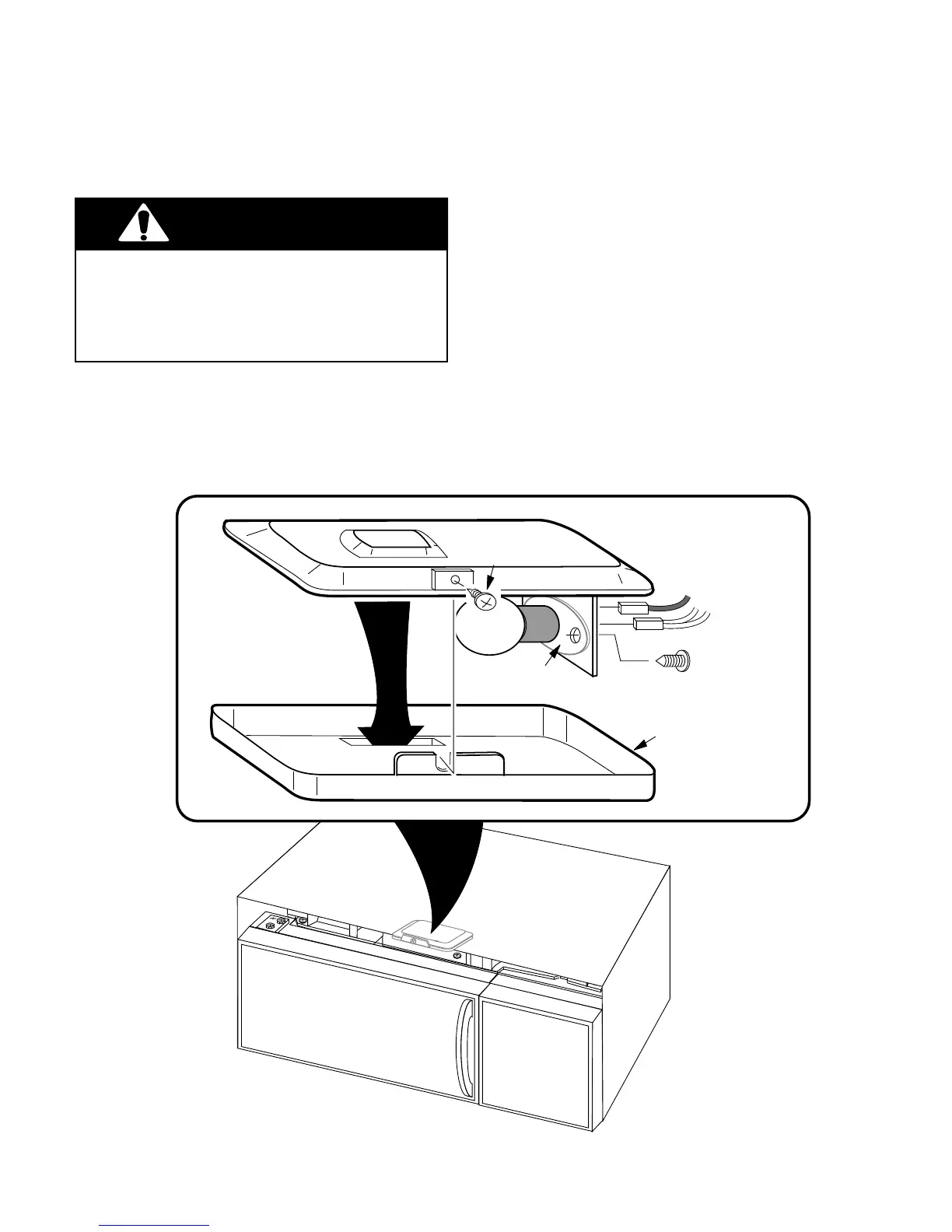
REMOVING THE OVEN LIGHT SOCKET
1. Disconnect the electrical supply to the
microwave oven.
2. Remove the two screws from the top of
the cabinet for the vent grille and remove
the grille (see page 2-3 for the illustra-
tion).
3. Remove the mounting screw from the light
cover and remove the cover.
4. Remove the bulb from the oven light
socket.
5. Unplug the wire connectors from the oven
light socket terminals and remove the
socket mounting screw and light socket
from the microwave oven.
6. Mount the new oven light socket and then
reassemble the microwave oven.
WHITE WIRES
BLUE WIRE
SOCKET
MOUNTING
SCREW
LIGHT
COVER
SCREW
LIGHT
SOCKET
OVEN TOP
COVER



 To Next Page