Page 3-23
3-23
Microwave Oven Hood Combo Service Manual — LIT 4317216
Original 03/97
TEST PROCEDURE RESULTCOMPONENT
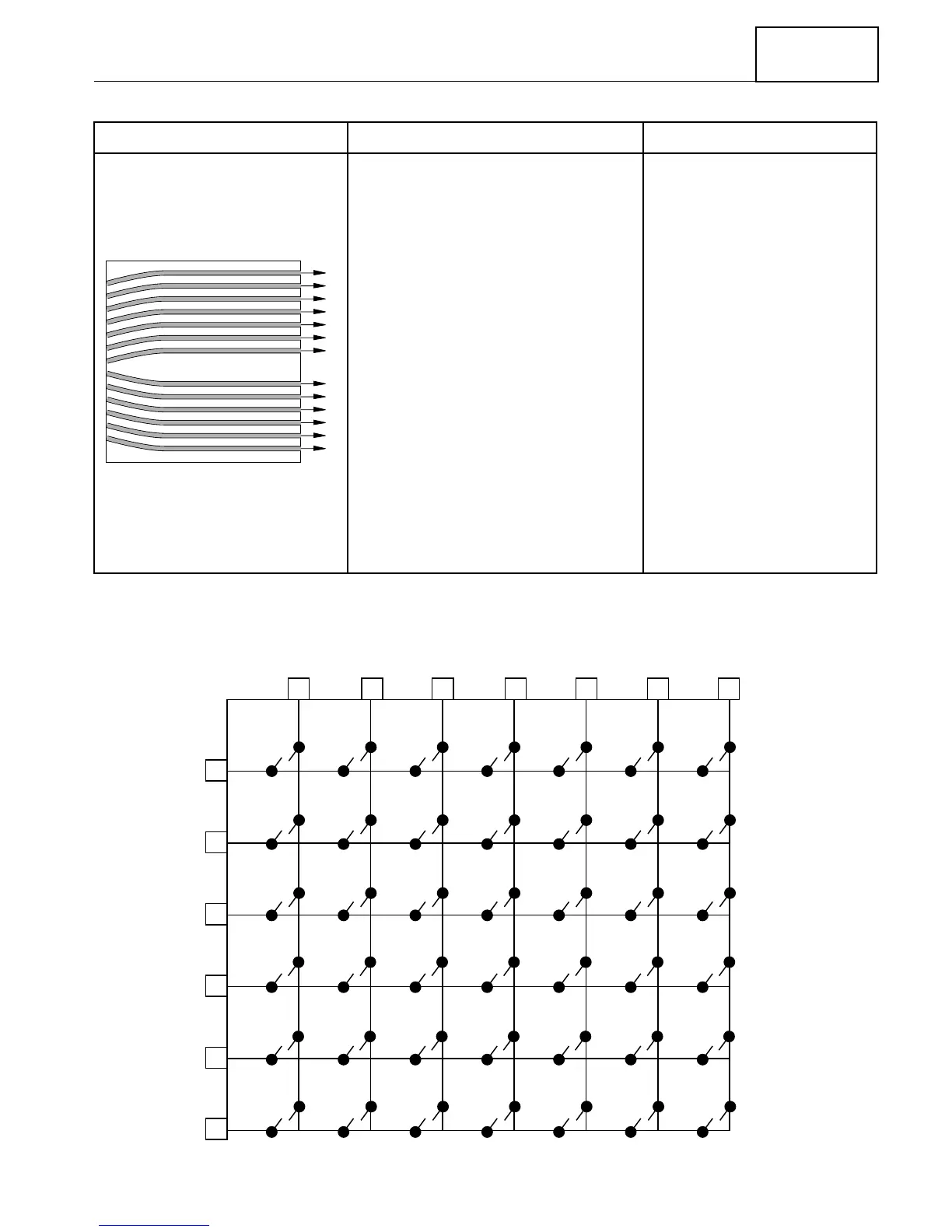
Touch Keyboard (see below). Measure the resistance between
the terminal pins of the keypad
(shown below) that you wish to
check.
For example: To measure the
“TEMP PROBE” keypad, refer to
the illustration, and:
1.Find the first terminal number
along the top bar (pin 4).
2.Find the second terminal num-
ber in the side bar (pin 8).
3.Set the ohmmeter to the
R x 1
scale.
a) With the keypad not de-
pressed, touch the ohmmeter
leads between pins 4 and 8
on the ends of the FPC con-
nector.
b) Press the TEMP PROBE
keypad.
Normal Readings:
KEYPAD NOT PRESSED - In-
dicates more than 1 MΩ re-
sistance.
Normal Readings:
KEYPAD PRESSED - Indicates
less than 400 Ω resistance.
Abnormal Readings:
KEYPAD NOT PRESSED - In-
dicates continuity (zero re-
sistance).
Abnormal Readings:
KEYPAD PRESSED - Indicates
infinite resistance.
1
2
3
4
5
6
7
8
9
10
11
12
13
FPC CONNECTOR
(TOP)
AUTO
ROAST
BEVERAGE
TEMP
PROBE
CUSTOM
DEFROST
CLOCKSET
60
71
82
93
4
5
FAN
HIGH / LOW
/ OFF
POPCORN
TIMER
SET/START
KEEP
WARM
EASY
MINUTE
FAVORITE
RECIPE
TIMER
CANCEL
DELAY
START
LIGHT
ON / NIGHT
/ OFF
MICRO
COOK
COOK
POWER
AUTO
COOK
CANCEL
OFF
START
1
2
3
45
6
7
8
9
10
11
12
13
KEYBOARD MATRIX



 To Next Page