8 | USING THE TOASTER
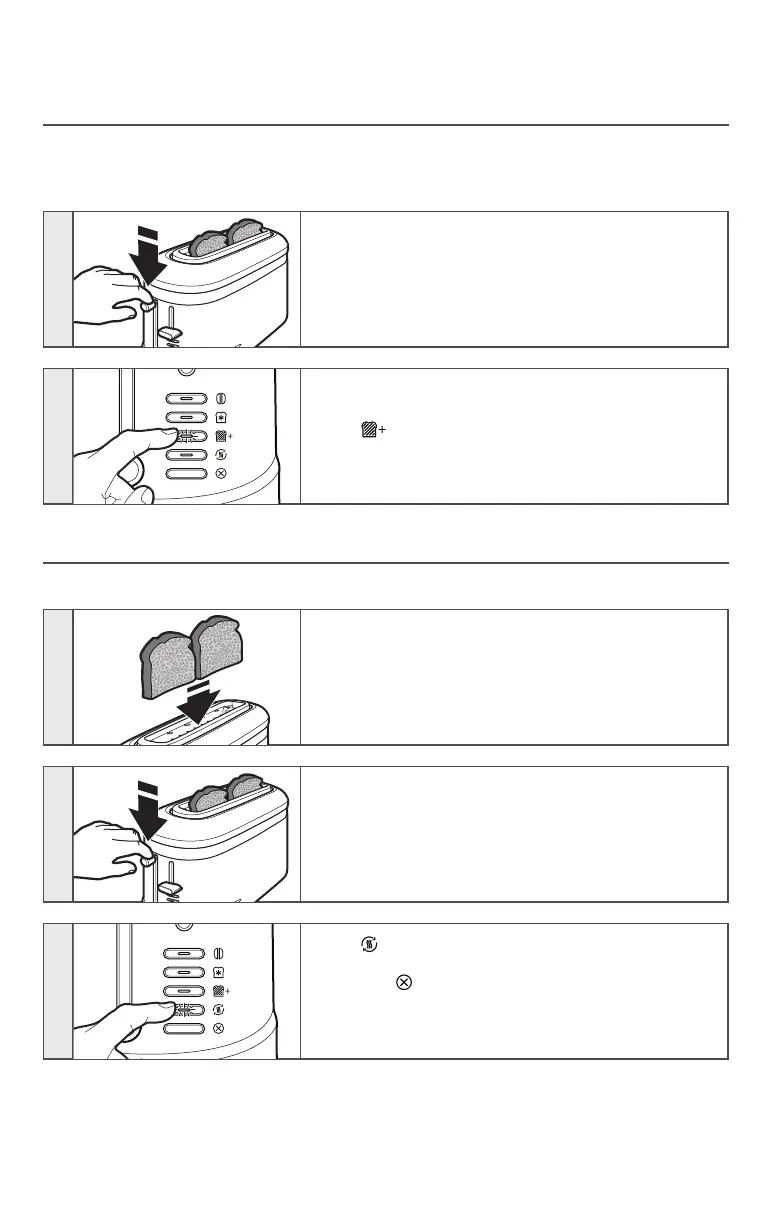
A LITTLE LONGER
This function allows you to toast something for just “a little longer” at the touch of a
button without changing your favorite setting. Use this function after the toasting cycle is
complete and the toast has risen.
1
Press down on the high lift lever to lower the toast
again into the Toaster to resume toasting.
2
Press . The toast will pop up automatically at the
end of the cycle and the Toaster will turn off.
REHEAT
This function allows you to quickly reheat previously toasted foods.
1
Insert the previously toasted food into the slot(s).
NOTE: Do not place food with butter or any other
topping in the Toaster. Use the Reheat function with
dry foods only.
2
Press down on the high lift lever to start the toasting
cycle.
3
Press . The toast will pop up automatically at the
end of the cycle and the Toaster will turn off, or you
may press at any time to cancel the function.
NOTE: No shade adjustment is necessary — the
Reheat function overrides whatever shade level you
have set.
USING THE TOASTER
W11222478A_ENv06.indd 8 5/30/18 11:52 AM




 To Next Page