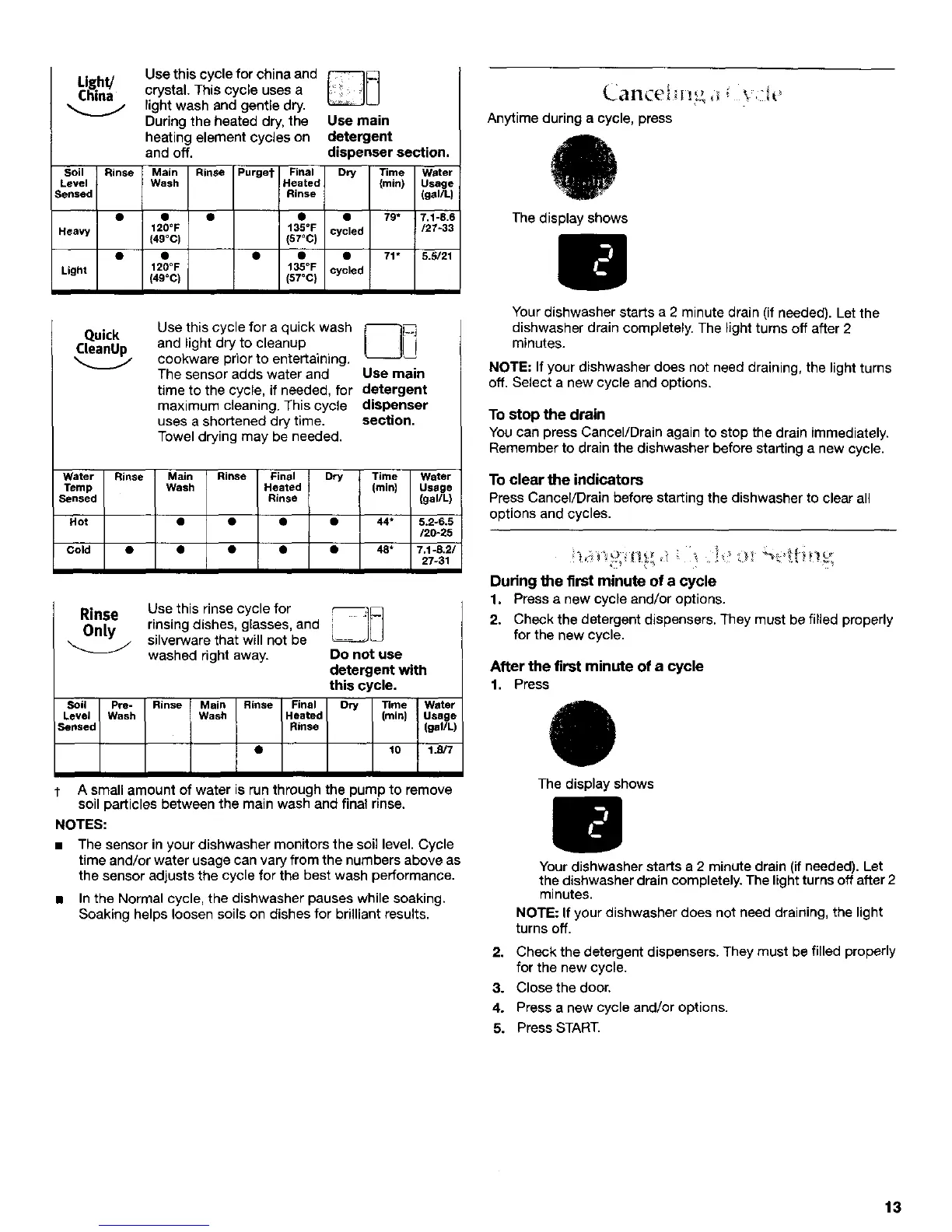
Light/
China
Use thiscycIeforchinaand _]
crystal.Thiscycleuses a
lightwash and gentledry.
Duringtheheated dry,the Use main
heatingelementcycleson detergent
and off. dispenser section.
Soil Rinse Main Rinse Purger Final Dry Time Water
Level Wash Heated (min) Usage
Sensed Rinse (gaUL)
• I • • • 79* 7.1-8.6
Heavy 12g°F t35°F cycled /27-33
(49°C) (57°C)
• • • • • 71" 5.5/21
Light 120°F t35°F cycled
(49°C) (57°C}
Use this cycle for a quick wash t'--q[C]
and light dry to cleanup L_J] i
cookware prior to entertaining.
The sensor adds water and Use main
time to the cycle, if needed, for detergent
maximum cleaning. This cycle dispenser
uses a shortened dry time. section.
Towel drying may be needed.
Water Rinse Main Rinse Final Dry Time Water
Temp Wash Heated (min) Usege
Sensed Rinse (gal/L)
Hot • • • • 44* 5.2-6.5
/20-25
Cold • • • • • 48* 7.1-8,21
27-31
Rinse Use this rinse cycle for _]
Only rinsing dishes, glasses, and
silverware that will not be
washed right away. Do not use
detergent with
this cycle.
Soil Pre- Rinse Main Rinse Final Dry Time Water
Level Wash Wash Heated (rain) Usage
Sensed Rinse (gal/L)
• 10 1.B/7
A small amount of water is run through the pump to remove
soil particles between the main wash and final rinse.
NOTES:
• The sensor in your dishwasher monitors the soil level. Cycle
time and/or water usage can vary from the numbers above as
the sensor adjusts the cycle for the best wash performance.
• In the Normal cycle, the dishwasher pauses while soaking.
Soaking helps loosen soils on dishes for brilliant results.
Anytime during a cycle, press
The display shows
Your dishwasher starts a 2 minute drain (if needed). Let the
dishwasher drain completely. The light turns off after 2
minutes.
NOTE: If your dishwasher does not need draining, the light turns
off. Select a new cycle and options.
To stop the drain
You can press Cancel/Drain again to stop the drain immediately.
Remember to drain the dishwasher before starting a new cycle.
To clear the indicators
Press Cancel/Drain before starting the dishwasher to clear all
options and cycles.
During the first minute of a cycle
1. Press a new cycle and/or options.
2. Check the detergent dispensers. They must be filled properly
for the new cycle,
After the first minute of a cycle
1. Press
O
The display shows
Your dishwasher starts a 2 minute drain (if needed). Let
the dishwasher drain completely. The light turns off after 2
minutes.
NOTE: If your dishwasher does not need draining, the light
turns off.
2. Check the detergent dispensers. They must be filled properly
for the new cycle.
3. Close the door.
4. Press a new cycle and/or options.
5. Press START.
13



 To Next Page