2 3
Please read this manual carefully before use.
Box contents
• KS Metro Wireless headphones
• USB charge cable
• 3.5 mm cable
• User manual
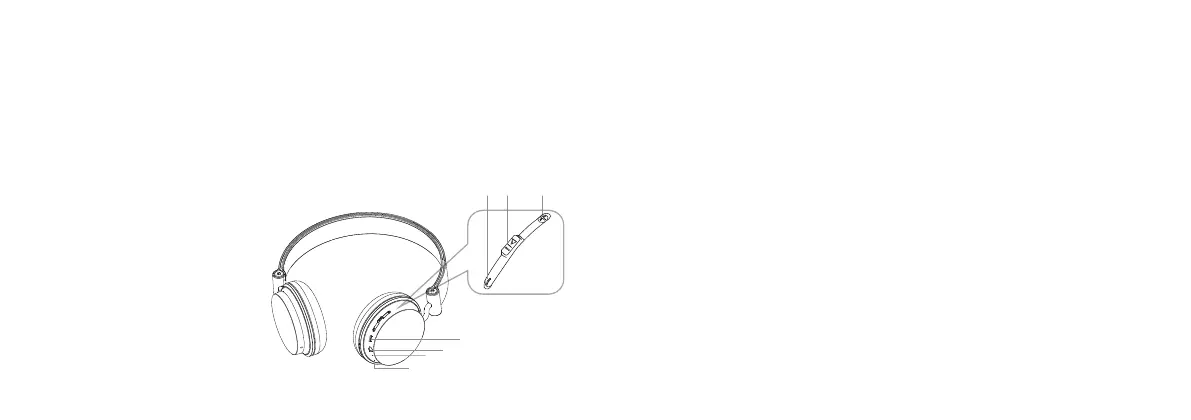
Functions
1. Multi Function Button (MFB)
2. Previous track/Volume–
3. Micro USB charging port
4. 3.5 mm aux-in
5. Next track/Volume+
6. Microphone
7. LED indicator
Instructions for use
Charging the battery
1. Connect the micro USB end of the charging cable to the Micro USB charging port (3)
and the standard USB end to a PC USB port or USB mains charger
2. The LED indicator (7) will be red whilst charging and will turn o after around 2 hours.
The battery is now fully charged
Note: The rst charge may take up to 3 hours to complete.
Battery information
• Your device is powered by a rechargeable battery. Unplug the charger from the electrical
plug and the device when not in use
• If left unused, a fully charged battery will lose its charge over time. We recommend a full
charge twice a month to ensure battery integrity
• Please do not leave the device in hot or cold places, such as in a closed car in summer
or winter conditions as it will reduce the capacity and lifetime of the battery
• Do not dispose of batteries in a re as they may explode. Batteries may also explode
if damaged
2 1 5
3
4
6
7


 To Next Page