6 7
Functions
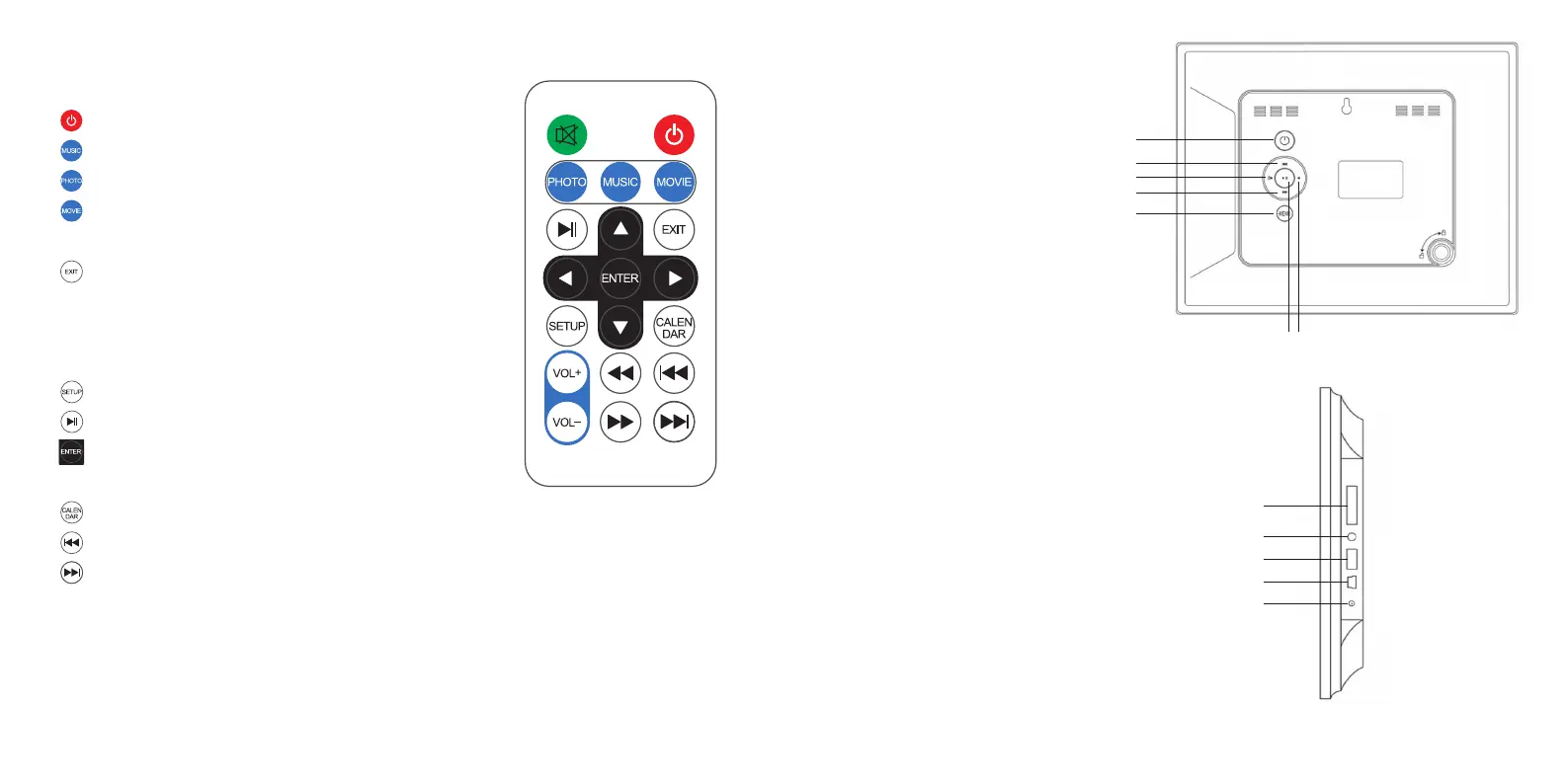
Using your remote control
– Poweron/off
–
Play music
–
Watch photos
–
Watch movies
–
Up
–
Returntopreviouspage
–
Left
–
Right
–
Down
–
GodirectlytoSetupmode
–
Play/pause
–
Conrmchoice
–VOL+/VOL– Turnvolumeup/down
–
GodirectlytoCalendarmode
–
Previous file
–
Nextle
Unit
1. Power
2. Up
3. Left
4. Down
5. Menu
6. Enter
7. Right
Note:Whentheunitispoweredon,
press and hold the enter button (6)
for2-3secondstoenterintocalendar
mode.PresstheExitbuttontoreturn
to the photo thumbnail mode.
a. SD/MMC/MScardslot
b. Audioout
c. USBstick
d. MiniUSB–PCconnection
e. Power socket
1
a
b
c
d
e
2
4
5
3
6 7


 To Next Page