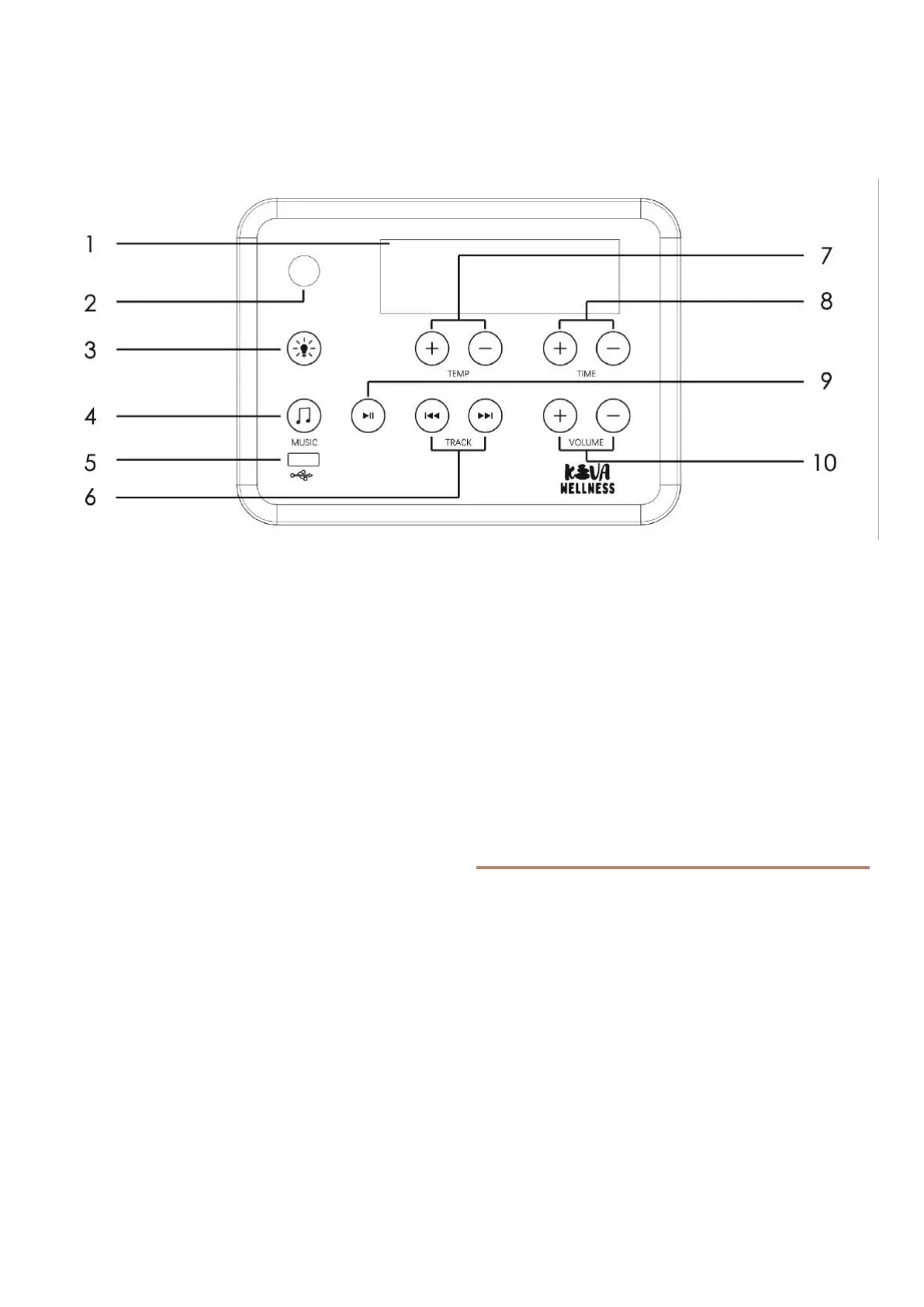
1 Display screen - For temperature, time, FM.
2 Power button - Touch this key to turn it on or off.
3 Light button - Touch the key to turn on/off the light
inside of cabin.
4 Music button - Touch this key to adjust bluetooth,
MP3 and FM.FM from 85.7-108.0M.
5 USB function - Touch this key to start USB function.
6 Song selection function - Press key upon the
TRACK for last song and key for next one.
7 Temp control - Touch the ‘+’and ‘-‘ button to
increase or decrease the temperature. If the ‘heat’
light is on, the temperature setting will increase one
degree every time the ‘+’ button is pushed. If pressed
for three seconds, the setting will increase quickly.
Decrease the temperature in the same manner by
pressing the ‘-‘ button. After the sauna reaches the
desired temperature, the ‘heat’ light turns off. The
Fahrenheit and Centigrade display can be switched:
press the temperature button “+” and “-” at the
meantime.
8 Time control - Touch the ‘+’and ‘-‘ buttons to set
the timer from 5 to 90 minutes. If pressed for three
seconds, the timer will increase quickly. To extend the
sauna session, reset the timer again.
9 Pause/Play - When playing music in this mode, this
key is for pause or play. In FM mode, press long for 5
seconds to enter FM station search automatic.
10 Volume control - Press ‘+’and ‘-‘ to increase or
decrease volume.
Colour Light Function
5 seconds press on “LIGHT” button,shows“ 2N” on
display. Short press “LIGHT ”button to change color
of LED light.
Press to convert one color at a time and it can be
cycled and memorized (L0 shade, L1 all bright, L2-
17 corresponding to different colors). Quick press on
TEMP+, can control LED 1 ON/OFF ( if available).
Quick press on TEMP-, can control LED 2 ON/OFF (
if available). Quick press on TIME+, can control RGB
Light ON/OFF ( if available).
Control Panel


 To Next Page
 Loading...