41
Troubleshooting
Phenomenon Check items Solution
Indoor unit cannot receive
remote control signal or re-
mote control has no action.
Whether it's interfered severely
(such as static electricity, stable
voltage).
Pull out the plug. Reinsert the
plug after about 3min, and then
turn on the unit again.
Whether remote controller is
within the signal receiving range.
Signal receiving range is 8m.
Whether there are obstacles. Remove obstacles.
Whether remote controller is
pointing at the receiving window.
Select proper angle and point
the remote controller at the re-
ceiving window on indoor unit.
Is sensitivity of remote control
low; fuzzy display and no
display?
Check the batteries. If the power
of batteries is too low, please re-
place them.
No display when operating
remote control.
Check whether remote control
appears to be damaged. If yes,
replace it.
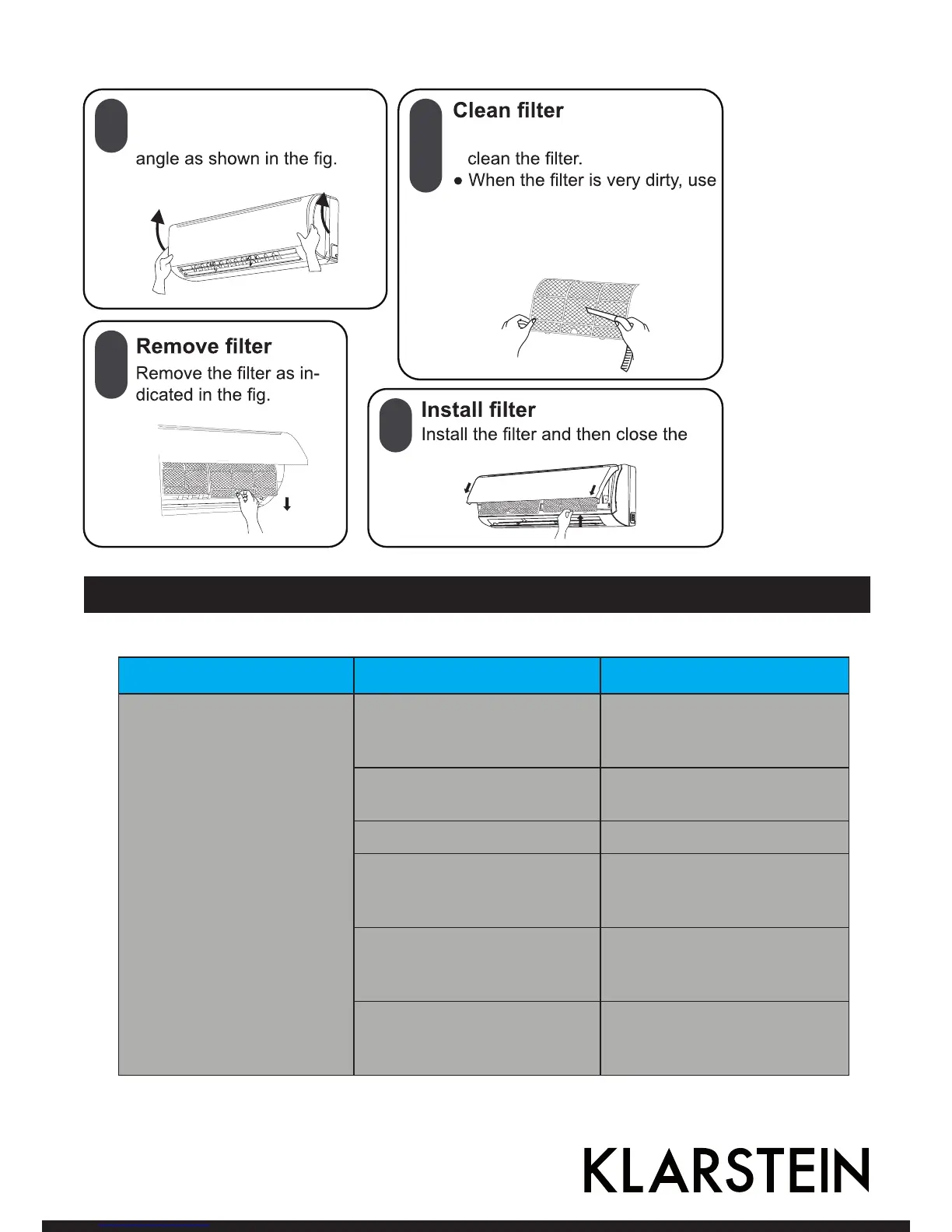
1
2
3
4
● Use dust catcher or water to
panel cover tightly.
the water (below 45
℃




 To Next Page