22
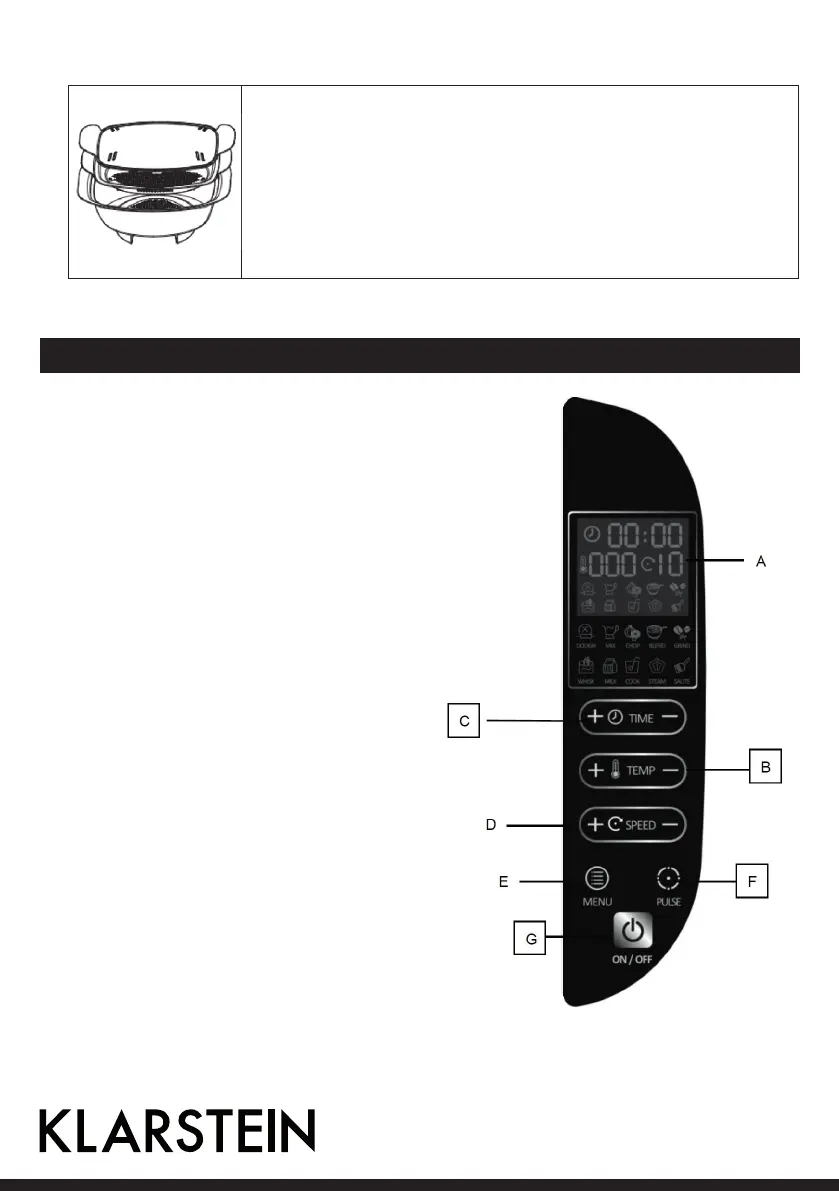
Steaming trays
• The trays serves to steam the food in big size. It has a tongue at the bottom of
the basing tray. Place the tower on the base for steaming.
• Important: When working in hot kitchen or steamed, reaching high tempera-
tures. Use caution when handling unit and accessories, as that there is risk of
burns.
Control Panel and Operation
A LCD Display
B TEMPERATURE: 40-100 °C
C TIME: 0-60 minutes
D SPEED: 1-10
E MENU: Select default dishes
F PULSE
G ON/OFF
1. ON/OFF setting:
Connect it to the mains supply. After the buzzer
rings, the product enters stand-by mode. The dis-
play shows 00:00. The speed shows 00 (If the jar
has not been placed properly, And the icons of time
and speed . temperature keep flashing.)
• Press ON/OFF, the display is off. Then, if you
press ON/OFF again, the product resume to
stand-by mode.
• When you select the manual or set TIME/SPEED/
TEMP, press ON/OFF to start working.



 To Next Page