14
EN
OPERATION AND FUNCTIONS
Getting Started
When using the appliance,
make sure that it is on a at
and stable surface. Damage
may occur if it is placed on
an incline or decline.
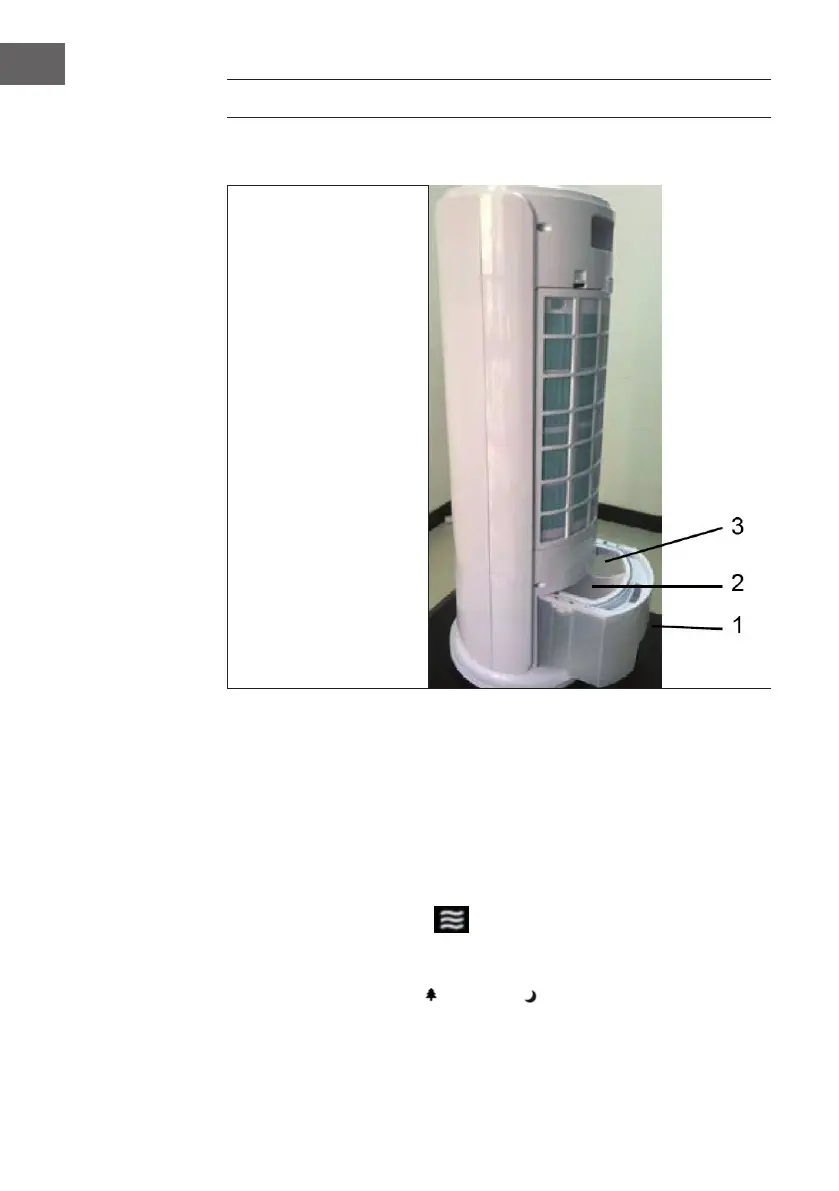
1 Pull out the water tank
2 Add the water into this
part of the water tank.
3 Add the ice into this part
of the water tank.
Operation
1 Insert the power plug into a standard AC socket-outlet; be sure the plug ts tightly
into the outlet.
2 Press the “ON/OFF” button to switch on the equipment. Air will be blown out at
medium speed, and then to low speed; press the button again to switch off the
equipment.
3 Press the “SPEED” button to set the fan speed in the following order: Medium-High-
Low-Medium. The LED lights will light up accordingly.
4 Press the “MODE” button to select desired wind mode, NATURE→ SLEEP→
NORMAL→NATURE in turn. The corresponding wind mode indicator will be
displayed by only Nature ( ) and Sleep ( ).




 To Next Page