19
EN
START-UP AND OPERATION
Before rst Use
• Before use, remove all packing materials, including bottom cushions, foam pads
and tapes inside of the refrigerator; tear off the protective lm on the doors and the
refrigerator body.
• Keep away from heat and avoid direct sunlight. Do not place the unit in moist or
watery places to prevent rust or reduction of insulating effect.
• Do not spray or wash the refrigerator; do not put the refrigerator in moist places
easy to be splashed with water so as not to affect the electrical insulation properties
of the refrigerator.
• The refrigerator is placed in a well-ventilated indoor place; the ground shall be at,
and sturdy (rotate left or right to adjust the wheel for levelling if unstable).
• The top space of the refrigerator shall be greater than 30 cm, and The refrigerator
should be placed against a wall with a free distance more than 10 cm to facilitate
heat dissipation.
• Before initial start, keep the refrigerator still for half an hour before connecting it to
power supply.
• Before putting any fresh or frozen foods, the refrigerator shall have run for 2-3
hours, or for above 4 hours in summer when the ambient temperature is high.
• Spare enough space for convenient opening of the doors and drawers.
Operation
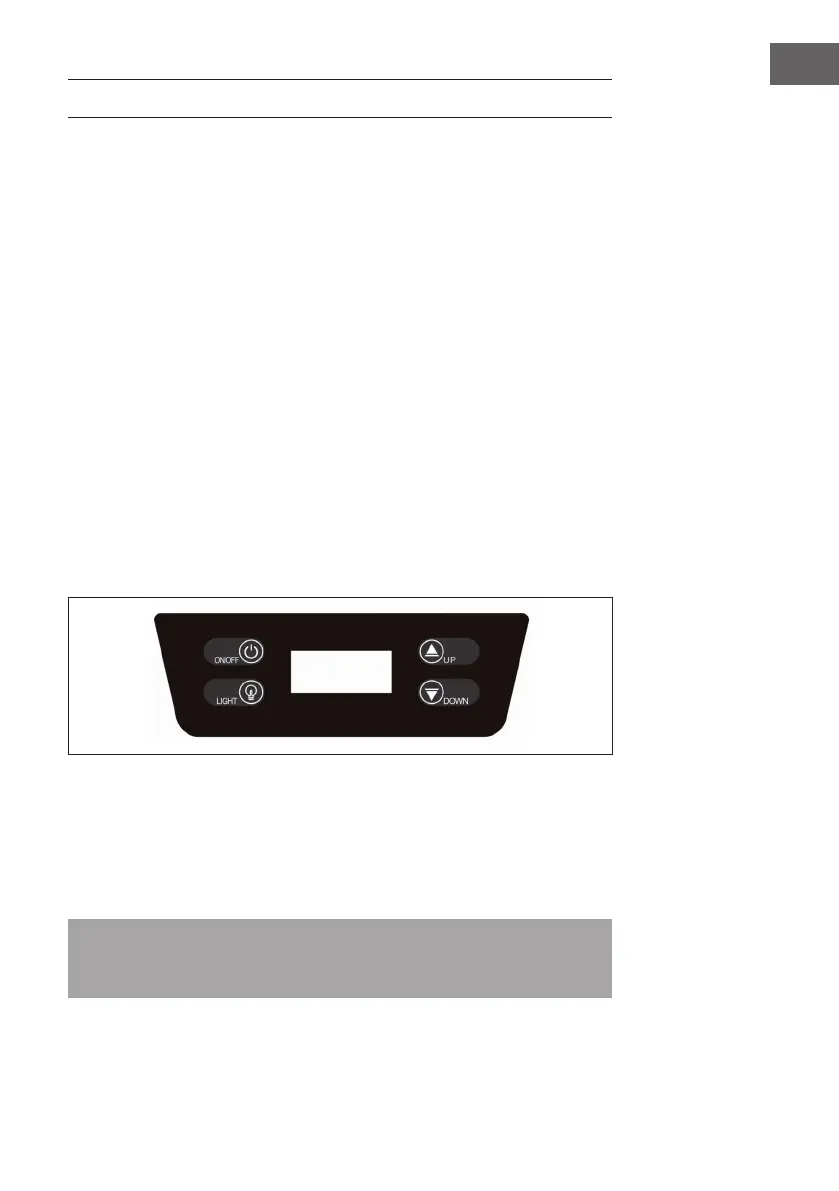
• Press ON/OFF switch for 3 seconds to turn on or turn off the appliance.
• Press temperature control button UP and DOWN together for 3 seconds to change
the LED display from Celsius to Fahrenheit.
• You can set the desired temperature by pressing UP or DOWN.
• The temperature selected will increase/decrease by 1°C with each press of the
buttons.
Note: after selecting the desired temperature, the display will continue to show the
real temperature inside the equipment, which will vary gradually until it reaches the
selected temperature
• Press LIGHT switch to turn on or turn off the light.


 To Next Page