37
EN
Operating functions
• Temperature setting (only effective in cooling mode):
- In cooling mode, you can set a temperature between 17-30 °C.
- The low fan speed is not adjustable.
- The accuracy of the temperature detection is ±1°C.
• Fan speed: 2 different speed levels are available: low and high speed.
• Timer mode: Set the timer to a time within 24 hours for automatic on/off.
• Swing function: swing up and swing down
• Temperature display (in Celsius).
• Self-diagnostic fault display
• Power off memory function
• The control panel adopts LED digital tube and LED indicator light as the display.
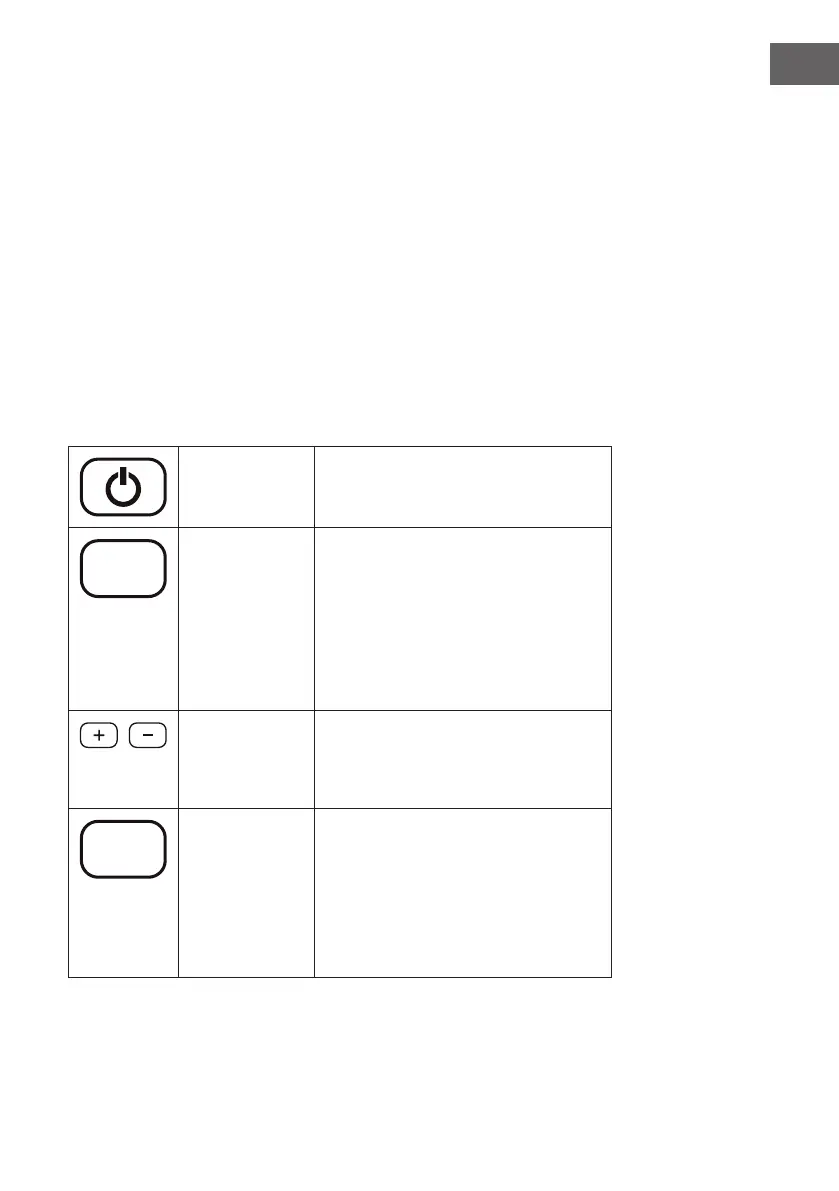
Button functions
POWER:
(On/Off)
Press this button to turn the unit on and off.
Mode
Mode
Press this button to switch between cool, dry
and fan modes.
The LED indicator will illuminate in different
colours depending on the mode:
• Blue: Cooling mode
• Green: Fan mode
• Orange: Dry mode
Up / Down
With these buttons a temperature between
17-30 °C can be set. If you then press the
TIMER button, the buttons can be used to set
the timer time.
Speed
Fan speed In cooling and fan mode:
Press this button to switch between high and
low speed.
In dry mode:
The fan runs at low speed. The speed cannot
be adjusted.



 To Next Page