EasyManua.ls Logo

Klarstein AQUALINE - Device Overview; Device Components; Control Panel Operation

Klarstein AQUALINE
Print Icon
To Next Page IconTo Next Page
To Previous Page IconTo Previous Page
Loading...
17
EN
DEVICE OVERVIEW
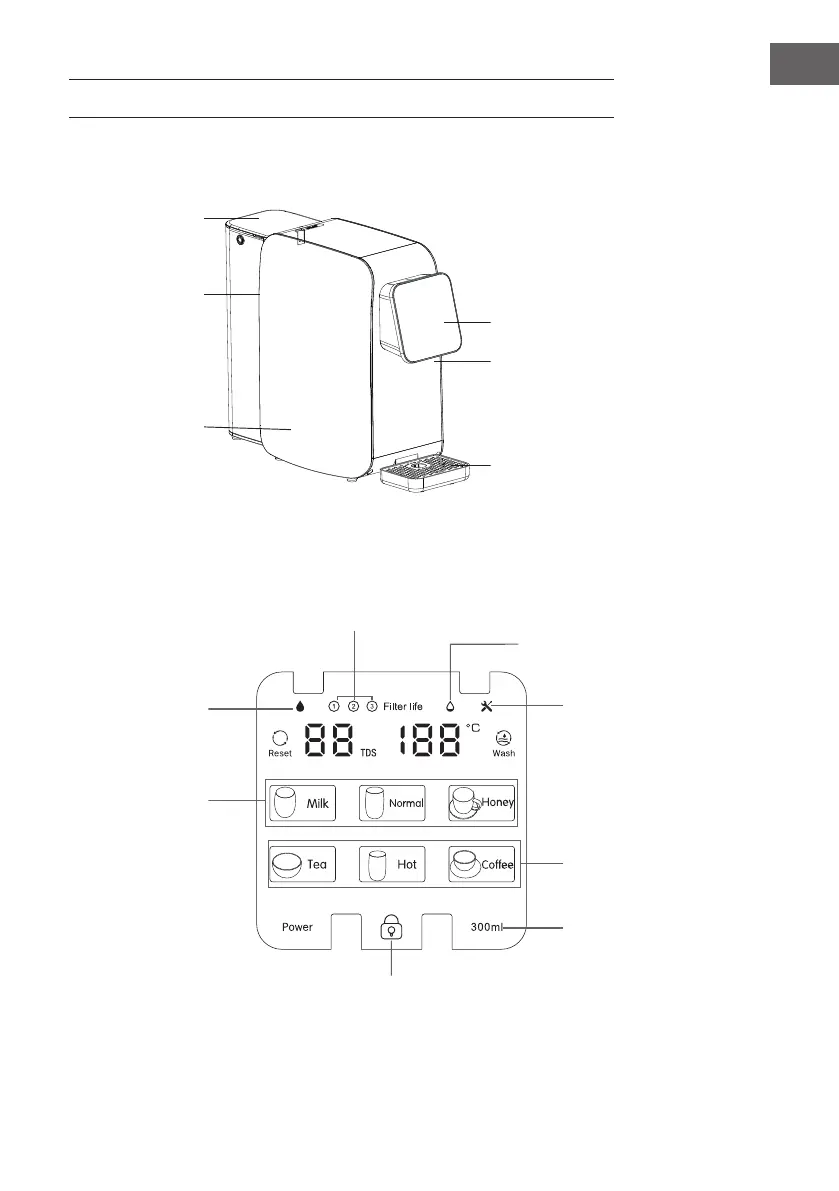
water tank cover
water tank
host
display panel
water outlet
drip tray
Device
Control panel
Replace the lter element
when the orange lamp
lights normally.
Hot water
Press to unlock.
The ashing indicator
indicates that water is
being produced and
cannot be output.
Normally on of the
indicator indicates that
water is produced and
can be output. When
the indicator light goes
off, it means the water
production is over.
Water shortage indicator
Read the manual
for service and
maintenance.
First release, then
choose the water tem-
perature.
Choose the amount of wa-
ter here. Cold water can be
drawn immediately. In the
high temperature range,
rst press the button with
the lock symbol on the left
to release the water.
Temperature selec-
tion for direct water
delivery