28
EN
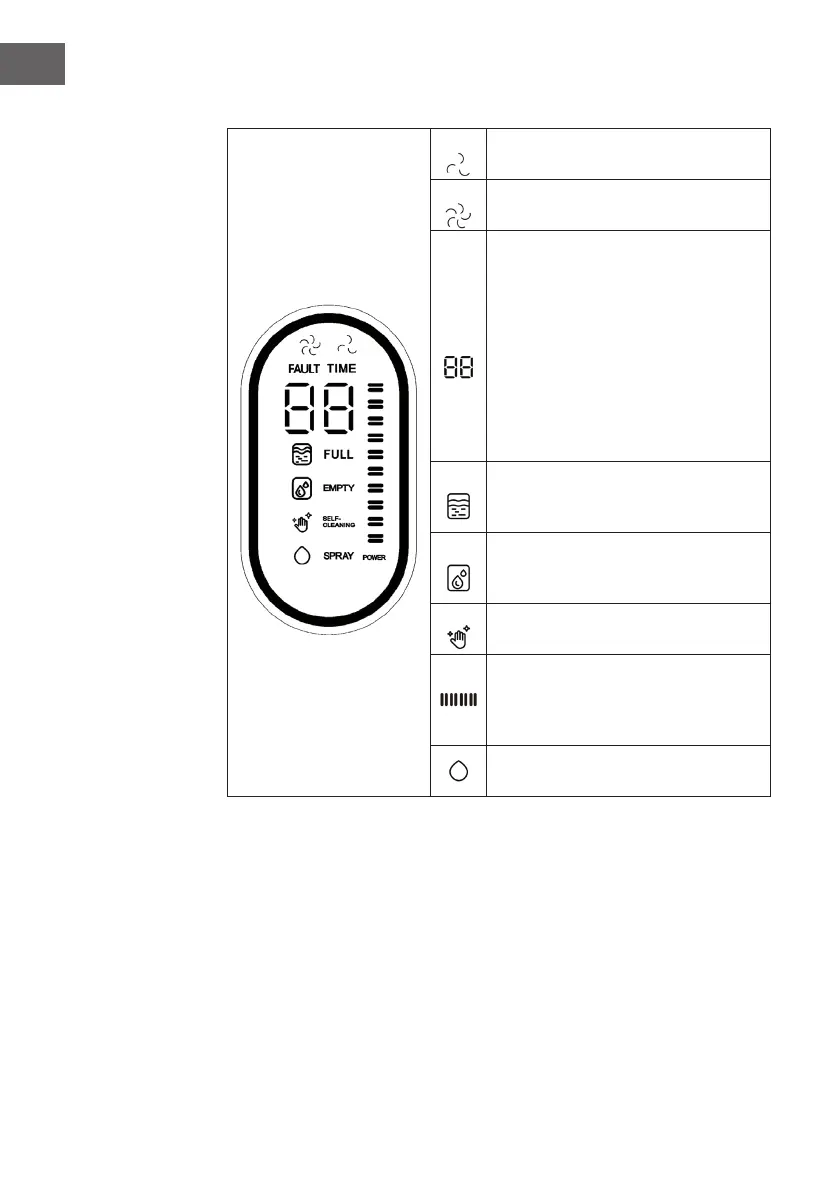
Digital screen
The light indicator lights up white when
the unit is in ECO mode.
The light indicator lights up white when
the unit is in MAX mode.
During normal cleaning, the operating
time from switching on to the current
time is displayed.
When the unit is in self-cleaning mode,
the self-cleaning countdown is displayed
from "59" to "0".
If the unit has a problem, the
corresponding error code is displayed to
identify the problem.
The indicator light ashes red slowly
when the dirty water tank is full. Empty
the dirty water tank in good time.
The indicator light ashes red slowly
when the water tank needs to be
relled. Fill it up with clean water.
The light indicator lights up white when
the unit is in self-cleaning mode.
The battery light ashes white slowly
during charging. The indicator stops
ashing when the unit is fully charged.
When you spray water, the indicator
light lights up white.


 To Next Page