27
EN
OPERATION
Heat selector button
• Choose a high temperature for large laundry or
a high load.
• Choose a low temperature for small garments or
a low load.
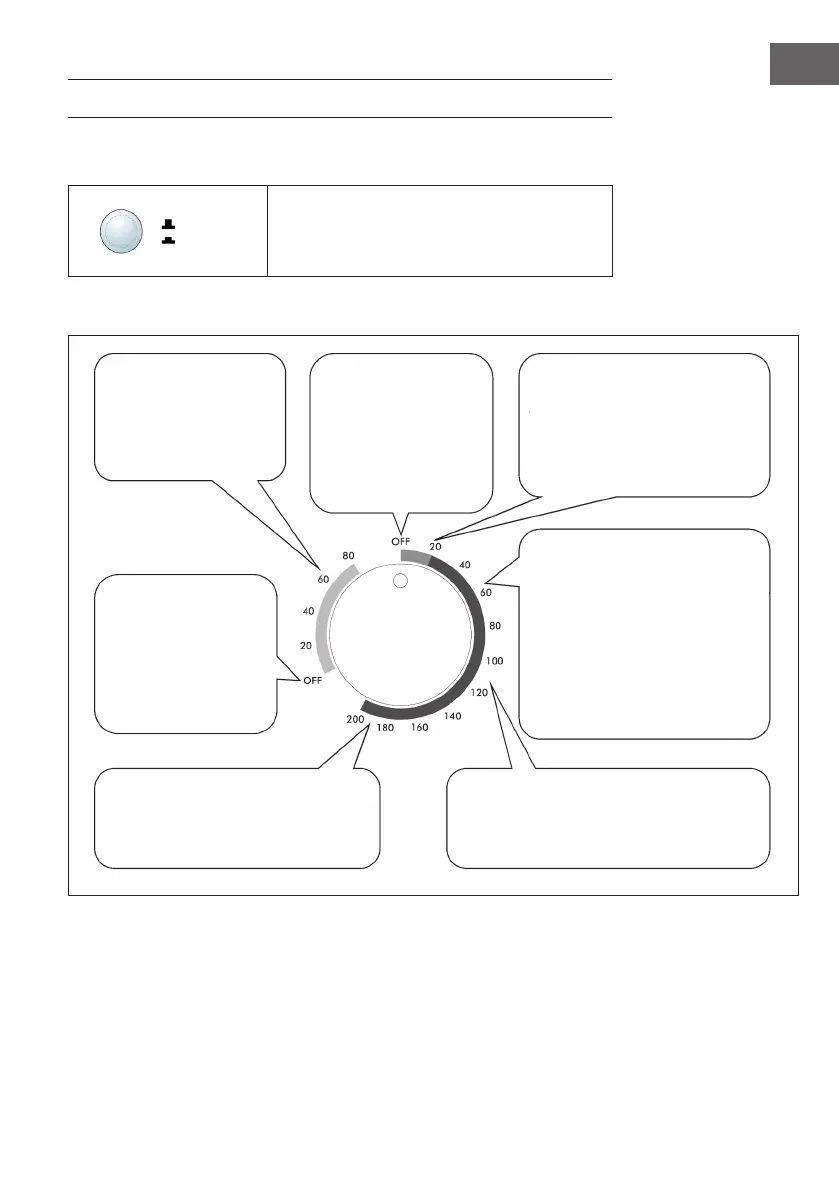
Drying programs
Hoch
Niedrig
Air Dry: Runs with cool air
and is suitable for laundry
that needs to be refreshed
(after long storage in a
cupboard).
Off: If the controller is set
to Off, the device is off.
Turn the knob clockwise
to select a program.
Cool: For laundry that has already
been dried and thus prevents
creasing.
Warm: With this function the laundry is rst
heated and then cooled down to prevent
creasing. Set the heat button to high and the
timer to 60-120 minutes.
Hot: For large laundry or a high load. Set
the heat button to high and the timer to
>120 minutes.
Off: If the controller is set
to Off, the device is off.
Turn the knob clockwise
to select a program.
Anti-wrinkle: Suitable for heavy
ironed garments such as cotton
shirts or linen. Set the Heat button
to Low and turn the knob to 30-60
minutes. When the cycle is nished,
the clothes are still slightly damp
and easier to iron.



 To Next Page