28
EN
Start button
After you have set the heat selection button and the timer, press the start
button. The program starts. If the door is opened during drying or there
is a power failure, the program stops. Close the door and press Start
again to continue with the program.
Note: The Start button is only intended to start the dryer. If you press it during drying,
the dryer will not pause. To stop the dryer, turn the knob to OFF.
CLEANING AND CARE
Note: Disconnect the plug from the socket before cleaning.
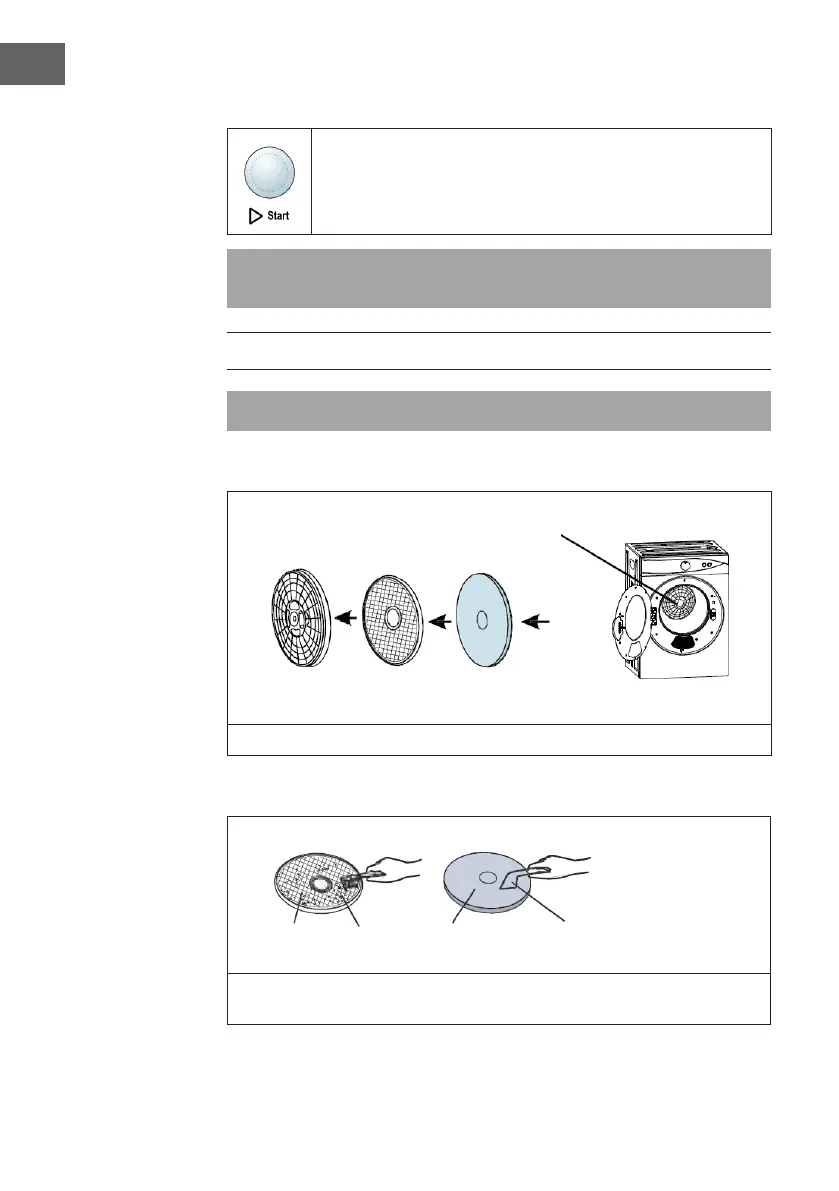
Removing the lter
Remove the lter insert from the rear of the interior. The lter insert consists of 3 lters.
Filter cleaning
Separate the lters. Clean the lter cover, lint lter and exhaust lter with a soft brush
or vacuum cleaner. Be careful not to damage the lters.
Lint lter
Lints
Exhaust lter vacuum cleaner
Filter insert
Filter cover Lint lter Exhaust lter



 To Next Page