21
EN
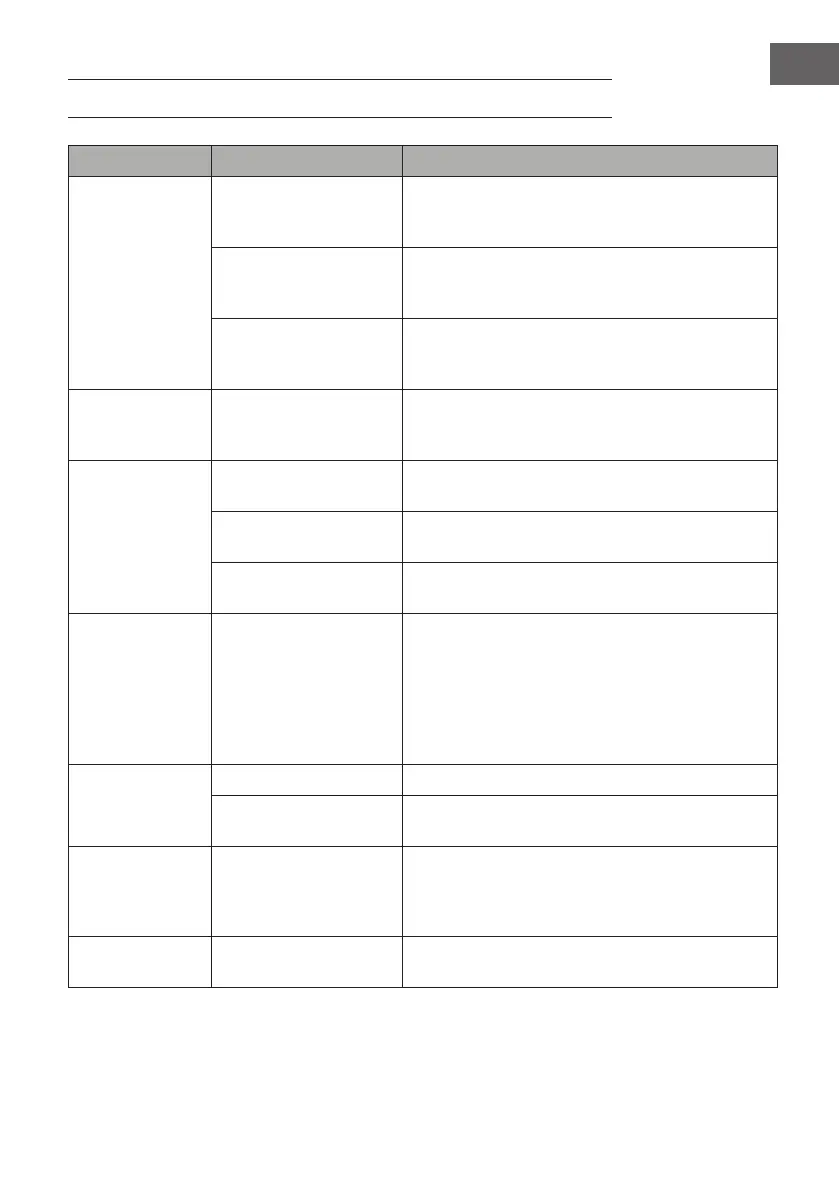
TROUBLESHOOTING
Problem Potential cause Possible solution
No water/steam. There is no water in the
water tank/the water tank
is blocked.
Fill the water tank with water, switch on the appliance
and press the coee button.
Not enough water has
been added.
Press the hot water button and the machine will start
pumping water into the line until water ows out of
the steam nozzle or funnel.
The appliance has not yet
preheated.
The appliance must be preheated before making
coee. The indicator light must be on steadily and
must not be ashing anymore.
The espresso is too
thin.
The coee powder is too
coarse/ was not pressed
in.
Use a ner coee powder and press this into the lter.
No steam. The steam outlet is
blocked.
Use a thin wire and plug this through the steam
opening.
The steam button is not
on.
Use the hot water function to clean the pipe after milk
frothing.
The preheating process is
not yet complete.
Before using the steam function, wait until the
preheating process is complete.
The espresso is too
strong or too thin.
Too much or too little
coee powder.
Fill the lter with the standard amount of coee.
One coee spoon for one cup and press the coee
powder rmly in the lter. The coee powder must
be neither too coarse-grained nor too ne-grained.
Coee powder that is too coarse cannot be extracted
completely and coee powder that is too ne can
aect the amount of coee.
The milk does not
foam properly.
Whole milk was not used. Use whole milk.
The appliance has not yet
preheated.
Only use the steam function when the steam indicator
is permanently lit and no longer ashing.
No coee, coee
too weak and
steam light
ashing rapidly.
Temperature too high
after using the steam
function.
Use water cooling.
The machine does
not brew coee.
The steam switch is not
turned o.
Set the steam switch to the 'OFF' position.



 To Next Page