P/N 1.07080 Revision G 4 of 8
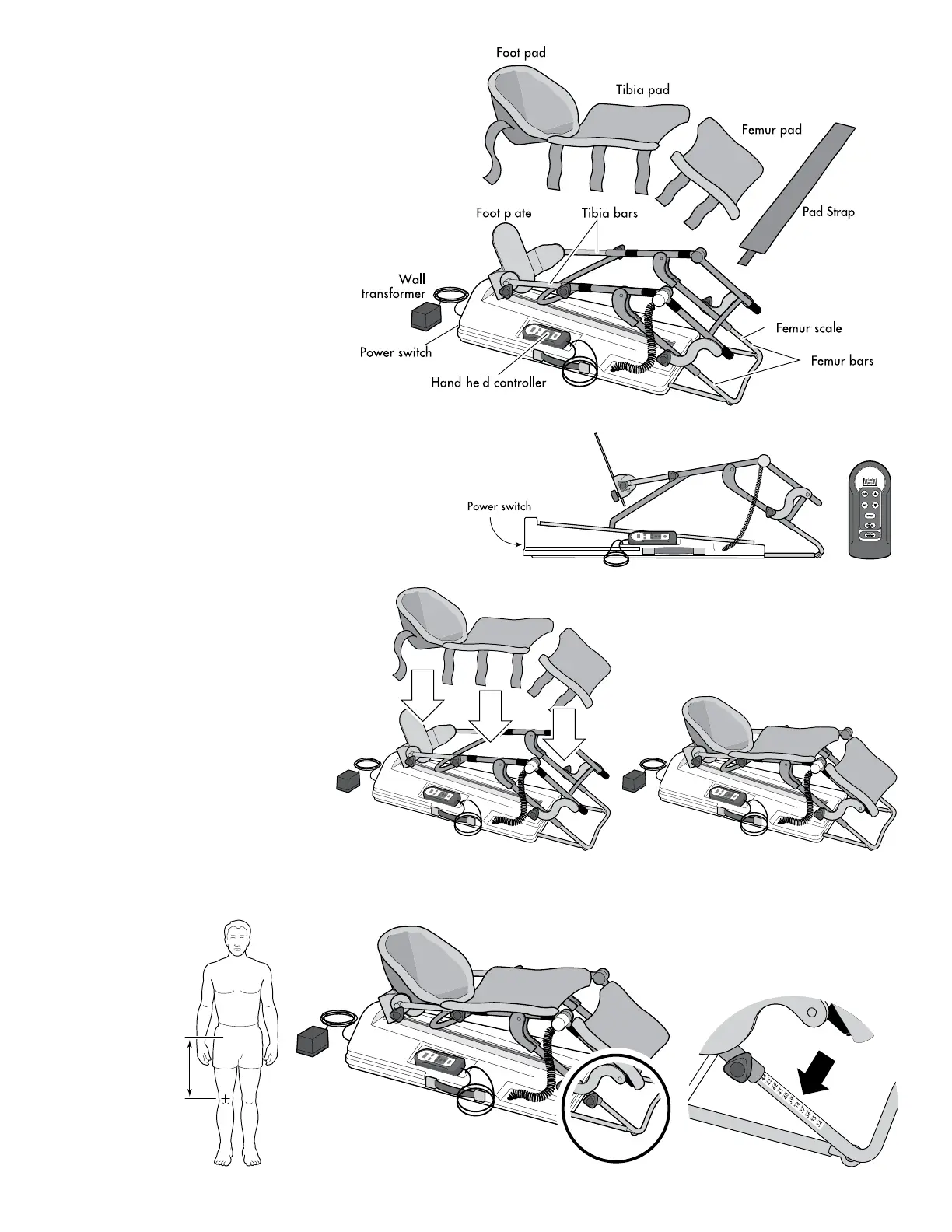
2. Plug the wall transformer into a 110/120V AC
wall outlet close to the machine. Locate the
power switch and press the “On” position.
Using the hand-held controller, bring the
machine to between 45° and 90°. See Hand-held
Controller Operation instructions.
3. Secure the patient pads to the
machine. The Foot Pad has a
pocket that slips over the Foot
Plate. The Tibia and Femur
Pads have straps that secure to
the black velcro pads.
4. Measure the patient’s involved leg in centimeters from the hip joint to the
midline of the knee joint, set the femur scale to this measurement, and retighten knobs.
Set Up Instructions
1. Open the shipping container and set
aside the soft goods bag. Lift the
FLEX-MATE
®
K500 from the box
and place it where it is to be used.



 To Next Page