Hand-held Controller Operation
Turn on the power switch located at the
foot of the machine.
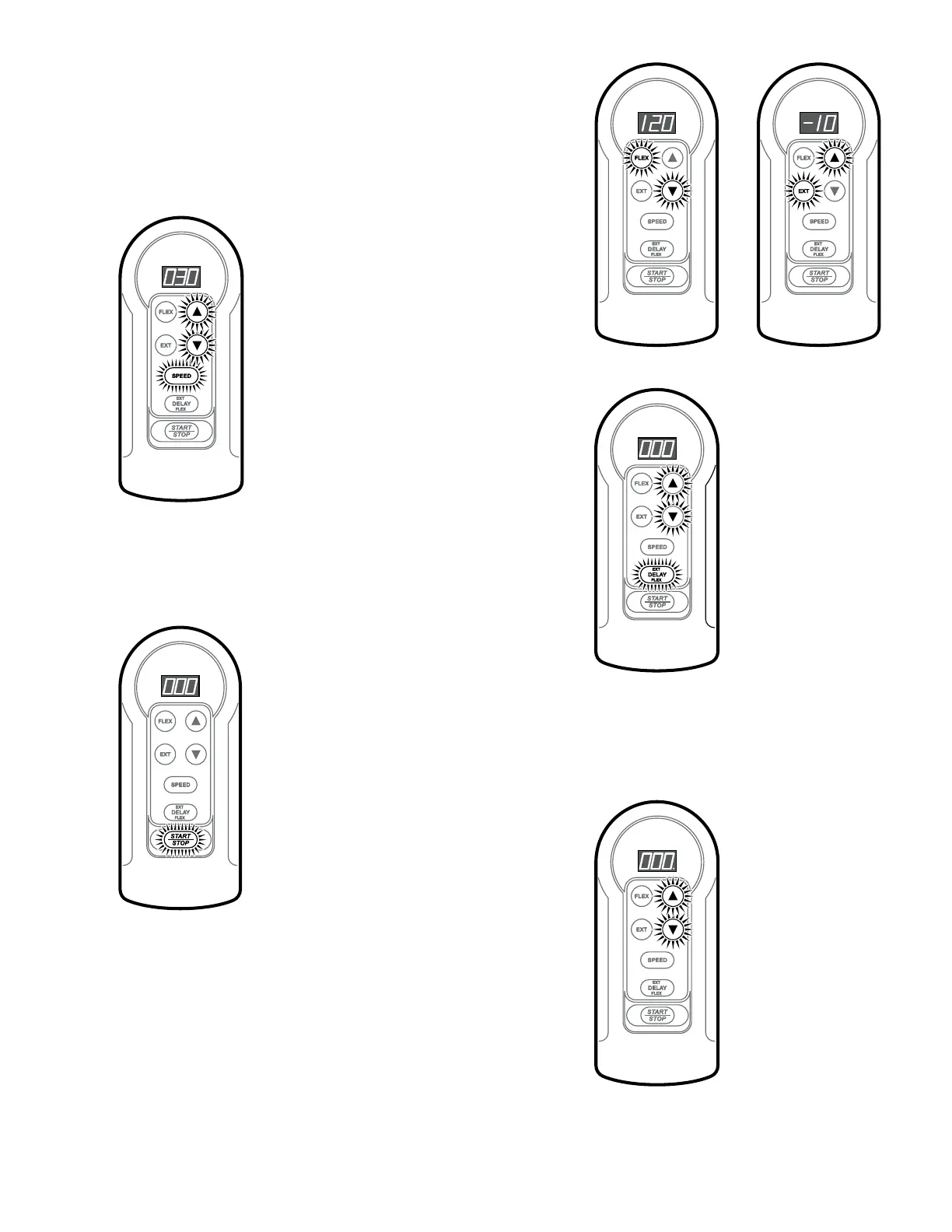
RangeofMotionSet
Hold down “EXT” or “FLEX” and press “UP”
or “DOWN” arrow to set the limits. Full range
is from –10° extension to 120° exion.
SpeedSet
Hold down “SPEED” and press “UP” or
“DOWN” arrow to set speed. Speed can be
adjusted in 10 degree increments ranging
from 30° per minute to 150° per minute.
PauseSet
Hold down “DELAY” and press “UP”
or “DOWN” arrow to set the length of
time the unit will pause at the exion
and extension limits. Delay range is
from 0 seconds to 30 seconds.
Press “START/STOP” to begin motion.
Press “START/STOP” again to stop motion.
SettingLock
Press both “UP” and “DOWN” arrows at the
same time to lock the setting, and again to unlock.
When locked, a dot will show in the lower right
corner of the display.
NOTE: Locking mode retained
even when power is turned off.
P/N 1.07080 Revision G 7 of 8
Cleaning and Maintenance
With unit unplugged, clean housing and leg carriage with a mild soap solution and dry thoroughly. Refer to the Service Manual for recommended maintenance.
CAUTION: Avoid getting water inside the housing as it may damage the electrical components.



 To Next Page