ENGLISH
NOTE: No user-serviceable parts inside.
FIG. 1
FIG. 2
ET920
INSTRUCTION MANUAL - USB DIGITAL METER - TYPES A AND C
1
2
5
4
3
6
1. Power source INPUT (USB-A)
2. Power source INPUT (USB-C)
3. Load OUTPUT (USB-A)
4. Load OUTPUT (USB-C)
5. Mode button
6. LCD display
A. DC voltage
B. DC current
C. Capacity/Charge delivered (mAh)
D. Energy delivered (Wh)
E. Resistance (Ω)
F. Elapsed Time (Hour:Min:Sec)
G. Memory Location (M:1, M:2, etc)
H. Memory Clear/Reset ("CLR")
I.Connector type in use (USB-A or USB-C)
##.## V
#.## A
USB-#
###### mAh ####Wh
###:##:## ###.#Ω
I
Default Screen
C
B
F
A
Memory Screen
##.## V CLR
#.## A
###### mAh ####Wh
###:##:## ###.#Ω
E
D
G H
C
B
F
A
WARNINGS
T
o ensure safe operation and service of the tester, follow these instructions. Failure to observe these
warnings can result in severe injury or death.
• This tester will NOT display current below 50 mA, even if it is allowing this to pass through.
NOTE: The
display will show zero current.
• DO NOT use with ports that operate outside of the rated voltage and current.
• Before each use verify tester operation by measuring a known voltage or current.
• NEVER use on a circuit with voltage or current that exceeds the maximums specified for this device.
Use caution when working with voltages above 25V AC RMS or 60V DC. Such voltages pose a shock
hazard.
Voltage above 24V DC will damage product.
Display will read "OVERLOAD" in this condition
and output port will be disabled.
• DO NOT use during electrical storms or in wet weather.
• DO NOT use if tester appears to be damaged.
• Use caution when working with voltages above 25V AC RMS or 60V DC. Such voltages pose a shock
hazard.
NOTE: Voltage above 24V DC will damage product.
• Always adhere to local and national safety codes. Use personal protective equipment to prevent shock
and arc blast injury where hazardous live conductors are exposed.
CAUTION
• DO NOT attempt to repair this tester. There are no serviceable parts.
• DO NOT modify this tester in any way.
• DO NOT expose to extremes in temperature or high humidity.
• This tester will NOT be able to monitor a source port if any of the following conditions occur:
• The USB port or plug is not properly connected.
• The source device shuts down. Some portable storage batteries have auto-shutdown or standby
modes to save power if no load is detected from downstream device.
FUNCTION BUTTONS (FIG. 1)
MODE BUTTON
5
(Screen Toggle/Data Storage/Memory reset)
The Mode button serves three purposes:
1. Switch between screens (FIG. 2):
• From the default screen, pressing and releasing once will switch to the Memory
Screen.
• When in the Memory Screen, repeated pressing will cycle through all 10 memory
locations, beginning with M:1A or M:1C.
NOTE: If no data has been stored into
memory, pressing the Mode button will do nothing. The ET920 will only display
memory locations containing stored data.
2. Data/Memory Storage and Recall:
• To record a reading during live monitoring event, press and hold the Mode
button for 3 seconds. Release the button after the memory location (i.e. M:1A)
flashes momentarily on the screen. The next set of readings will be stored at the
next available location until all 10 memory locations are used.
NOTE: After all
10 locations are used, subsequent readings will overwrite the original 10 stored
readings, beginning with M:1. The memory location will reflect the connector type
in use when the data was stored (i.e. "M:1A" if USB-A, "M:1C" if USB-C). NOTE:
When in the Memory screen, if the Mode button is not pressed within 3 seconds,
the display will return to the Default screen.
3. Memory Reset:
• To reset or erase all data in memory, press and hold the Mode button for 5 seconds
from the Memory screen until the letters CLR flash in the upper right corner (FIG.
2). All data in memory will be erased in all 10 memory locations.
GENERAL SPECIFICATIONS
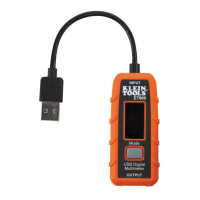
The Klein Tools ET920 is a USB digital meter for both USB-A (Type A) and USB-C (Type C)
ports. It accurately and reliably measures and displays the USB port voltage, current,
capacity, energy and resistance simultaneously. It can function with any USB-A and most
USB-C ports that have the ability to deliver power. It requires no batteries, as it draws power
from the power source.
• Measurement Range:
Voltage: 3 to 20V DC
Current: 0.05 to 3A (Type A), 0.05 to 5A (Type C)
Charge delivered: 99,999mAh MAX*
Energy delivered: 999Wh MAX*
Resistance: 400Ω MAX
Elapsed Time: Up to 999 hours, 59 min, 59 sec*
*
Based on display layout
• Operating and Storage Altitude: Up to 6562 ft. (2000 m)
• Operating and Storage Temp: 14° to 122°F (-10° to 50°C)
• Relative Humidity: <95% non-condensing
• Dimensions: Tester: 2.95" x 1.96" x 0.6" (75 x 50 x 15 mm)
Cable: Approx. 4" (100 mm)
• Weight: 1.7 oz. (49 g)
• Pollution degree: 2
• Drop Protection: 6.6 ft. (2 m)
• Ingress Protection: IP20
• Compatibility: Qualcomm Quick Charge® Compatible
• Standards:
EN 61326-1, EN61326-2-2, FCC Part 15B VOC.
Conforms to UL STD. 61010-1, 61010-2-030.
Certified to CSA STD. C22.2 No. 61010-1, 61010-2-030.
Specifications subject to change.
OPERATING INSTRUCTIONS
MONITORING MODE
NOTE: USB-A and USB-C sides CANNOT be used simultaneously.
The rst device connected, whether USB-A or USB-C, will be the
monitored source.
NOTE: The input plug must be connected to a powered USB device
before the downstream device is connected to the output port.
"Downstream device" refers to any device that has the ability to
draw current over USB.
1. Connect one of the ET920’s input connectors (USB-A or USB-C) to
the USB port that needs to be monitored.
• The LCD screen will turn on with Klein Tools logo screen and
move quickly to the Default Screen (FIG 2).
NOTE: For USB-C, a
downstream device must be connected to turn on the ET920.
• If the source port has power, it should only display a live voltage
reading within the operating range, 3-20V DC.
NOTE: Most USB
ports deliver ~5V DC.
2. Connect the device being charged to the output port of the ET920.
The display will show actual readings (FIG. 2).
NOTE: "mAh" resets only when source is disconnected.
CLEANING
Be sure the tester is disconnected from both the input and output port.
Use clean, dry, soft lint-free cloth to wipe down the entire unit.
•
Do NOT use abrasive cleaners or solvents.
STORAGE
Do not expose to high temperatures or humidity. After a period of
storage in extreme conditions exceeding the limits mentioned in the
General Specifications section, allow the tester to return to normal
operating conditions before using.
DISPOSAL / RECYCLE
Do not place equipment and its accessories in the trash. Items must
be properly disposed of in accordance with local regulations. Please
see www.epa.gov or www.erecycle.org for additional information.
CUSTOMER SERVICE
KLEIN TOOLS, INC.
450 Bond Street, Lincolnshire, IL 60069
1-877-553-4676
customerservice@kleintools.com
www.kleintools.com
SYMBOLS ON TESTER
This product has been independently tested
by Intertek and meets applicable published
standards
Conformité Européenne: Conforms with
European Economic Area directives
Read instructions before using
USB
Important information: It is important
that users of this tester read, understand,
and follow all warnings, cautions, safety
information, and instructions in this
manual before operating this tester. Failure
to follow instructions could result
in death or serious injury.
Warning – Risk of electric shock

 Need help?
 General
 Weight and Dimensions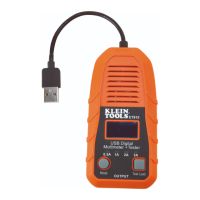





 To Next Page