On/O
ON/OFF Button Turn on Appliance. Start and Stop Programs. Awaken from Sleep Mode
When the appliance has been connected to power the ‘ON/OFF’ Button will light up, press the button to turn on.
When the lid is on the Blender, it will enter Standby Mode and the entire control panel will light up.
Use the ‘ON/OFF’ button to start a selected program or immediately stop the Blender during operation.
If the appliance is connected to power with no setting selected within 5 minutes, it will enter Sleeping Mode.
Use the ‘ON/OFF’ button to awaken the Blender and use.
PROGRAMS
E01 is a safety feature that is designed to notify you that the lid is not securely attached. The Mealio™ will not
function if the Lid is not secure. The Mealio™ has a magnetic sensor design which requires the blender sensor
on the lid to be locked into place and be in alignment with the Mealio™ jar handle sensor.
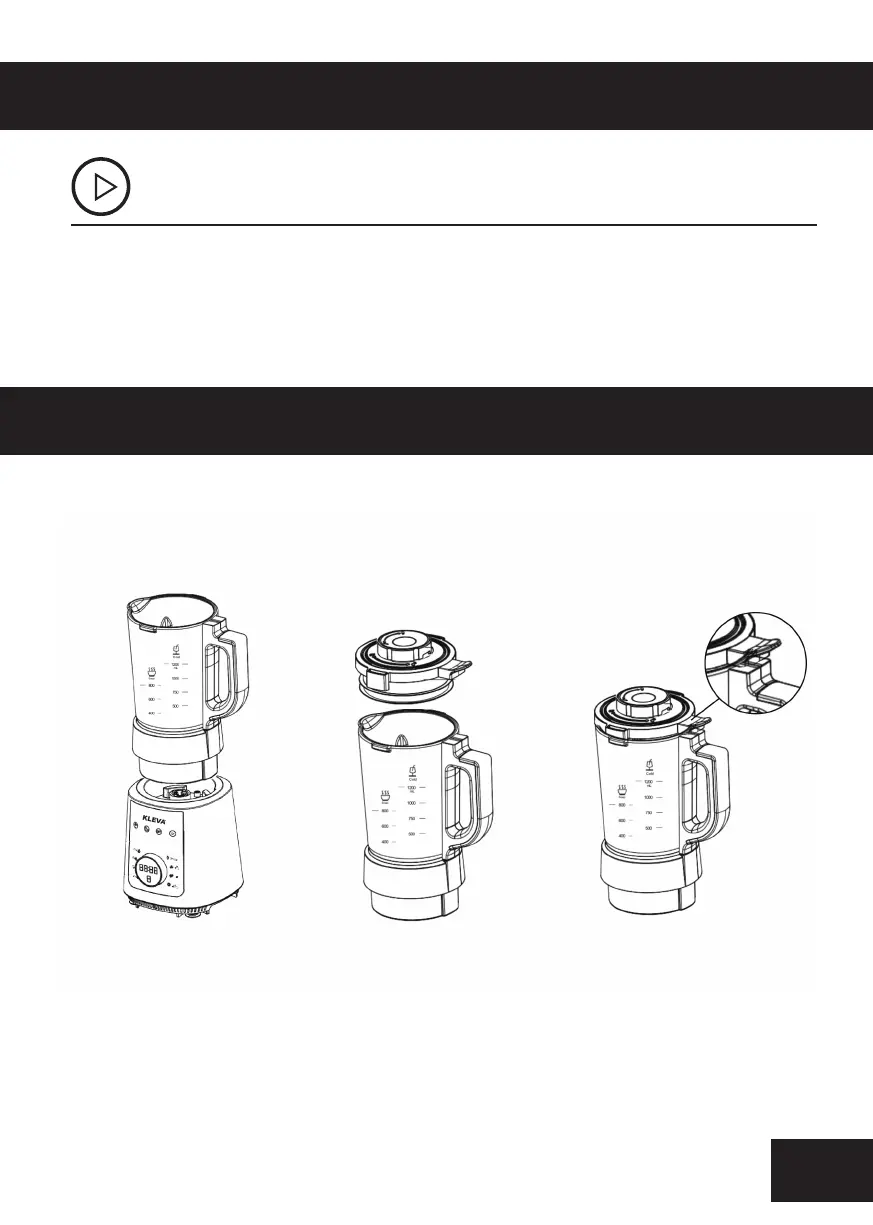
HOW TO ATTACH LID
Please refer to The Next Page of the instruction
Manual for HOT BLENDING PRESETS.
Step 3 - Turn the lid
clockwise until it cannot
turn anymore. Making sure
to line up the lip of the lid
with the jar
Step 2 - Push the Mealio™
lid into the Mealio™ Jar
Step 1 - Once the Mealio™ motor
base is plugged in, you are to place
the Mealio™ Jug on top. Once the
jug is in the motor base an Error
sign will appear on the selector
wheel screen which is E01.



 To Next Page