5
CD & BLUETOOTH MODES
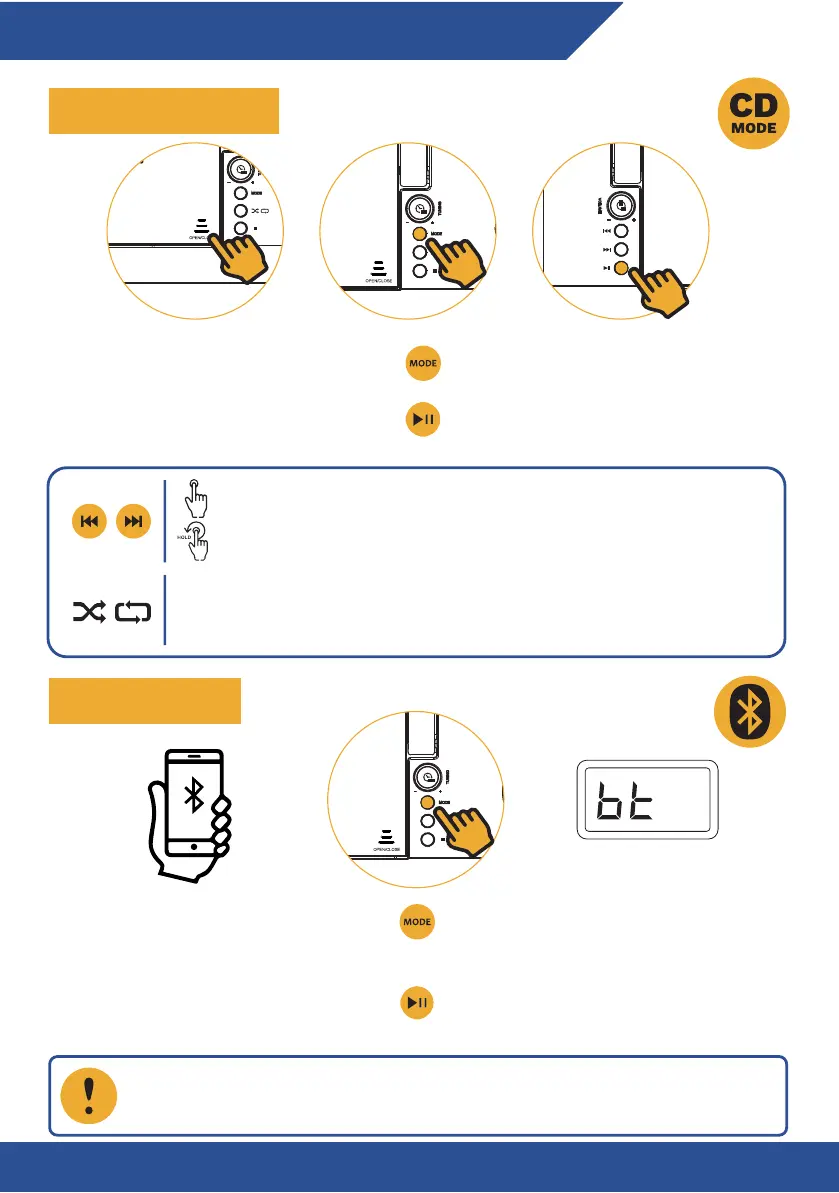
USING THE CD PLAYER
BLUETOOTH MODE
Step 1: Open the CD compartment.
Step 2: Place the CD inside and close
the compartment.
Step 3: Press MODE and select CD mode.
Step 4: Press PLAY/PAUSE button to play the
loaded CD.
Step 1: Activate Bluetooth on your phone
or tablet.
Step 2: Press MODE and select BT mode.
Step 3: Find “KLIM Boombox B4” in the
available devices list and select it to pair
with the boombox.
Step 4: Press the PLAY/PAUSE button to play
or pause the current track. Press and hold to
disconnect the paired device.
Press once to go to the previous/next track.
Press and hold to fast-forward or rewind the current track.
While playing a track, press once for single-track repeat. Press again for
playlist repeat (ALL). Press again for random playback (RAND). Press again to
cancel this function.
Some playback features such as fast-forward or rewind may not function,
depending on the connected device.


 To Next Page