6
RADIO & AUX INPUT
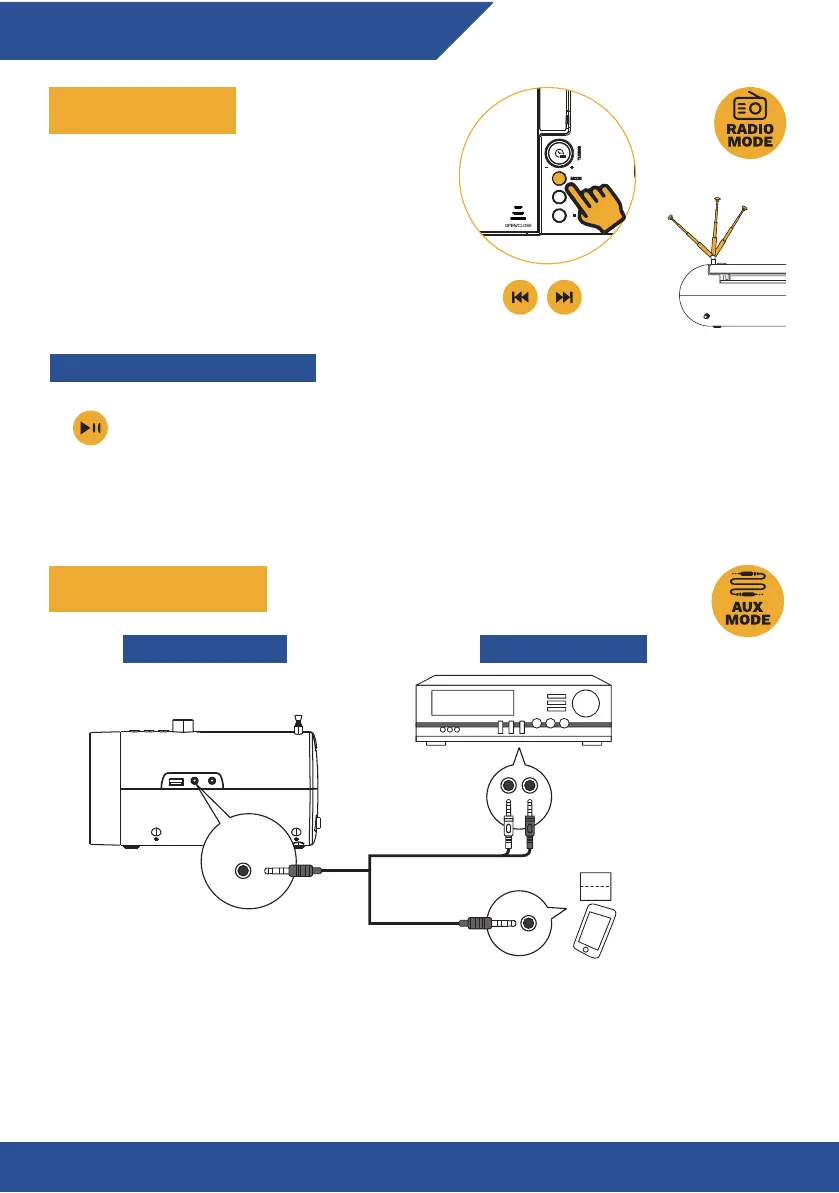
USING THE RADIO
AUXILIARY PORT (IN)
Step 1: Press the MODE button and select FM or
AM, then extend the antenna to improve radio
reception.
Step 2: Press the PREV or NEXT buttons to jump
to the previous or next available station. Use the
tuning knob to manually select the frequency.
AUX IN
3.5mm to RCA stereo
audio cable (not included)
3.5mm to 3.5mm stereo
audio cable (not included)
Audio devices
KLIM BOOMBOX B4 EXTERNAL DEVICES
Step 1: Connect a 3.5 mm cable
(not included) to the AUX
port on the KLIM Boombox.
Step 2: Connect the other end
to the output auxiliary port on
your device (such as an Mp3
player)
Step 3: Press the MODE button
to select AUX mode. Audio
played through the connected
device will now sound through
the Boombox.
SETTING RADIO STATION PRESETS
Press and hold the PLAY/PAUSE button to auto-scan available FM frequencies. All
detected frequencies will be saved to presets P01 to P20. Once the auto-scan has
finished, press the NEXT/PREV button to select the desired preset.


 To Next Page