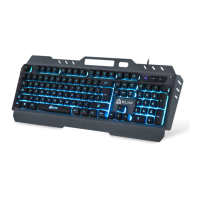
Multimedia keys
The Function key (FN) does not only allow for color customization, it also gives access to
a wide range of useful shortcuts:
FN + F1: Media player
FN + F2: Volume -
FN + F3: Volume +
FN + F4: Mute sound
FN + F5: Stop
FN + F6: Previous track
FN + F7: Play/Pause
FN + F8: Next track
FN + F9: E-mail client
FN + F10: Home (browser)
FN + F11: Calculator
FN + F12: Search (browser)
NOTE: Some function shortcuts are not available on MacOS.
Reset keyboard & Win Lock key
Press FN + Esc + F1 + F3 + F5 to restore the keyboard's factory settings.
Press FN + WIN to deactivate the Windows key.
IV. TROUBLESHOOTING
If you ever encounter any problems, remember that we remain at your disposal to help you
with any issues. Do not hesitate to contact us at support@klimtechnologies.com for
additional support.
The computer is typing more than one character with a single press
This effect is known as "key chattering" and can sometimes happen due to the nature of
mechanical keyboards. Here is how you can fix it:
1) Remove the keycap of the affected key (use your fingers or the removal tool included)
2) Take a thin, blunt object such as a ballpen and push the blue switch down until it "clicks"
3) Repeat this for each of the 4 sides of the switch
4) Place the keycap back on the switch and try the affected key
For a video demonstrating the above procedure or for any additional help, contact us
directly via e-mail.
It is also recommended that you clean your keyboard regularly to remove any excess dust
on the switches and avoid further problems.
We thank you again for your purchase and hope that you enjoy using our KLIM Domination
keyboard. Do not hesitate to leave a comment on the site you purchased it from, it will
help us tremendously :)
The KLIM team


 To Previous Page
 Loading...