EasyManua.ls Logo

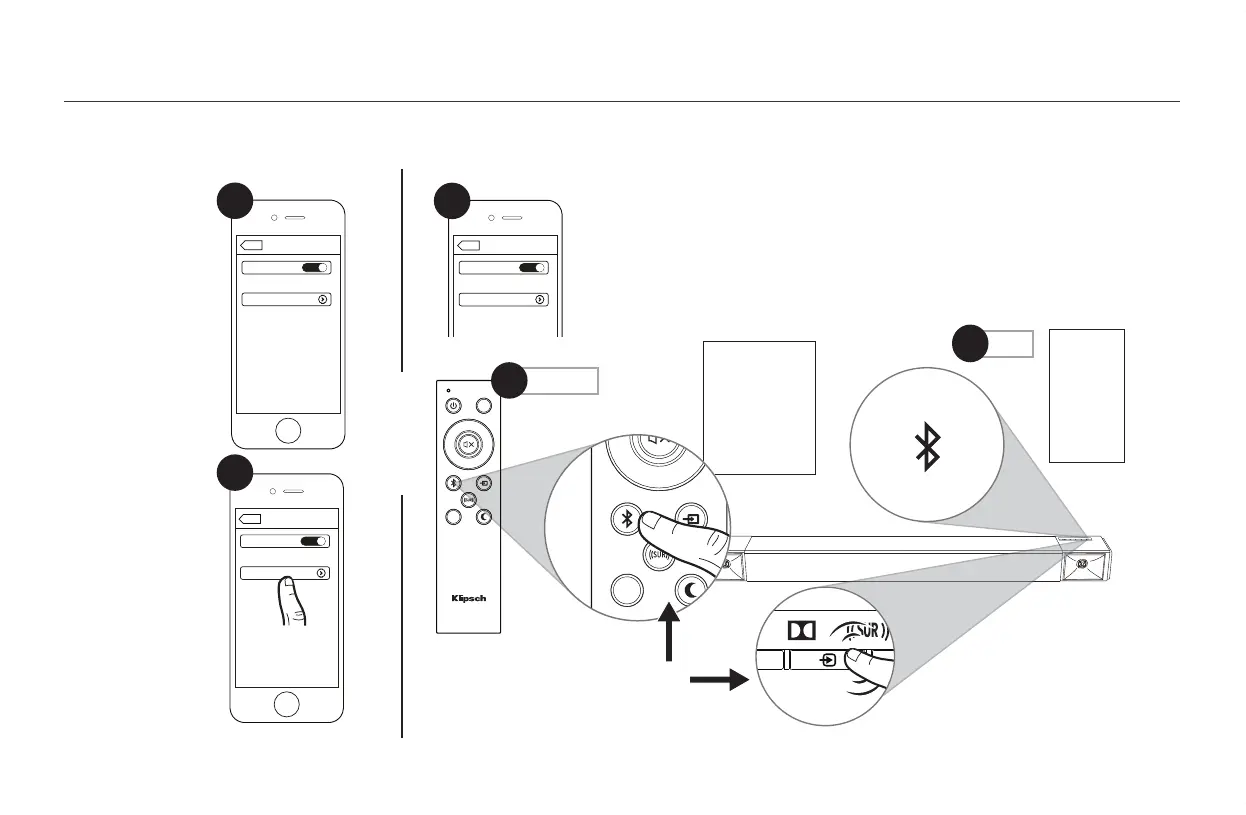
Klipsch CINEMA 400 - Bluetooth Reconnection; Reconnecting Paired Bluetooth Device

Klipsch CINEMA 400
30 pages
Print Icon
To Next Page IconTo Next Page
To Previous Page IconTo Previous Page
Loading...
18
Bluetooth
Bluetooth
ON
Devices
Settings
Cinema 400
Connected
Bluetooth
Bluetooth
ON
Devices
Settings
Cinema 400
Connected
Bluetooth
Bluetooth
ON
Cinema 400
Devices
Not Paired
Settings
Klipsch Bar 40
Phone
DIALOG
LED
VOL +
VOL
SUB – SUB +
DIALOG
LED
VOL +
VOL
SUB – SUB +
DIALOG
LED
VOL +
VOL
SUB – SUB +
DIALOG
LED
VOL +
VOL
SUB – SUB +
Bluetooth
Bluetooth
ON
Devices
Settings
Cinema 400
Connected
Bluetooth
Bluetooth
ON
Devices
Settings
Cinema 400
Connected
Bluetooth
Bluetooth
ON
Cinema 400
Devices
Not Paired
Settings
Klipsch Bar 40
Phone
DIALOG
LED
VOL +
VOL
SUB – SUB +
DIALOG
LED
VOL +
VOL
SUB – SUB +
DIALOG
LED
VOL +
VOL
SUB – SUB +
DIALOG
LED
VOL +
VOL
SUB – SUB +
Bluetooth
Bluetooth
ON
Devices
Settings
Cinema 400
Connected
Bluetooth
Bluetooth
ON
Devices
Settings
Cinema 400
Connected
Bluetooth
Bluetooth
ON
Cinema 400
Devices
Not Paired
Settings
Klipsch Bar 40
Phone
DIALOG
LED
VOL +
VOL
SUB – SUB +
DIALOG
LED
VOL +
VOL
SUB – SUB +
DIALOG
LED
VOL +
VOL
SUB – SUB +
DIALOG
LED
VOL +
VOL
SUB – SUB +
BLUETOOTH
®
WIRELESS TECHNOLOGY
TECNOLOGÍA INALÁMBRICA
BLUETOOTH
®
• CONFIGURACIÓN DE TECNOLOGIA WIRELESS
BLUETOOTH
®
• DRAHTLOSE
BLUETOOTH
®
-TECHNOLOGIE-SETUP • CONFIGURAZIONE TECNOLOGIA WIRELESS
BLUETOOTH
®
• CONFIGURAÇÃO DE TECNOLOGIA SEM FIO
BLUETOOTH
®
BLUETOOTH
®
蓝牙无线电技术
Solid
Continu
Continuo
Dauerhaft
Luce fissa
Constante
常亮
Solid
3
RECONNECT
RECONNECTER
RECONECTAR
ERNEUT VERBINDEN
RICONNESSIONE
RECONECTAR
重新连接
OR
Press x1
Appuyer 1 fois
Oprima 1 vez
1x drücken
Premere 1 volta
Pressionar uma vez
按 1 次
Bluetooth
Bluetooth
ON
Devices
Settings
Cinema 400
Connected
Bluetooth
Bluetooth
ON
Devices
Settings
Cinema 400
Connected
Bluetooth
Bluetooth
ON
Cinema 400
Devices
Not Paired
Settings
Klipsch Bar 40
Phone
DIALOG
LED
VOL +
VOL
SUB – SUB +
DIALOG
LED
VOL +
VOL
SUB – SUB +
DIALOG
LED
VOL +
VOL
SUB – SUB +
DIALOG
LED
VOL +
VOL
SUB – SUB +
1
1
Press x1
2

2
OR
OU
O BIEN
ODER
OPPURE
OU
Not
Not

Related product manuals