EasyManua.ls Logo

klover DIVA MID - 1 General Description; Console

klover DIVA MID
48 pages
Print Icon
To Next Page IconTo Next Page
To Previous Page IconTo Previous Page
Loading...
4
1. GENERAL DESCRIPTION
1.1 Console
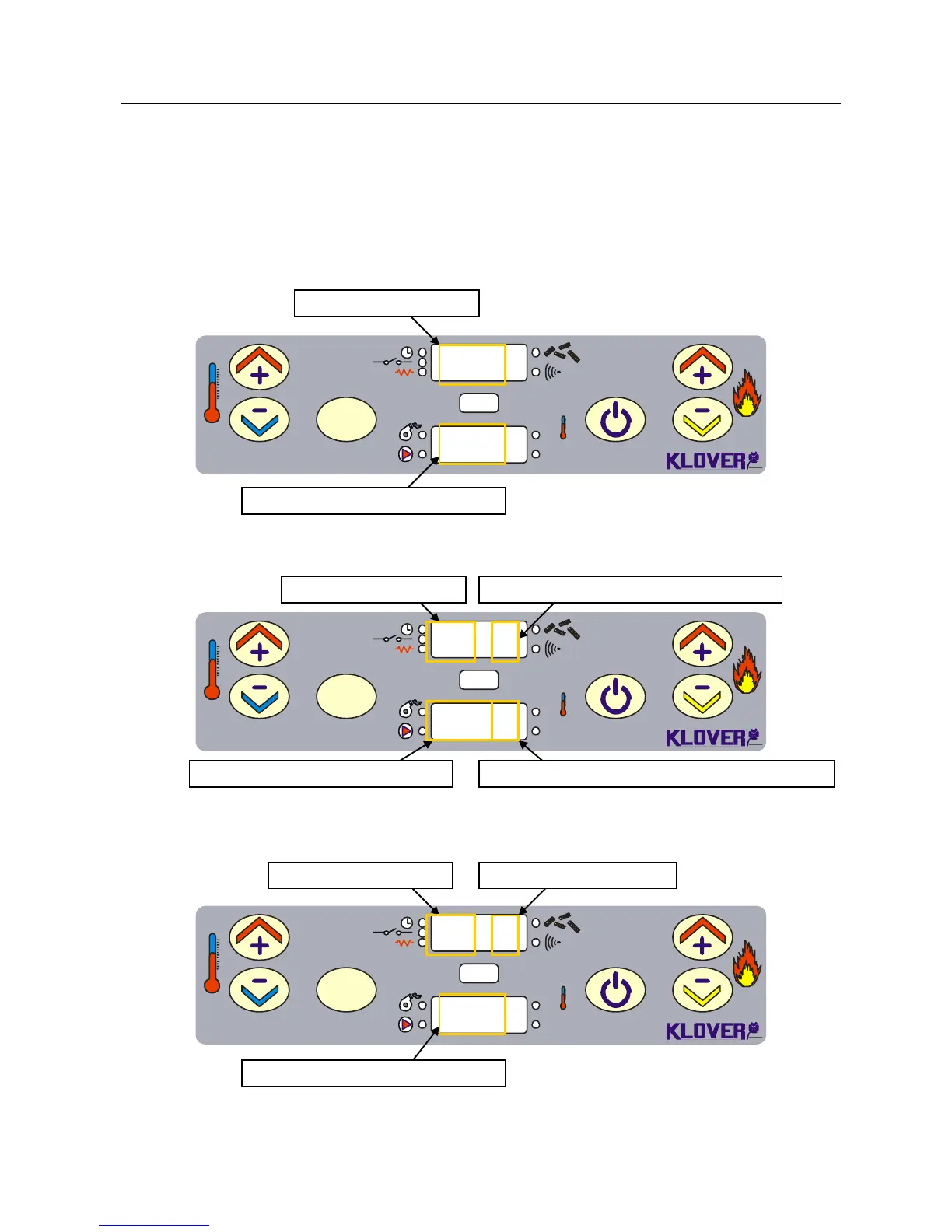
The equipment's functioning state is displayed by the console. Many types of displays and the
available settings based on the selected menu can be made by accessing the menu.
Figure 1 shows the display in equipment on conditions.
SET
OK
Set
°C
1
2 3 4 6
5
60°C
Po 5
Figure 2 shows the display in equipment on conditions (on products with ventilation).
SET
OK
Set
°C
1
2 3 4 6
5
60°C 2
P5 2
Figure 3 shows the display in equipment on conditions (on pellet/wood combined products).
SET
OK
Set
°C
1
2 3 4 6
5
60°C
P5 L
EFFECTIVE WORK POWER (modulation)
Fig. 2
BOILER WATER TEMPERATURE
VENTILATION POWER (optional)
Fig. 3
BOILER WATER TEMPERATURE
WOOD SIDE ON
Fig. 1
BOILER WATER TEMPERATURE

Related product manuals