Need help?
Do you have a question about the KME NEVO and is the answer not in the manual?
Overview of control panels for NEVO-SKY, NEVO, and DIEGO systems.
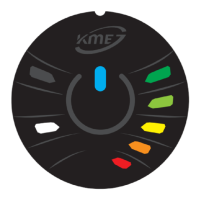
Explanation of control panels DG8, DG7, DG5, DG4, and DIEGO G3 and their functions.
Step-by-step guide to automatically configure the gas level indicator on the panel.
List of error codes, their descriptions, and corresponding flashing codes for NEVO systems.
Step-by-step guide for emergency engine start directly on gas fuel and important warnings.
This document is a user manual for KME autogas systems, specifically for cars equipped with gas injection systems such as NEVO-SKY, NEVO, and DIEGO. It provides practical advice, operational instructions for the control panel, and troubleshooting information.
The KME autogas system allows a vehicle to run on LPG (Liquefied Petroleum Gas) or CNG (Compressed Natural Gas) in addition to petrol. The core function is to manage the transition between fuels and monitor the gas system's operation.
Fuel Type Selection: The system primarily starts on petrol and automatically switches to gas when specific parameters are met, such as coolant/reducer temperature, engine speed (RPM), and a predefined delay time. Users can manually switch between petrol and gas by pressing a button on the control panel.
Gas Level Indication: The control panel features an LED indicator that displays the current gas level in the tank. The number of illuminated LEDs corresponds to the degree of tank filling. For the DG8 panel, the fill level is indicated by a single LED changing color.
Automatic Calibration of Gas Level Indicator: The system supports automatic calibration of the gas level indicator to ensure accurate readings. This process involves emptying the gas tank, initiating calibration via the control panel, and then completely refilling the tank. The calibration mode is signaled by alternating blinking of the gas level diodes.
Acoustic Signalization: In addition to visual cues on the control panel, the system uses acoustic signals to indicate various events:
Gas System Signaling (Error Detection): The Diego G3 / NEVO / NEVO-SKY systems include a self-monitoring function to detect malfunctions. Errors are stored in the controller and can be signaled on the control panel through alternating flashing of status LEDs (or color changes for DG8) and an acoustic signal. Gas level indicator diodes may also flash to show errors if configured. The most common error cause is an empty gas tank. Alarms can be canceled by pressing the mode change button or will silence automatically after about 5 seconds.
Gas Controller Sleep Mode (NEVO-SKY only): The gas controller enters sleep mode when the ignition is off or when connected to PC software for specific functions. This mode is indicated by the lighting of gas level LEDs, with the DG8 panel showing alternating white and blue colors.
Gas Controller Software Update Mode: The start of a firmware update is signaled by a short beep. The update progress is indicated by the sequential illumination of four gas level LEDs, or by color changes (red -> orange -> yellow -> green) for the DG8 panel.
Emergency Start on Gas: In case of petrol fuel system failure, the NEVO-SKY / NEVO / DIEGO G3 systems allow for an emergency start directly on gas. This procedure involves a specific sequence of ignition turns and button presses on the control panel. A long beep confirms the system is operating on gas.


 To Next Page
 General