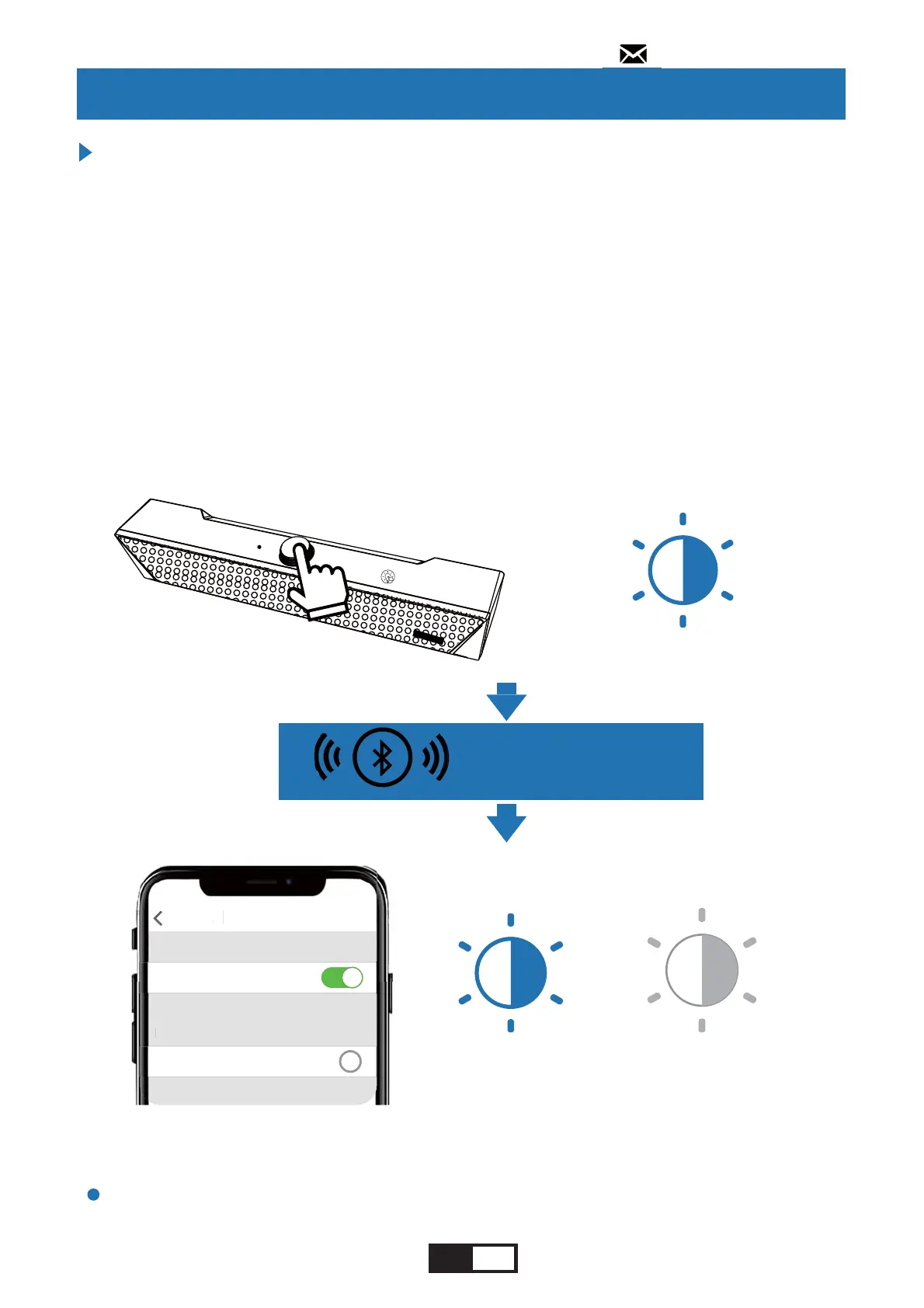
1.Power on the unit.
2.Double click the Multi-Function Knob to switch to
Bluetooth mode.
3.Turn on the Bluetooth on your device and search for
nearby devices. Find "KMOUK KM-HSB002" in your
Bluetooth list and press to connect, once connected, a
voice prompt will be and the knob indicator light will keep
solid blue.
In Bluetooth mode, the soundbar will automatically enter
pairing mode and connect to the last connected device.
Connect with Bluetooth
Notes:
Using This Unit
----------------------------
----------------------------------------------------------------------------
flashing goes off
(1 minute later)
Settings Bluetooth
Bluetooth
Devicese
KMOUK KM-HSB002
L
ettin
Bl
t
t
Bl
t
t
D
vi
KM
K KM-H
B
----------------------------
----------------------------------------------------------------------------
range<32.8ft(10m)
flashing
X 2
135;1
----------------------------------------------------------------------------
---------------------
---------------------
----------------------------------------------------------------------------
EN 11
support@kmouk.com


 To Next Page