Page: 9/17
I. Operating instructions:
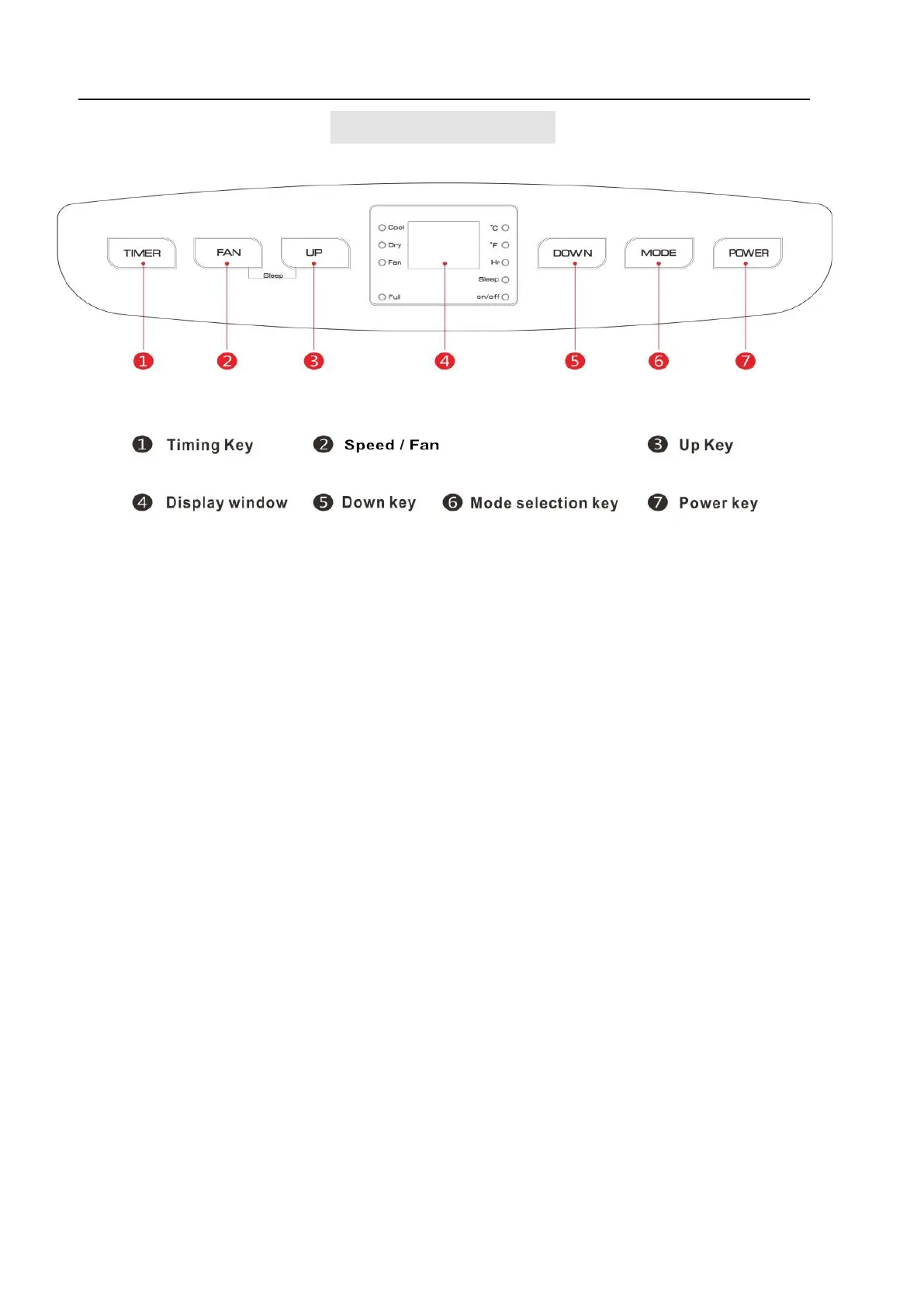
1. TIMER: Press TIMER button to set the unit automatically turn ON or OFF. Use the + and -
buttons to program the hour increment.
2. SPEED/FAN: In cooling, heating, and fan mode, press the key to select high, middle, low
fan speed. This function is not available in SLEEP mode and DEHUMIDIFYING mode.
3. UP: Pressing this button to increase the temperature setting or set up the timer to the required
timer setting. This function is not available under FAN mode and DEHUMIDIFYING mode.
Simultaneously press UP and DOWN keys to switch between Celsius (℃) and Fahrenheit (℉)
4. DISPLAY WINDOW
5. DOWN: Pressing this button to decrease the temperature setting or set down the timer to the
required timer setting. This function is not available under FAN mode and DEHUMIDIFYING
mode.
6. MODE: In the case of power on, press this key to switch between cooling → fan →dry m ode.
7. POWER: Press the key to turn on and turn off the unit.
IV. Control Setting



 To Next Page