12
PROCESSING VOTERS | SEARCH BY MANUAL ENTRY
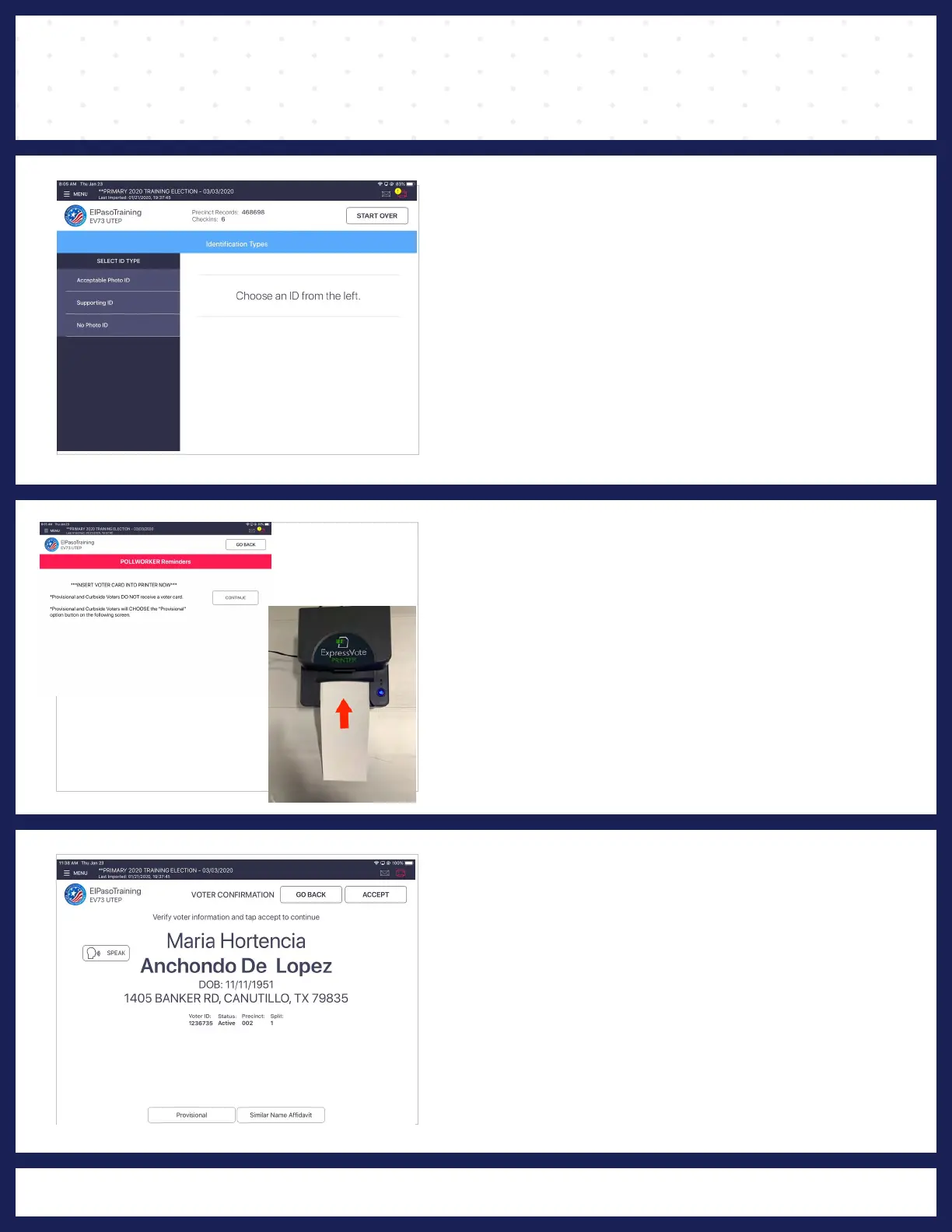
❹ IDENTIFICATION TYPES
TYPES" screen The "IDENTIFICATION
displays 3 choices:
1. Acceptable Photo ID - Voter does have an acceptable
form of ID but was not able to be pulled up on Poll Pad by
scanning ID.
2. Supporting ID - Voter does not have one of the forms
of acceptable photo ID and cannot reasonably obtain
one. (Voter must execute a Reasonable Impediment
Declaration).
3. No photo ID - Voter will be processed provisionally.
5 POLL WORKER REMINDERS
Once the barcodes is recognized, the
"POLL WORKER REMINDER" screen appears
and instructs the Poll Worker to insert the
activation card printer. Press the "CONTINUE".
The POLL WORKER REMINDER screen also
reminds the pollworker that:
* PROVISIONAL and CURBSIDE voters DO NOT
receive a activation card.
6 VOTER CONFIRMATION
The "VOTER CONFIRMATION" screen displays
the voter's information. Verify voter's information,
if all information is correct, press ACCEPT.



 To Next Page