Need help?
Do you have a question about the KnoxGear KN-PAS02 and is the answer not in the manual?
Provides guidance on optimal product use and maintenance for reliable service.
1/4" connector for an unbalanced microphone or instrument.
Allows connection of an external audio device via RCA connector.
Red LED light indicating volume overload; turn down volume.
Light indicates that the power is on.
Selects the operating voltage (115V or 230V).
Port for connecting the AC power cord.
Allows turning LED lights on or off; lights react to music volume.
Main switch to turn the unit's power on or off.
Connects the active speaker to a passive speaker.
Allows insertion of USB mass storage devices with MP3 files.
Allows insertion of SD cards containing MP3 files.
Receives signals from the remote control.
Button to cycle through input modes: Bluetooth, FM, Line In, MP3 player.
Controls for previous/next song, volume, repeat, and folder selection.
Function to pair with another PA system using TWS.
Dial to adjust the volume level of the microphone signal.
Dial to adjust the volume level of the line-in signal.
Dial to adjust the volume level of the MP3 signal.
Allows 12 dB cut or boost for equalization.
Steps to select and activate Bluetooth mode.
Connects devices like tablets or smartphones via Bluetooth.
Setting volume on the connected device and the system.
Enables playing music from one Bluetooth device over two systems simultaneously.
Designates one system as master for pairing and audio playback.
Procedure to disconnect the TWS link between systems.
Using the 1/4" input connector for microphones or instruments.
Setting the desired volume level for the microphone input.
Connecting external audio devices via RCA connection.
Adjusting the volume level for the line-in signal.
Buttons for navigating previous (-) or next (+) folders in SD/USB mode.
Button to switch between SD/USB, FM, Bluetooth, and Line In modes.
Controls for previous/next song or cycling through FM preset stations.
Play/pause songs in SD/USB mode, scan FM channels.
Buttons to decrease or increase the system volume.
Selects from five preset EQs: pop, rock, jazz, classical, country.
Selects songs using 2-digit numbers (00).
Selects songs using 3-digit numbers (000).
Numerical buttons for selecting MP3 tracks, including double/triple digits.
Specifies power output, woofer size, magnet, coil, and impedance.
Details horn size and the system's frequency response range.
Provides physical dimensions and the total weight of the system.
Lists all items included in the box, such as speakers, microphone, and cables.
Details the 1-year warranty covering parts and labor.
Provides contact information for technical assistance and warranty inquiries.
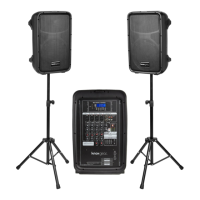
The Knox Gear KN-PAS02 Active Loudspeakers Combo Set is a versatile audio system designed for various applications, offering multiple input modes and control options for optimal sound performance. This combo set includes an active speaker and a passive speaker, allowing for a comprehensive audio setup.
The KN-PAS02 functions as an active loudspeaker system capable of playing audio from several sources, including USB drives, SD cards, Bluetooth-enabled devices, FM radio, and line-in connections. It is designed to deliver clear and powerful sound, suitable for events, performances, or general audio playback. The system features an integrated MP3 player, allowing direct playback of audio files from storage devices. It also supports True Wireless Stereo (TWS) functionality, enabling two KN-PAS02 active loudspeaker systems to connect wirelessly and play music simultaneously from a single Bluetooth source, enhancing the stereo sound experience. The system includes a microphone input with dedicated volume control, making it suitable for public address, karaoke, or vocal performances. An equalizer is built-in to allow users to adjust the sound profile to their preference, with options for various preset EQs.
The KN-PAS02 offers a user-friendly interface with a control panel on the active speaker and a remote control for convenient operation.
To begin, the system is powered on using the On/Off Power Switch. The MP3 dial should be set to the minimum level before inserting any audio sources to prevent sudden loud sounds. Once an audio source is selected, the MP3 dial can be used to set the desired volume for the MP3 signal. Separate dials are provided for microphone input (Mic In) and line-in input (Line In) to adjust their respective volume levels independently. The remote control also provides volume up and down buttons for easy adjustment.
The "Mode" button on the control panel or remote allows users to cycle through different input modes: Bluetooth, FM radio, Line In, and MP3 player (USB/SD). The system automatically switches to SD/USB mode when an SD card or USB device is inserted.
Users can insert a USB mass storage device or an SD card containing MP3 files into the designated ports. The system will automatically switch to MP3 mode. Playback controls include buttons for previous/next song, play/pause, and repeat/folder functions. The repeat function allows users to repeat all songs, a single song, or songs within a specific folder. Folder mode can be accessed by pressing and holding the Playback/TWS button, then using the previous/next song buttons to navigate folders.
To use Bluetooth, select Bluetooth mode using the "Mode" button. The display will show "Blue." Users can then connect their Bluetooth-enabled device (e.g., tablet, smartphone, PC) by finding "Knoxgear" in their device's Bluetooth settings. Once connected, the device's volume should be set, and then the MP3 control on the loudspeaker system can be used to adjust the overall volume.
For TWS functionality, two KN-PAS02 active loudspeaker systems are required. Both systems should be powered on and set to Bluetooth mode. One system is designated as the main (master) system. To sync them, hold down the TWS/Playback button on the main system for 5 seconds until a beeping tone is heard and the screen displays "br-A." The secondary (slave) system's screen will display "br-B." A Bluetooth device can then be connected to the main system, and audio will play simultaneously on both systems. To cancel TWS, hold the TWS button down for 5 seconds. It's important to note that TWS only works with Bluetooth audio and does not support FM radio, microphone, USB, or other connections on the secondary system.
A 1/4" connector is available for an unbalanced microphone or instrument. After turning on the power and setting the Mic In dial to MIN, the microphone can be inserted. The Mic In control is then used to set the desired volume for the microphone signal.
The Line Input allows connection of external audio devices via RCA connectors. Similar to other inputs, the Line In dial should be set to MIN before connecting a device. After connecting, the volume on the external device should be set, and then the Line In dial can be used to adjust the system's volume. This feature is useful for connecting devices like entertainment systems without needing a mixer console.
In FM mode, the Playback/TWS button can be pressed to scan for available radio stations, which will then be saved. The previous/next song buttons can be used to cycle through the saved stations.
The built-in graphic equalizer allows for sound customization, with a capability of 12 dB cut or boost. The remote control offers preset EQs such as pop, rock, jazz, classical, and country.
The remote control provides comprehensive control over the system, including:
The system includes LED lights that can be turned on or off via the LED Lights Power switch. These lights are volume-sensitive and only activate when the music reaches a certain volume level. If the lights do not turn on, increasing the volume may activate them.
The active speaker features a speaker output (8 Ohm) to connect to the passive speaker included in the combo set, creating a stereo sound experience.
A red LED light serves as an overload indicator. If this light is constantly illuminated, it signals that the volume is too high and should be reduced to prevent distortion or damage.
A 115-230 V selector allows the user to choose the appropriate voltage for the power supply, ensuring compatibility in different regions.
The product should be cleaned with a dry cloth only, following the manufacturer's recommendations.
To establish a safe listening volume, it is recommended to start at the lowest setting and gradually increase it until the sound is comfortable, clear, and free of distortion.
When moving the product, a suitable means of transportation should be used to prevent damage.
Always ensure that USB devices and SD cards are inserted correctly and gently to avoid damage. It is advisable to remove USB/SD devices before turning off the speaker.
The product contains no user-serviceable parts, and all servicing must be performed by a qualified technician. The housing of the unit should not be removed or tampered with, as this increases the risk of electric shock. The product should not be exposed to high temperatures, moisture, electricity, or used near exposed flames. The maximum operating temperature is 113°F. The unit should be unplugged when not in use.
 General
| Brand | KnoxGear |
|---|---|
| Model | KN-PAS02 |
| Audio Output Mode | Stereo |
| Color | Black |
| Type | Portable Speaker |
| Connectivity Technology | Bluetooth |
| Power Source | Battery |
| Output Power | 5W |
| Battery | Lithium-ion |
| Input Voltage | 5V |
| Bluetooth Range | 10 meters |


 To Next Page