EasyManua.ls Logo

KnTech KNZD-63 - Page 6

Default Icon
24 pages
Print Icon
To Next Page IconTo Next Page
To Previous Page IconTo Previous Page
Loading...
6
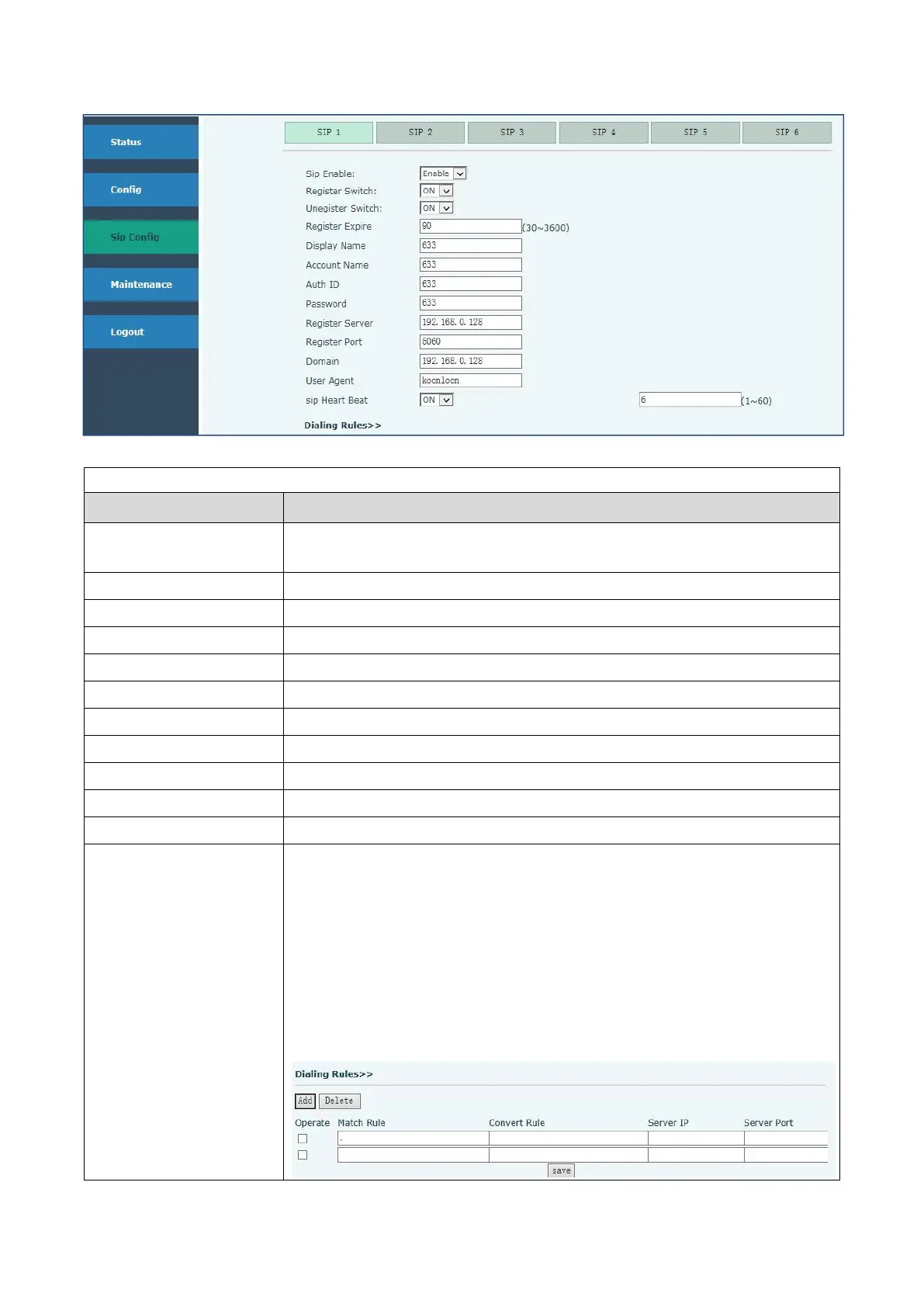
SIP Config
Field Name
Explanation
Sip Enable
If the phone registered on your server successfully the status is Enable, or
it shows Unabble
Register Switch
ON
Unegister Switch
OFF
Display Name
Set the display name.This can be English name or telephone number
Account Name
Set the server name.
Auth ID
Input your SIP server ID
Password
Set your SIP server password
Register Server
Config SIP server’s IP address
Register Port
Config SIP server’s port
Domain
Config SIP server’s IP address
SIP Heart Beat
The interval time for detecting with server
Dialing Rules
1: Add ”00” in the corresponding location
Eg: (a:00)
2: Delete the digit in the corresponding location
(d)
3: Modify the numbers to “89”
Eg: (m:89)
You can config the server IP and port. This setting go into effect after
rebooting

Related product manuals