EasyManua.ls Logo

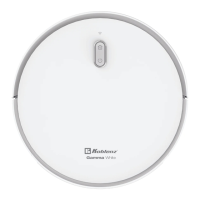
Koblenz Gamma DE R-601 - User Manual

Koblenz Gamma DE R-601
14 pages
Print Icon
To Next Page IconTo Next Page
Loading...
Electrical Rating / Características Eléctricas: 14.4 V 36 W
MADE IN CHINA / HECHO EN CHINA
Thorne Electric, Co.
Visit our website www.koblenz.com.mx
Canada Call:
Tel: (210) 590 1226
Koblenz Eléctrica, S.A. de C.V.
Av. Ciencia No. 28,
Parque Industrial Cuamatla
Cuautitlán Izcalli, Edo. de México,
México, C.P. 54730
Tel. (55) 5864-0300
610 Lanark Suite 205
San Antonio, TX.
78218-0363 U.S.A.
Tel: (210) 590-1226
Fax: (210) 590-1258
1 (800) 548-5741
For models /
Para modelos:
DE R-601
DE R-901
Intelligent Robot Vac
Gamma
Compatible con:
Alexa
®
, Google Home
®
& App Tuya Smart
®
ROBOT VAC
User Manual
ASPIRADORA ROBOT
Manual de uso
Read all instructions before using this robot vac.
Antes de operar este aparato, lea cuidadosamente las instrucciones de uso.
You have just purchased a Koblenz
®
Robot Vac. Please read this manual carefully before
operating the machine. Model and serial number may be found at the bottom of your vac. You
should record both model and serial numbers and keep them in a safe place for future use.
Keep this manual.
Acaba de adquirir una aspiradora robot Koblenz
®
. Favor de leer detenidamente este manual
antes de operar esta máquina. Los números de modelo y serie se pueden encontrar en la parte
inferior de la aspiradora. Ud. debe anotar ambos números y guardarlos en un lugar seguro para
futura referencia. Conserve este manual.
Congratulations!
Felicidades!
Alexa
®
is a registered trademark of Amazon Web Services, Inc.
Google Play
®
is a registered trademark of Google Inc.
Apple Store
®
is a registered trademark of Apple Inc. registered at US and other countries
* Koblenz
®
has no relationship with the registered trademarks Alexa
®
, Google Play
®
and Apple Store
®
owned by a third party.
Alexa
®
es una marca registrada de Amazon Web Services, Inc.
Google Play
®
es una marca comercial registrada de Google Inc.
Apple Store
®
es una marca comercial registrada de Apple Inc. registrada en EE.UU. y otros países.
*Koblenz
®
no guarda relación alguna con las marcas registradas Alexa
®
, Google Play
®
y Apple Store
®
, propiedad de un tercero.
Question and Answer IconNeed help?

Do you have a question about the Koblenz Gamma DE R-601 and is the answer not in the manual?

Summary

Product Overview and Welcome

Robot Model and Features

Information on DE R-601 and DE R-901 models and key features.

Contact and Support Information

Details for customer service and company locations.

IMPORTANT SAFETY INSTRUCTIONS

General Usage and Battery Safety

Key precautions for operating, charging, and handling the robot's battery.

Battery Handling and Disposal Warnings

Critical safety advice on battery care, damage, and proper disposal.

Supervision, Operation, and Restrictions

Guidelines for safe use, child supervision, and operational limitations.

Cord, Power, and Surface Safety

Advice on power cords, adapters, and floor surface compatibility.

Robot Components and Features

Polarized Outlet and Power Adapter

Explanation of the polarized plug and adapter usage for charging.

Component Identification Diagram

Visual guide to the robot's parts like sensors, brushes, and dust container.

Lithium Ion Battery Safety and Shipping

Battery Removal and Shipping Procedures

Steps for safely removing and shipping the Li-Ion battery.

Battery Type and Usage Precautions

Important warnings about using only the specified battery type.

Robot Vacuum Cleaner Assembly

Side Brush and Charging Base Installation

Instructions for attaching side brushes and setting up the charging base.

Charging Methods and Base Setup

Details on manual, automatic charging, and base positioning.

Robot Status Indicators and Controls

Understanding LED Status Lights

Interpreting LED signals for charging, cleaning, error, and standby modes.

Remote Control Setup and Operation

Instructions for remote control battery installation and button functions.

Robot Operation and Smart Home Integration

Basic Robot Usage and Modes

How to start, stop, pause cleaning, and use virtual walls.

Smart Home Assistant Configuration

Steps to connect the robot with Alexa or Google Home.

Tuya Smart App Automation Setup

Configuring automated tasks and routines via the Tuya Smart app.

Robot Operation via App

App Menu Navigation and Features

Overview of the app's menu for controlling robot functions.

App Settings for Vacuum and Water Control

Adjusting suction power and water flow through the app.

App for Scheduling and Gyroscope Mapping

Using the app for cleaning schedules and intelligent area mapping.

Cleaning Modes Explained

Detailed Cleaning Mode Descriptions

Explanations for Automatic, Spot, Edge, Random, and Mopping modes.

Remote Control Programming Features

Time and Cycle Programming

Programming specific times and cycles for automatic cleaning via remote.

App Download and WiFi Connectivity

Downloading the Tuya Smart Application

Instructions for scanning the QR code to download the mobile app.

Establishing Robot WiFi Connection

Guide to connecting the robot to a 2.4 GHz WiFi network.

Connecting the Robot to the Tuya App

App Registration and Device Pairing Process

Step-by-step guide for app registration and adding the robot to your account.

WiFi Connectivity Activation and Confirmation

Activating the robot's WiFi mode and confirming successful connection.

Advanced Robot Operation via App

App Control for Robot Settings

Operating vacuum speed, water level, and scheduling through the app.

Detailed Cleaning Mode Explanations

In-depth descriptions of Automatic, Spot, Edge, Random, and Mopping modes.

Robot Status Indicators and Basic Usage

Understanding LED Indicators and Basic Operation

Interpreting LED signals and initial steps for robot use.

Robot Control and Virtual Wall Setup

Using the robot's controls and setting up virtual boundaries.

Smart Home Assistant Integration

Configuring Alexa and Google Home Assistants

Steps for pairing the robot with voice assistants like Alexa and Google.

Tuya Smart App Automation Configuration

Creating automated cleaning routines and tasks within the Tuya app.

Cleaning and Maintenance Procedures

Dust Container and Filter Cleaning

Instructions for emptying the dust bin and cleaning the robot's filter.

Brush, Wheel, and Sensor Maintenance

Cleaning side brushes, caster wheel, and anti-drop sensors for optimal performance.

Lithium Ion Battery Safety and Shipping

Battery Removal and Shipping Regulations

Procedures for safely removing and shipping the Li-Ion battery.

Robot Assembly and Charging Base Setup

Instructions for assembling the robot and positioning the charging base.

Troubleshooting Common Robot Issues

Simple Fault Removal and Error Codes

Addressing common faults and interpreting alarm codes and sounds.

Error Indicators and Troubleshooting Solutions

Troubleshooting based on beep sounds, red light indicators, and app errors.

Tuya Smart App WiFi Connectivity Problems

Resolving issues related to connecting the robot via WiFi to the app.

Robot Component Identification

Diagram of Robot Parts and Accessories

Visual identification of robot components and included accessories like brushes and filters.

Product Warranty Information

Warranty Coverage and Exclusions

Details on what the warranty covers, its duration, and specific exclusions.

Repair and Service Process

Instructions for submitting the robot for warranty repair or replacement.

General Safety and Usage Guidelines

Important Operational Precautions

Essential safety rules for operating the robot and handling its components.

Battery, Power, and Environmental Safety

Critical advice on battery care, power sources, and safe operating environment.

Floor Surface and Usage Restrictions

Guidelines for safe operation on different floor types and usage restrictions.

Detailed Cleaning Mode Explanations

Automatic, Spot, Edge, and Random Cleaning

In-depth descriptions of various cleaning patterns and their functions.

Floor Mopping Functionality

Mopping Setup and Operation Guide

Instructions for preparing and using the mopping feature.

Mopping Safety Warnings and Tips

Crucial warnings regarding detergent use and tips for safe mopping.

Koblenz Gamma DE R-601 Specifications

General IconGeneral
BrandKoblenz
ModelGamma DE R-601
CategoryVacuum Cleaner
LanguageEnglish

Related product manuals