EasyManua.ls Logo

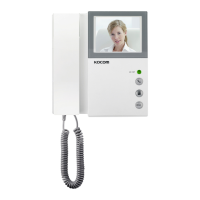
KOCOM KCV-401EV - User Manual

KOCOM KCV-401EV
5 pages
Print Icon
To Next Page IconTo Next Page
Loading...
This manual is based on the date as shown in the right and specifications are subject to change without notice for quality improvement
www.kocom.com E-mail : export@kocom.co.kr
,$7&7
.
KCV-401EV MANUAL
[ Operating Installation Manual ]
SINCE 1976
%PPSDBNFSBGPS,$7&7
,$.$,$$,$.$ ,$.$
ⶮⲳ%JHJUBM-$%-&%UZQF
ⶮ(PJOHPVUPGIPVTFPSBCTFODFTFUVQ
ⶮ$POOFDUQDTPG%PPS$BNFSB
ⶮ4VSGBDF*OTUBMM5ZQF
ⶮ*OUFSOBM$BMM
Warranty
Warranty Card
1) This product is produced under strict quality control and inspection procedures.
2) If this product breaks down during proper use as a result of product defect, KOCOM
will repair it within one year from date of purchase free of charge.
3) The following cases will be subject to charge, even during warranty period:
a. Breakdown during transport, or through careless treatment, by consumer.
b. Breakdown cause by unauthorized repair, or system modification.
c. Breakdown caused by natural disaster or power disorder.
1. Name of the product.
2. Model number of the product.
3. The area of problem.
4. Phone number and address at which you can be contacted.
PRODUCT
MODEL
DATE PURCHASED
WARRANTY PERIOD
AGENCY ADDRESS
KOCOM Warranties the original purchaser of this product as follows.
To receive after service, have the following ready before you
contact our branches.
www.kocom.com
KCV-401EV
Question and Answer IconNeed help?

Do you have a question about the KOCOM KCV-401EV and is the answer not in the manual?

Summary

Safety and Usage Precautions

Installation Safety Cautions

Important considerations for safe and correct product installation.

Maintenance and Repair Safety

Safety advice for cleaning, moving, and internal checks of the unit.

Critical Usage Warnings

Warnings on installation location, power, and handling to prevent damage or injury.

Operational Cautions

Precautions during normal product use, including security and handling.

System-Specific Safety

Specific safety advice for different system components and wiring.

Installation Location Guidelines

Camera Placement Precautions

Warnings against installing cameras in locations with direct sunlight or backlighting.

Technical Specifications

Part Identification and Wiring

System Connection Diagrams

Diagrams showing typical system setups with monitor and door cameras.

Camera Wiring Guide

Specific instructions for wiring cameras to the monitor, including port mapping.

Cable Requirements by Distance

Guidance on suitable cable types and specifications based on cable length.

Product Operation Guide

Door Camera Communication Steps

Steps for initiating and conducting communication with a visitor.

Camera Monitoring Procedure

How to view the camera feed on the monitor when no call is active.

Summary

Safety and Usage Precautions

Installation Safety Cautions

Important considerations for safe and correct product installation.

Maintenance and Repair Safety

Safety advice for cleaning, moving, and internal checks of the unit.

Critical Usage Warnings

Warnings on installation location, power, and handling to prevent damage or injury.

Operational Cautions

Precautions during normal product use, including security and handling.

System-Specific Safety

Specific safety advice for different system components and wiring.

Installation Location Guidelines

Camera Placement Precautions

Warnings against installing cameras in locations with direct sunlight or backlighting.

Technical Specifications

Part Identification and Wiring

System Connection Diagrams

Diagrams showing typical system setups with monitor and door cameras.

Camera Wiring Guide

Specific instructions for wiring cameras to the monitor, including port mapping.

Cable Requirements by Distance

Guidance on suitable cable types and specifications based on cable length.

Product Operation Guide

Door Camera Communication Steps

Steps for initiating and conducting communication with a visitor.

Camera Monitoring Procedure

How to view the camera feed on the monitor when no call is active.

KOCOM KCV-401EV Specifications

General IconGeneral
CameraBuilt-in
Dimensions182(W) x 180(H) x 28(D) mm
Mount TypeWall mount
Wiring4-wire
LCD Size4.3 inch
Operating Temperature-10°C to 50°C
AudioTwo-way communication
Connectivity4-wire
Power SupplyAC 100~240V, 50/60Hz
TypeVideo Intercom
Operating VoltageAC 100~240V, 50/60Hz

Related product manuals