Power source
Power consumption
Ambient temperature
TFT LCD
Communication system
Call signal sound
Output Impedance
Wiring
Max Wiring Distance
DC12V 1V(power from Monitor)
-10~50
Diagonal 120 Diagonal 90
0.1Lux (LED ON)
F:2.0, f=3.0mm F:3.5, f=3.8mm
95(W)127(H)34(D)mm 95(W)127(H)33(D)mm
Thank you very much
for purchasing KOCOM
video doorphone.
please read this manual
thoroughly to ensure
correct usage, before
operating
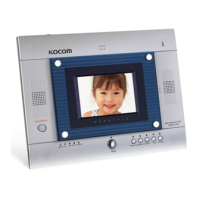
KIV-201C
KC-C60
www.kocom.com
e-mail:export@kocom.co.kr
PRODUCT
MODEL
DATE PURCHASED
WARRANTY PERIOD
AGENCY ADDRESS
KOCOM Warranties the original purchaser of this product
as follows.
1) This product is produced under strict quality control and inspection procedures.
2) If this product breaks down during proper use as a result of product defect, KOCOM
will repair it within one year from date of purchase free of charge.
3) The following cases will be subject to charge, even during warranty period:
a. Breakdown during transport, or through careless treatment, by consumer.
b. Breakdown cause by unauthorized repair, or system modification.
c. Breakdown caused by natural disaster or power disorder.
Warranty
Warranty Card
KIV-201C 04.07
To receive after-Sale service, have the following
ready when you contact our branches
1. Name of the product
2. Model number of the product
3. The area of problem
4. Phone number and address at
which you can be contacted.
Component
Monitor Accessories
Screws for fixing
(4x25mm)
Wall hanger panel
Camera Accessories
Monitor & Camera
Main body supporter
Screw for fixing camera
to panel
(2.6x6mm)
Screw for fixing camera
main body supporter
(4x25mm)
Upward adjusting
supporter for adjusting
lens angle upward
Specifications
MONITOR
(KIV-201C)
CAMERA
(KC-C60)
Power source
Ambient temperature
Angle of picture
Min. Illumination
Lens
Dimension
Precautions for Operation
Keep away from humidifier and
stove. High temperature and
humidity can cause breakdown.
When cleaning, never use wet
hands, volatile benzene or paint
thinner.
Keep picture clear by cleaning
camera window frequently with
soft cloths.
As this device consists of
electronic precision
components, and high voltage
is generated internally, do not
attempt to disassemble.
Do not drop monitor or door
camera, and avoid strong
impact.
Keep away from devices
generating strong magnetic field
(TV, Speaker, etc.) (Picture can
be disturbed or blurred and
breakdown can result)
Installation Precautions
Monitor and camera must be installed away from direct
light and counter light.
Camera must be installed at a place free from rain.
Standard height of monitor must be 1,450mm~1,500mm
from ground, centered around brawn tube.
Camera should be installed on the wall in which cement
is completely dry.
If installed during winter season at temperature below
-5, condensation might be generated inside monitor and
camera due to temperature difference between indoors
and outdoors. To prevent breakdown due to such
condensation, connection should be made in 2 hours or
more after installation.
Do not install monitor and camera in locations subject to
direct heating as harmful gases may subsequently be
emitted in significant amounts.
Stopping up pipe as above minimizes
temperature difference between indoors
and outdoors, and also eliminates moisture
and condensation on door camera window.
Stop up P.V.C. pipe using
adiabatic substances, to
prevent air circulation
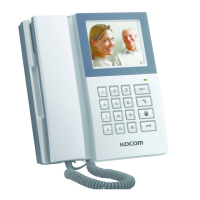
HANDS-FREE VIDEODOORPHONE
KIV-201C Operating Installation Manual
Clear & Bright Picture at Low Light
SMPS Type AC 110V/220V
Max.19W, Stand by : 2W
0~+50
4 inch Color TFT LCD
Hands-free system
Camera:Ding-dong, gardroom: Melody
Picture : 75ohm, Voice : 600ohm
4 Wired in polarity / 2 Wired in non-polarity
Camera: 0.65 Single Cable/50m Guardroom:IV 0.9mm
4TFT LCD
4 Wired
Easy Installation
Slim Size Camera
Wide view angle (120)
Hands-free System
This manual is based on the date as shown in the right and specifications
are subject to change without notice for quality improvement.
Metal Pinhole Camera
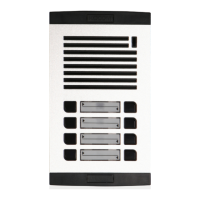
KC-D31
Option
KC-C61 KC-D31
Metal Pinhole
Camera
(KC-D31)

 Need help?
 General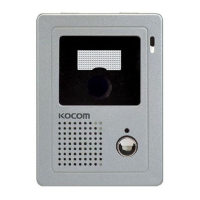

 To Next Page