EasyManua.ls Logo

KOCOM KIP-605PG - User Manual

KOCOM KIP-605PG
6 pages
Print Icon
To Next Page IconTo Next Page
Loading...
Thank you very much
for purchasing KOCOM
multiple interphone.
please read this manual
thoroughly to ensure
correct usage, before
operating
KIP-611PG / KIP-605PG 04.06
KIP-611PG/605PG MANUAL FOR OPERATION AND INSTALLATION
This manual is based on the date as shown in the right and specifications are subject to change without
notice for quality improvement.
MULIPLE INTERPHONE
KIP-611PG
KIP-605PG DS-4M
(OPTION)
Question and Answer IconNeed help?

Do you have a question about the KOCOM KIP-605PG and is the answer not in the manual?

Overview

The KOCOM KIP-611PG/KIP-605PG Multiple Interphone is a communication system designed for multi-unit housing, offering both operation and installation features. This manual provides comprehensive guidelines for safe and effective use, installation, and maintenance of the interphone system and its related components.

Function Description:

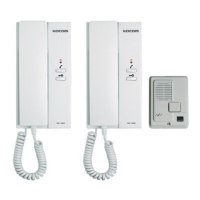
The Multiple Interphone system facilitates communication within multi-unit buildings. It allows residents to communicate with visitors at the lobby phone, and potentially with a guardroom or other internal units, depending on the system configuration. The core components include the KIP-611PG and KIP-605PG interphones, which serve as indoor units, and an optional DS-4M door speaker for external communication. The system supports basic call functions, including making and receiving calls, and paging.

For multi-unit housing, the system integrates with lobby phones (KLP-series, KDP-series) and can be expanded with image splitters (KSV-104P) and image amplifiers (KHU-102P) for video capabilities. Video phones (KVM-series, KCV-series, IP-203APB) and CCTV cameras can also be incorporated, providing visual verification of visitors. The system is designed to be user-friendly, with clear instructions for operation and adjustment.

Important Technical Specifications:

  • Power: DC 24V/0.2A
  • Consumption: In load: 0.85W, In no load: 1.7W
  • Number of Wires: 4-wired parallel
  • Voice/Calling/Power/GND: (Voice, Calling, Power, GND)
  • Range: TIV 0.6 (1Km)
  • Signal Sound: TONE SOUND
  • Paging Sound: 800Hz (Range: 0.4Km (Normal))
  • Adapter: 1Km (When additional DC 24V adapter is installed)
  • Composition:
    • Multiple Interphone (KIP-611PG/605PG)
    • AC/DC Adapter (DS-M) (Option)
    • Door Speaker (DS-4M) (Option)

The system's wiring is critical, with specific requirements for cable types and lengths to ensure optimal performance and prevent issues like short circuits or poor display quality for video components. The use of standard wiring materials and adherence to installation specifications are emphasized.

Usage Features:

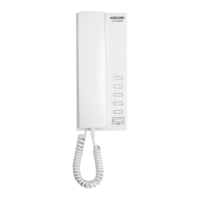
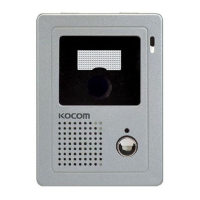
The interphone units (KIP-611PG and KIP-605PG) feature a handset, call button, and speaker/microphone. The DS-4M door speaker includes a call button and C-Mic.

  • Making a Call: To make a call, users select and press the unit number, then press the call button.
  • Receiving a Call: When the phone is ringing, users pick up the phone to start the conversation.
  • Paging: After picking up the phone and pressing the P/G button, users can make an announcement through the handset. Alternatively, pressing the call button on the DS-4M (option) will initiate a call.

The system includes DIP switches for address adjustment, which are crucial for proper system configuration. For KIP-611PG, DIP switches 1-4 are used for residence number, and 5 is for residence No. For KIP-605PG, DIP switches 1-4 are for residence number, and 5 is for residence No. The manual provides detailed instructions on how to set these switches based on the desired unit number. It is important to note that KIP-611PG and KIP-605PG cannot be set as No. 1 in DIP switch.

For video phone systems, the manual highlights the importance of proper wiring to avoid interference and ensure clear image quality. It also advises against dropping the handset to prevent damage and emphasizes careful handling of CRT screens.

Maintenance Features:

The manual provides several cautions for safety, installation, use, and abnormality, which indirectly contribute to the longevity and proper functioning of the device.

  • General Maintenance:

    • Regularly clean the dust inside the product. Failure to do so can cause fire. For internal inspection and cleaning, contact a local sales agent.
    • Avoid exposing the product to benzene, thinner, or hot water.
    • Do not spray detergent directly onto the product.
    • When moving equipment, ensure the plug is detached from the outlet.
    • For equipment with terminal connections, contact a local sales agent or qualified electrician.
    • When replacing fuses, use insulated tools or contact A/S center.
    • Avoid direct exposure to sunlight and store equipment in a dust-free, moderate temperature environment to prevent fire and electric shock.
  • Troubleshooting and Abnormality:

    • If the power cable is broken (exposed core or short-circuit), replace it immediately to prevent fire and electric shock.
    • In case of abnormalities (e.g., communication failure, no image display, no sound, abnormal sound), immediately detach the plug from the outlet, turn off the circuit breaker, or detach batteries (if applicable) before contacting a sales agent for repair.
    • If foreign substances enter the equipment, detach the plug or batteries and contact a sales agent.
    • If smoke or an unknown smell emanates from the equipment, detach the plug or batteries and contact a sales agent. Do not attempt personal repairs.
    • If the equipment is dropped or its cabinet is broken, detach the plug or batteries and contact a sales agent.
  • Installation Cautions:

    • Wiring work for power supply must be carried out by a qualified electrician.
    • Wiring work for communication cables requires specific techniques and experience; consult a local sales agent.
    • Install communication cables separately from power cables to prevent fire, electric shock, and communication issues.
    • Avoid installing the product on rolling tables, sloping places, or areas exposed to tremors or shocks.
    • For wall-mounting types, ensure secure installation to prevent injury from falling.
    • Do not install the product in bathrooms, near washing machines, humid places, near dressers, humidifiers, heaters, or areas exposed to sparks, heat, or humidity.
    • Avoid dusty places, areas with harmful gases (e.g., hydrogen sulfide gas), or places exposed to water and chemicals.
    • Ensure proper grounding for lobby phones to prevent fatal and adverse effects from lighting strokes or strong shocks.
    • For CCTV cameras, avoid noisy places, areas exposed to electromagnetic waves, and humid places. Install in outdoor cases if placed outdoors and in well-ventilated areas.
  • Usage Cautions:

    • Do not handle the equipment with wet hands.
    • Do not place wet or metallic materials on the equipment.
    • Do not block ventilation openings or insert foreign substances into the equipment.
    • Use only designated batteries and ensure correct polarity.
    • Do not open the rear cover, cabinet, or equipment cover.
    • Do not modify the power cable or pull it excessively.
    • Do not modify the equipment.
    • Be mindful of call signal volume to prevent hearing damage.

The manual also emphasizes the importance of using standard wiring materials and adhering to prescribed specifications for all related products, including Home Auto systems and 4-Line related products, to ensure proper operation and prevent damage.

KOCOM KIP-605PG Specifications

General IconGeneral
BrandKOCOM
ModelKIP-605PG
CategoryIntercom System
LanguageEnglish

Related product manuals